HP L1502
14
Go to cover page
Mechanical Instructions
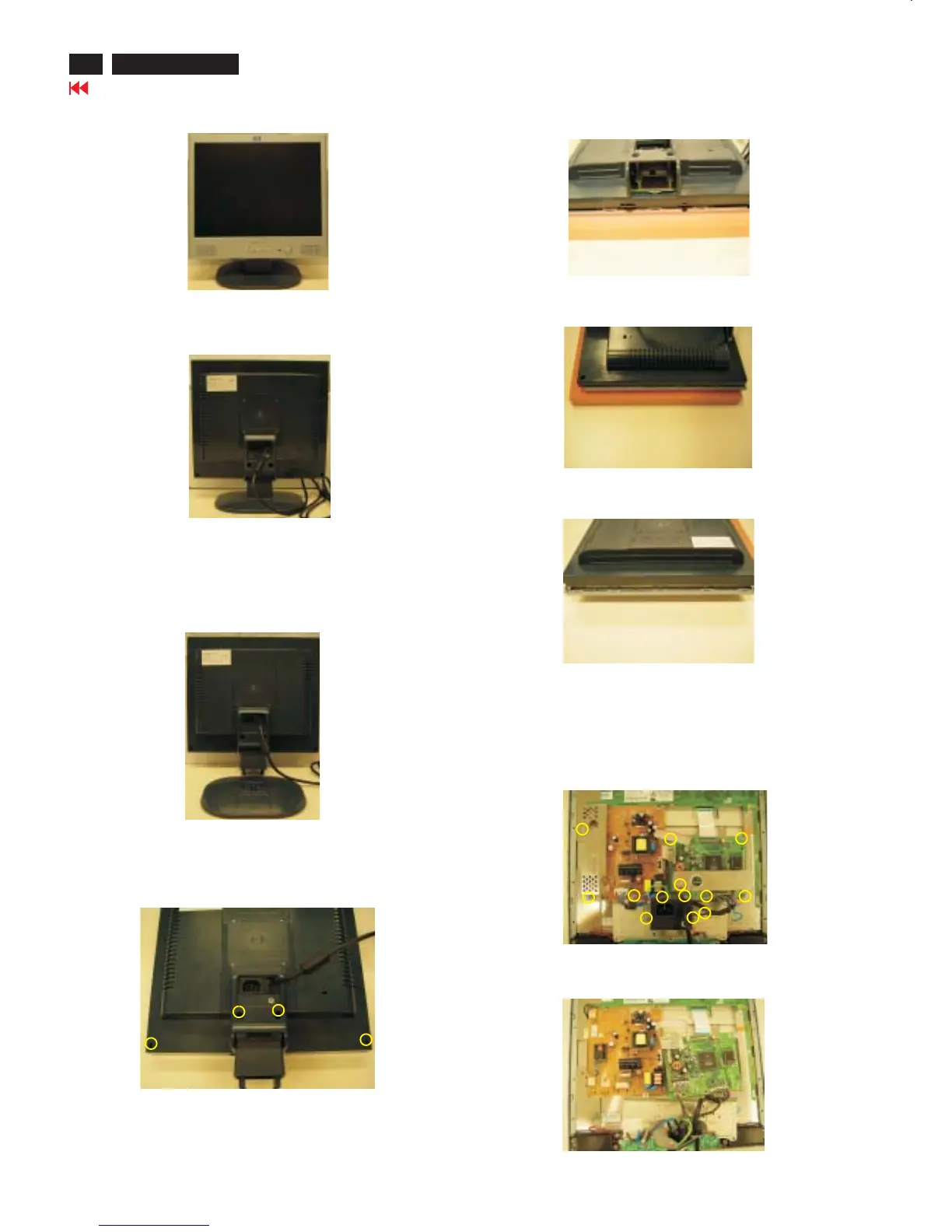
Front view-HP L1523
Fig. 1
Fig. 2
Fig. 3
Step 1. Remove the Base as Fig .3
Remove the four screws of Fig. 4.Back cover as
Step 2.Remove the
Use the thin "I" type screw driver to open the clicks as Fig.5~7.
back cover
Fig. 4
Back view
Fig.5
Fig.6
Step 3. Remove the 13 screws
And Disconnect the 4 cables as Fig.8
Base =====>
Four screws
=====>
=====>
=============>
============>
Botton view
Right and Left view
Fig.7
Top view
=====>
=====>
=====>
=====>
=====>
=====>
=====>
=====>
===>
=====>
=====>
Fig.8
=====>
4 Cables
===>
===========>
Fig.9
Step 4. Disconnect the 2 cables as Fig.9
2 cables===>
========>













 To Next Page