HP L1502
Main manu
Brightness
Contrast
Image control
Color
Language
Management
OSD control
Factory reset
Exit F
8
Go to cover page
Factory mode
Access Factory Mode
Step 2 :
[Push " " & " " buttons at the same time and hold it ] +
[Press power " " button untill comes out "Windows screen"
] => then release all buttons.
+
How to Get into Factory Mode Menu
Turn off monitor.
Press OK " " button, bring up Factory mode indication as
shown in Fig 2.
Step 1 :
Step 3 :
Basic and simple instruction on the control keys.
When you press the button on the front control of your monitor, the On-
Screen Display (OSD) Main Controls window will pop up and you can
then start making adjustments to your monitor's various features.
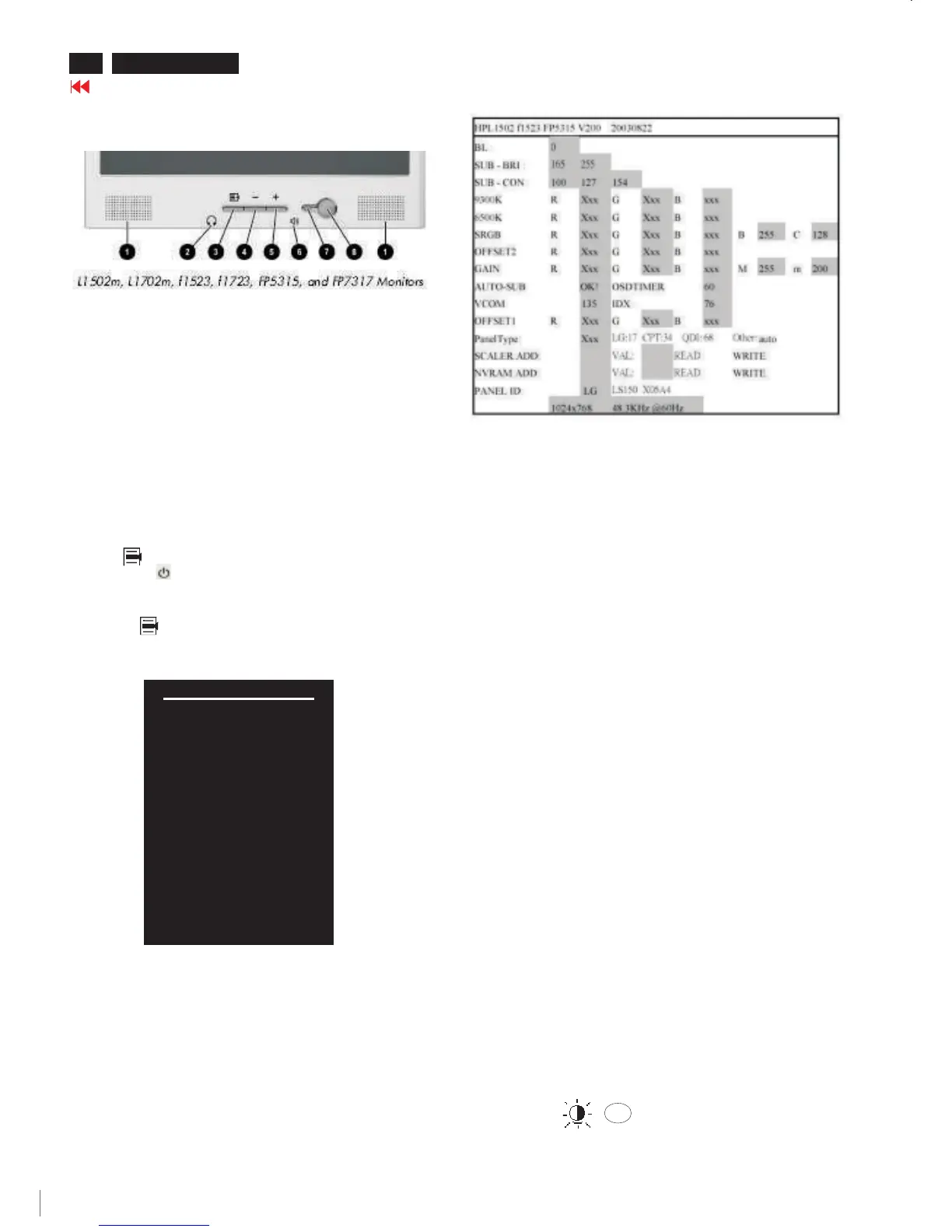
Front control panel
Fig. 1
Fig. 2
Contrast adjustment (Sub-Contrast). Use this menu item to
adjust the contrast gain of pre-amp ranges from 0 to 255.
9300KRGB
6500KRGB
Color temperature gain adjustment. Use these menu items to
adjust the RGB gains of pre-amp for different color
temperatures, ranges from 0 to 255.
OFFSET R G B
Sub-Brightness adjustment. Use this menu item to adjust
the brightness level (DC-level) of pre-amp range from 0 to
255.(R/G/B ANALOG DC -level).
GAIN R G B
R/G/B GAIN adjustment. Use this menu item to adjust
the R/G/B (GAIN) of Amp. range from 0 to 255.(R/G/B
ANALOG GAIN Values).
It is for 1024x768/60Hz with special pattern only.
AUTO SUB:
Do not use this function here.
AUTO SUB:
(PS: The OffsetRGB function can be used on reduce or eliminate
snowy noise on the background when the resolution of video signal is
1280 X 1024 vertical 60Hz. Slightly increase or decrease the value
until snowy noise completely disappear.)
Hot key function: by pressing "UP" and "DOWN" key
simultaneously at User mode (or Factory mode).
-
OK
-
SUB CON:SUB CON:
BL : Blacklevel value
SUB-BRI : Brightness value range(Min Max). Fix value for
continue mode requirement.LG(Min=165, Max=255),
CPT(Min=165, Max=230), QDI(Min=165, Max=225).
SUB-CON : Contrast value range(Min Mid Max)
SRGB-B : Brightness of sRGB(Reserved)
SRGB-C : Contrast of sRGB(Reserved)
Gain-m : Minimum value of User Gain
Gain-M : Maximum value of User Gain
AUTO-SUB: To do Auto color function when push "Up" key in
White pattern
OSDTIMER : OSD time out control (sec) Unused in this project
VCOM : For LG panel control
IDX : Limit current of inverter(Fix value QDI: 76, CPT: 45, LG:5)
Panel Type: If set this to 17, 34 or 68 then system will force panel
type to LG, CPT or QDI. Set to other value will auto
detect panel based on panel hardware.
SCALER : Read/Write scaler register
NVRAM : Read/Write eeprom address
Factory menu
Cursor can move on gray color area
Fig. 3
<------Factory mode indicator













 To Next Page