X
Go to cover page
21
HP L1730
DDC Instructions
24
HP L1502
PSG Serial number for HP system
The format for the serial number is as follows:
\/ | | \/ \| / /
ABCD E
A: Country of Manufacture Code
The country of manufacture code is based on the ISO
International country code standard (ISO # 3166, Alpha-2
code) and is used to designate the specific country of
manufacture. The same product can be manufactured in
more than one country.
B: Manufacturer Code
This code is corresponds to the type of panel being used
for the units. This digit as the following value :
C: Year
Corresponds to year of manufacture. For example,
year 1998, use the least significant digit 2 to designate
Year of manufacture.
D: Week
Corresponds to 01 - 52 week of manufacture.
E: Combine alphabets with digits depended on panel
For panel : B000~BZZZ, C000~CZZZ, D000~DZZZ
For panel: F000~FZZZ, G000~GZZZ, H000~HZZZ
For panel: J000~JZZZ, K000~KZZZ, L000~LZZZ
For panel: M000~MZZZ, N000~NZZZ, P000~PZZZ
Skip 5 letters A, E, I, O AND U.
C C PY W W NNNN
TW: TAIWAN
CN: CHINA
P: PHILIPS
LPL
CPT
HSD
QDI
Reset counter each week.
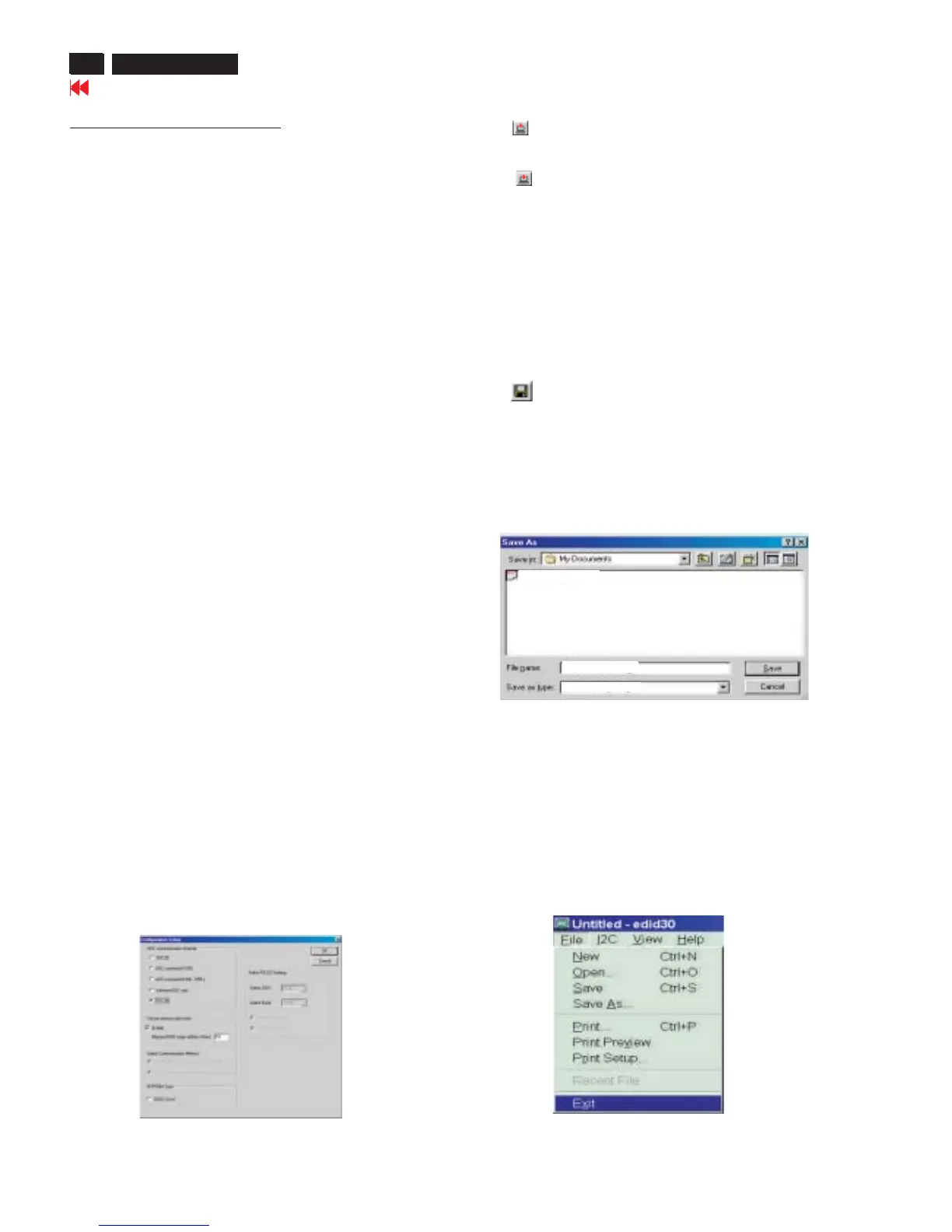
Step 7: Save DDC data
Sometimes, you may need to save DDC data as a text file for using
in other IC chip. To save DDC data, follow the steps below:
1. Click (Save) icon (or click "file"-> "save as") from the tool bar
And give a file name as shown in Fig. 25.
The file type is EDID45 file (*.ddc) which can be open in WordPad.
By using WordPad, the texts of DDC data & table (128 bytes, hex
code) can be modified. If DDC TEXTS & HEX Table are completely
correct, it can be saved as .ddc flie to re-load it into DDC IC for DDC
Data application.
2. Click .Save
Step 8: Exit DDC program
Pull down the File menu and select Exit as shown in Fig. 26.
Step 6: Write DDC data
1. Configuration should be as Fig. 24. And press OK.
2. Click (Write EDID) icon from the tool bar to write DDC data.
Bring up "Writing 0%~100%, ready" a progressing bar on the left
down corner.
3. Click (Read EDID) to confirm it.
4. Press the OK button to bring up the osd main manu.
5. Press the DOWN button to select PRODUCTION INFORMATION
press the OK button to confirm our selection.
6. Re-confirm the serial Number is updated.
Fig. 24
Fig. 26
Fig. 25
HP L1502-DDC-CPT
C:\My documents\HP L1502-DDC-CPT
Edid45Files













 To Next Page