2
Set up
A
Finding the viewing channel
A Press 2 (STANDBY ON) on the main unit to turn
it on.
B Turn on the TV. Use the TVs remote control to
select the correct viewing channel.
Note To search for the correct viewing channel,
press the Channel Down button on the TVs remote
control repeatedly (or AV, SELECT,
° button) until
you see the Video In channel.
B
Setting up the speakers
When you turn on this unit for the rst time, the
speaker setup message appears on the TV. Follow the
on-screen instructions to complete the setup.
The next few steps will help you set up your
Ambisound home theater system to match your
listening environment.
Stop: Exit Continue
Welcome
A Press cursor right key on the remote control to
access Sound Bar system setup.
B When the { Orientation } screen appears, press
cursor right key to continue.
C Select a most suitable predefined setting according
to your room environment and setup, press cursor
right key to confirm and go to the next screen.
{ Room Acoustics }
Select the type of walls that surround your room.
The default setting is ‘Hard (concrete, wood)’.
{ Room Placement }
Select the Sound Bar system’s placement position in
your room. The default setting is ‘Middle’.
{ Height }
Select the height at which the Sound Bar system is
placed. The default setting is between 0.8~1.2 metres.
{ Distance }
Select the distance between the listening position and
the Sound Bar system. The default setting is between
2~3 metres.
D When the { Complete } screen appears, press
cursor right key to exit.
Note Refer to the accompanying user manual
for other setup options.
E
Connect the radio antennas
Keep the antennas away from the electronic devices to
prevent unwanted interference.
TO MAIN UNIT
MW
FM/MW ANTENNA
SPEAKERS
COAXIAL
DIGITAL IN
AUX 1
AUX 2
RIGHT LEFT
FM 75
R
L
MAINS
A
B
FM 75
C
A Connect the FM antenna to the inner pin of the
FM 75 socket. For optimum reception, extend the
wire and fix its end to the wall.
B Unfold the AM/MW loop antenna and fix the claw
into the slot. Push the tabs and insert the wires into
the AM/MW sockets
C Connect the power cable from subwoofer to the AC
power outlet.
F
Connect audio output from other
device (optional)
Use a red and white audio cables (not supplied) to
connect the AUDIO IN-AUX1 or AUX2 sockets on the
subwoofer to the AUDIO OUT sockets on the
connected device (for example, DVD recorder, VCR,
Cable/Satellite Box).
AM/MW
FM/AM/MW ANTENNA
TO MAIN UNIT
SPEAKERS
COAXIAL
DIGITAL IN
AUX 1
AUX 2
RIGHT LEFT
FM 75
R
L
MAINS
3
Enjoy
Start disc playback
Before you start ...
Remove the door-lock tag on top of the disc
compartment door.
A Press ç to open the disc compartment.
B Place a disc with the disc label facing towards you.
C Press ç to close the disc compartment.
D Playback starts automatically.
E If the disc menu appears on the TV, use cursor keys
to select an option in the menu and press OK to
start playback.
z
To enjoy the powerful surround sound from the
speakers, press AMBISOUND on the remote
control to turn on the multi-channel surround
mode.
F Press
to stop playback.
Note When you press u button,
playback resumes from where it last
stopped. To start playback from the
beginning, you have to press ..
Need help?
User Manual
See the user manual that came with your Philips DVD Home Theatre System.
Online
Go to www.philips.com/support
2006 C Koninklijke Philips N.V.
All rights reserved.
12 NC 3139 245 26031
www.philips.com
Playback other supported
devices
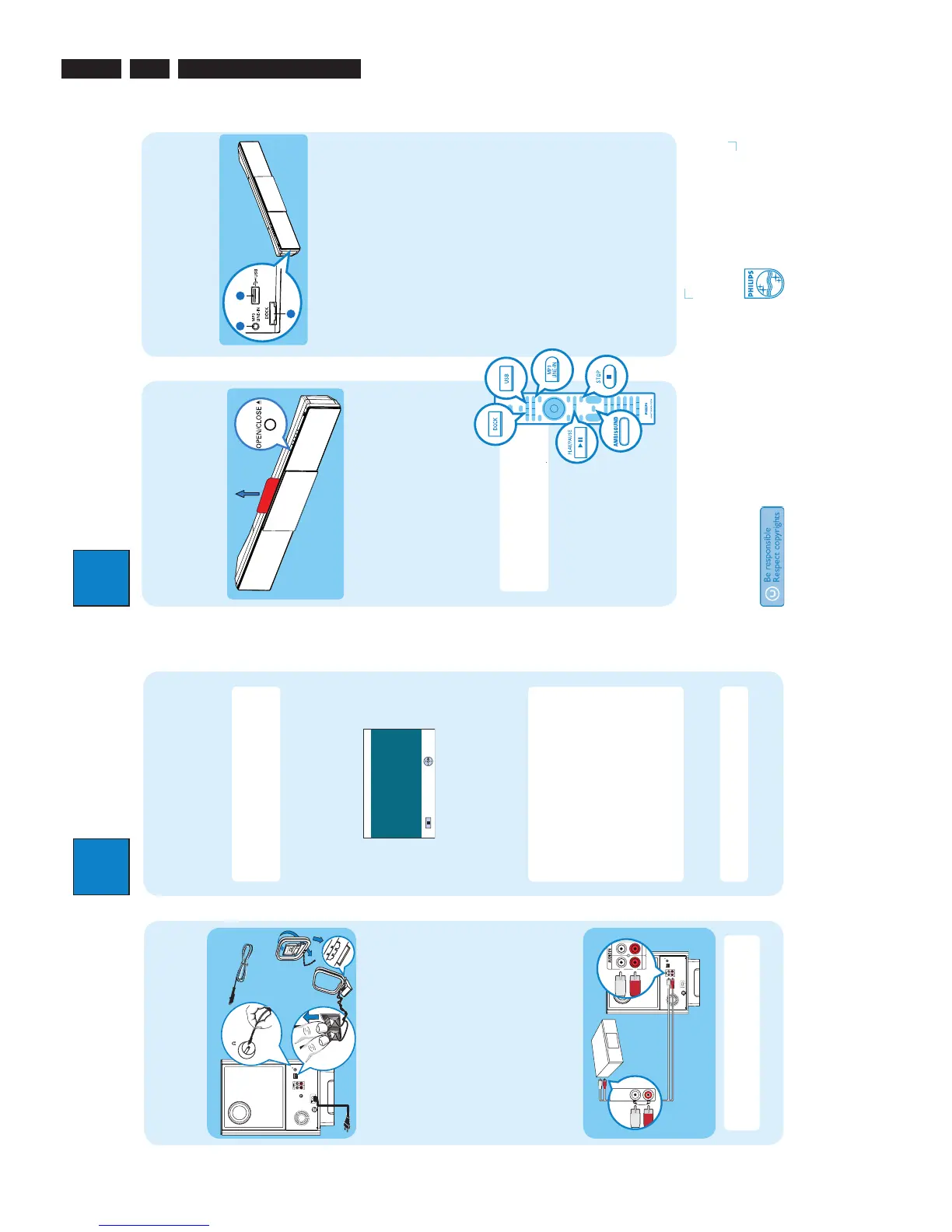
The connections to other devices are located at the left
side of the main unit.
Philips GoGear/Apple iPod
A Connect the Philips HTD7001 docking station (sold
separately) to
A
.
B Turn on your GoGear or iPod before dock it in the
correct cradle.
C Press DOCK to switch to ‘DOCK’ mode.
D Press PLAY on your GoGear or iPod.
Other portable audio player
A Use the supplied MP3 LINE-IN cable to connect the
headphone output socket on your portable audio
player to
B
.
B Press PLAY on your portable audio player.
C Press MP3 LINE-IN to listen to the playback.
USB device
A Insert your USB device to
C
.
B Press USB to switch to ‘USB’ mode.
C Press u to start playback.
D To stop playback, press DISC to switch to ‘DISC’
mode. You can unplug your USB device now.





 To Next Page