10
English
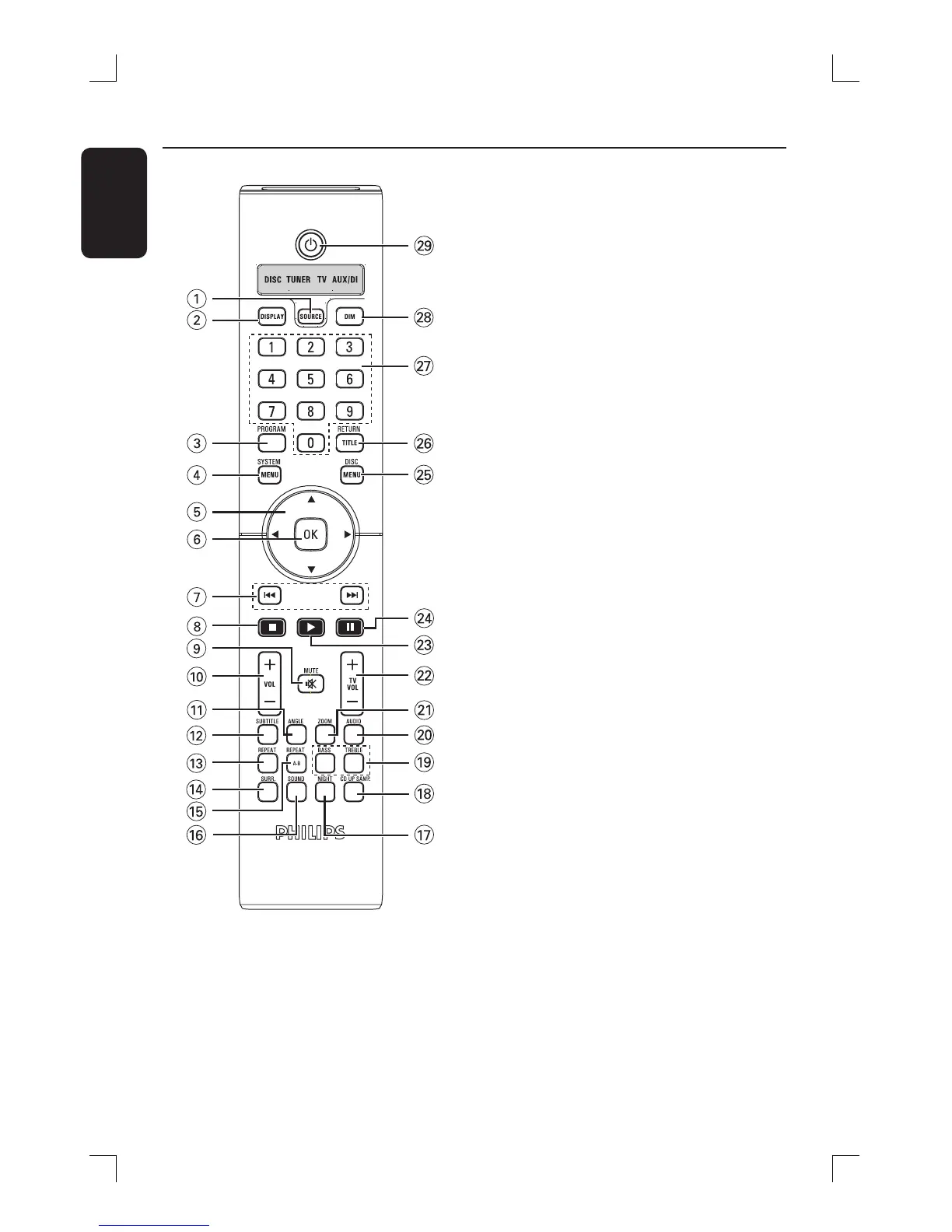
Remote control
a SOURCE
– Selects the relevant active source mode:
DISC, FM TUNER, TV or AUX/DI.
b DISPLAY
– Displays the current status or disc
information.
c PROGRAM
– TUNER: press and hold to start
automatic/manual preset programming.
d SYSTEM MENU
– Enters or exits the system menu.
e W X S T
– Selects movement direction in the menu.
– TUNER: press W or X to select a preset
radio station.
– TUNER: press S or T to select auto
tuning.
f OK
– Con rms a selection.
g . / >
– DISC: press and hold to search
backwards/forwards or to select a track.
– TV: selects previous/next channel (Philips
TV only).
– TUNER: tunes the radio frequency
up/down.
h Ç
– Exits an operation.
– DISC: stops playback or press and hold
to eject a disc.
– TUNER: press and hold to erase a preset
radio station.
i MUTE H
– Mutes or restores the volume.
j VOL +-
– Adjusts the volume level.
ON
STANDBY





 To Next Page