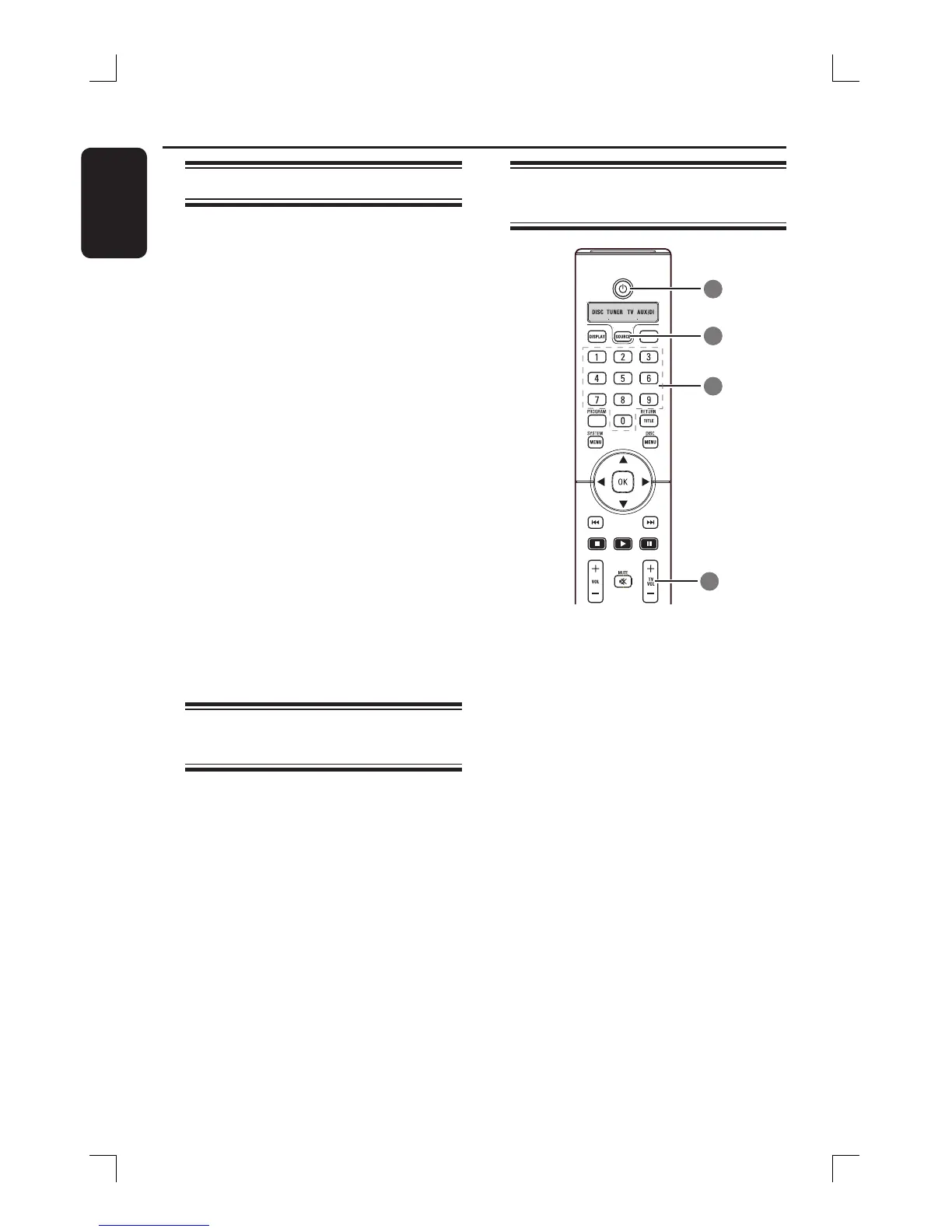
STANDBY
A Press SOURCE button until “TV”
appears on the display panel.
B Press . / > or use the numeric
keypad (0-9) to select the TV’s channel.
C Press TV VOL +/- to adjust the TV’s
volume level.
D Press and hold STANDBY2 to switch
off your TV.
Setting the Sleep timer
The sleep timer enables the system to
switch to standby mode automatically at
a preset time.
A Press and hold DIM on the remote until
“SLEEP XX” appear on the display panel
(XX = 15, 30, 45, 60 or OFF).
B To select the next sleep timer value,
press DIM button again while in sleep
timer mode until it reaches the desired
preset switch-off time.
‘SLEEP’ will be showed on the display
panel, except if “OFF” is selected.
Before the system switches to standby
mode, a countdown of 10 seconds is
displayed.
“SLEEP10” “SLEEP 9”....
“SLEEP1” “SLEEP”
To cancel the sleep timer
Press and hold DIM until “OFF” appears
or press the STANDBY
2 button.
Dimming system’s display
screen
In any active mode, press DIM on the
remote to select the desired brightness :
DIM 1 : 70% brightness
DIM 2 : 50% brightness
DIM 3 : 25% brightness
DIM OFF : normal brightness







 To Next Page