19
English
DIGITAL IN L AUX IN R COMPONENT VIDEO
Pr Pb Y
TO SUB-
WOOFER
VIDEO
AUDIO
OUT IN
TV
Optional Connections (continued)
Example of TV’s back panel
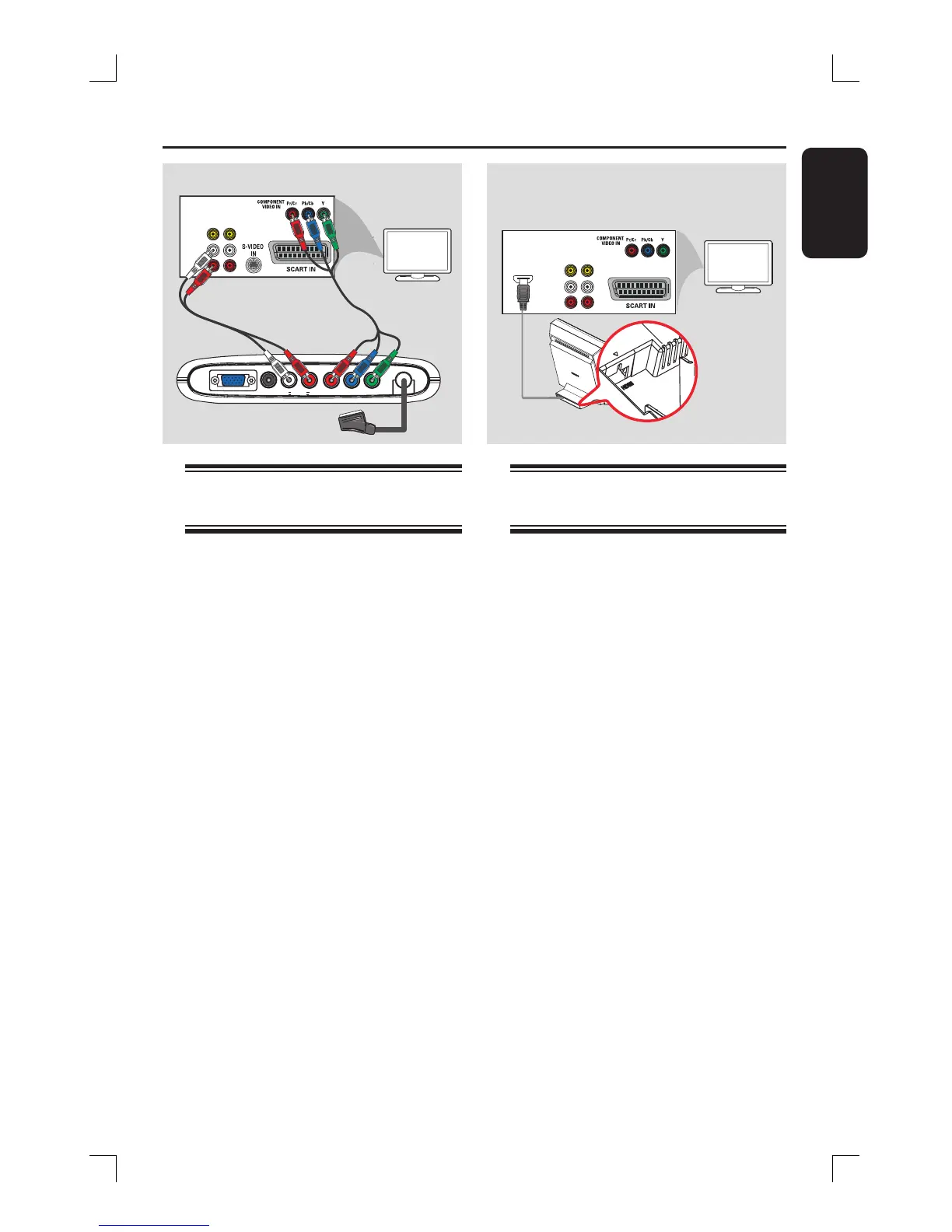
Connecting to a Progressive
Scan TV
IMPORTANT!
– The progressive scan video quality
is only possible when a progressive
scan TV is connected to the Y Pb Pr
sockets.
– DO NOT connect both the
SCART and Y Pb Pr to a TV, it may
affect the picture quality.
A Use the component video cables (red/
blue/green - not supplied) to connect the
Junction Box’s Y Pb Pr sockets to the
corresponding component video input
sockets (or labelled as Y Pb/Cb Pr/Cr or
YUV) on the TV.
Do not connect the SCART socket from
the Junction Box to your TV.
B To listen to the TV channels through this
DVD system, use an audio cable (white/
red - not supplied) to connect the AUX
IN sockets to the corresponding AUDIO
OUT sockets on the TV.
C Proceed to pages 25~26 for detailed
Progressive Scan set up.
Connecting to a HDMI
compatible device
HDMI connects uncompressed and
unprocessed digital transmission for the
highest and best de ned sound/image
quality. Its plug and play capability
requires only one cable for both audio/
video output.
A Open the DVD system’s back cover by
releasing the two catches located at the
base of the system.
B Use a HDMI cable (not supplied) to
connect the HDMI OUT socket (on the
back of the DVD system) to the HDMI
IN socket on a HDMI compatible device
(eg. HDMI TV, HDCP compliant TV).
C Once you have completed the necessary
connections, installation and set-up, see
pages 39 and 42 for optimum HDMI
audio and video settings
Helpful Hints:
– HDMI is backward compatible with some
DVI devices using an appropriate adaptor
plug.
– Most older DVI-enabled devices are not
HDCP compliant and playback is not
possible.
A
B
VIDEO
HDMI IN
AUDIO
OUT IN
TV
HDMI OUT
socket located
beneath
the cover of the
DVD system
Example of
HDMI TV’s
back panel
B







 To Next Page