9
English
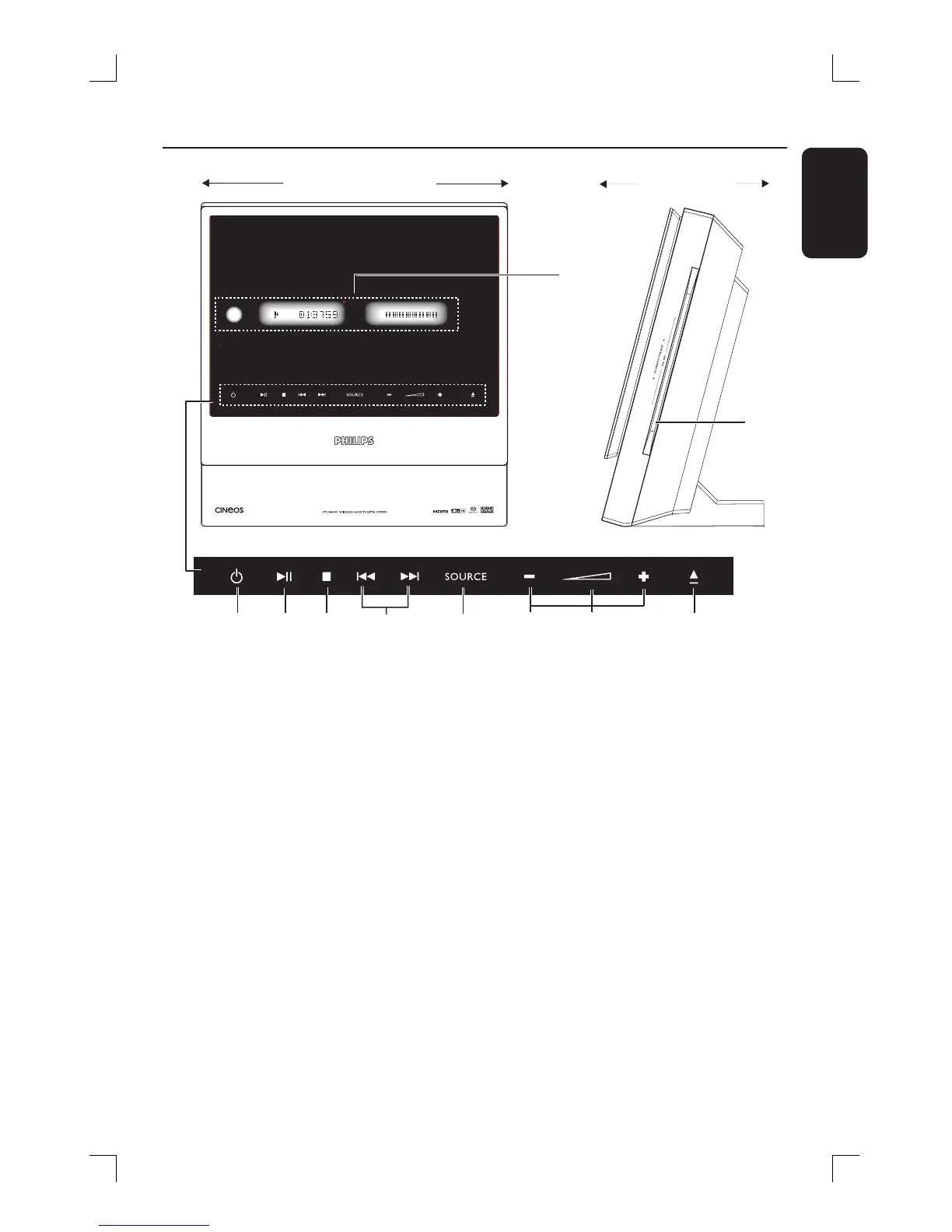
Main Unit
a 2 STANDBY ON
– Switches to standby mode, or switches
on the system.
b u PLAY PAUSE
– DISC: starts/pauses playback.
– TUNER: starts preset radio station
installation in Plug & Play mode.
c Ç STOP
– Exits an operation.
– DISC: stops playback.
– TUNER: press and hold this button to
erase the current preset radio station.
d ./ >
– DISC: select a track or press and hold
this button to search backwards/
forwards.
– TUNER: tunes the radio frequency
up/down.
e SOURCE
– Selects the relevant active source mode:
DISC, TUNER FM, TV or AUX/DI.
f +- VOLUME
– Adjusts the volume level.
g Volume Indicator A
h ç EJECT
– Opens/ closes the disc tray.
i System display panel
j Disc Slot
i
j
a
b
c
d
e
fg
h
Front View
Side View
Touch screen controls






 To Next Page