EasyManua.ls Logo

Philips Illuminate - Music Screen; Music-Synchronized Light Shows

Philips Illuminate
26 pages
Print Icon
To Next Page IconTo Next Page
To Previous Page IconTo Previous Page
Loading...
Illuminate™ www.seasonalspecialties.com Page 13 of 26
Rev 082015
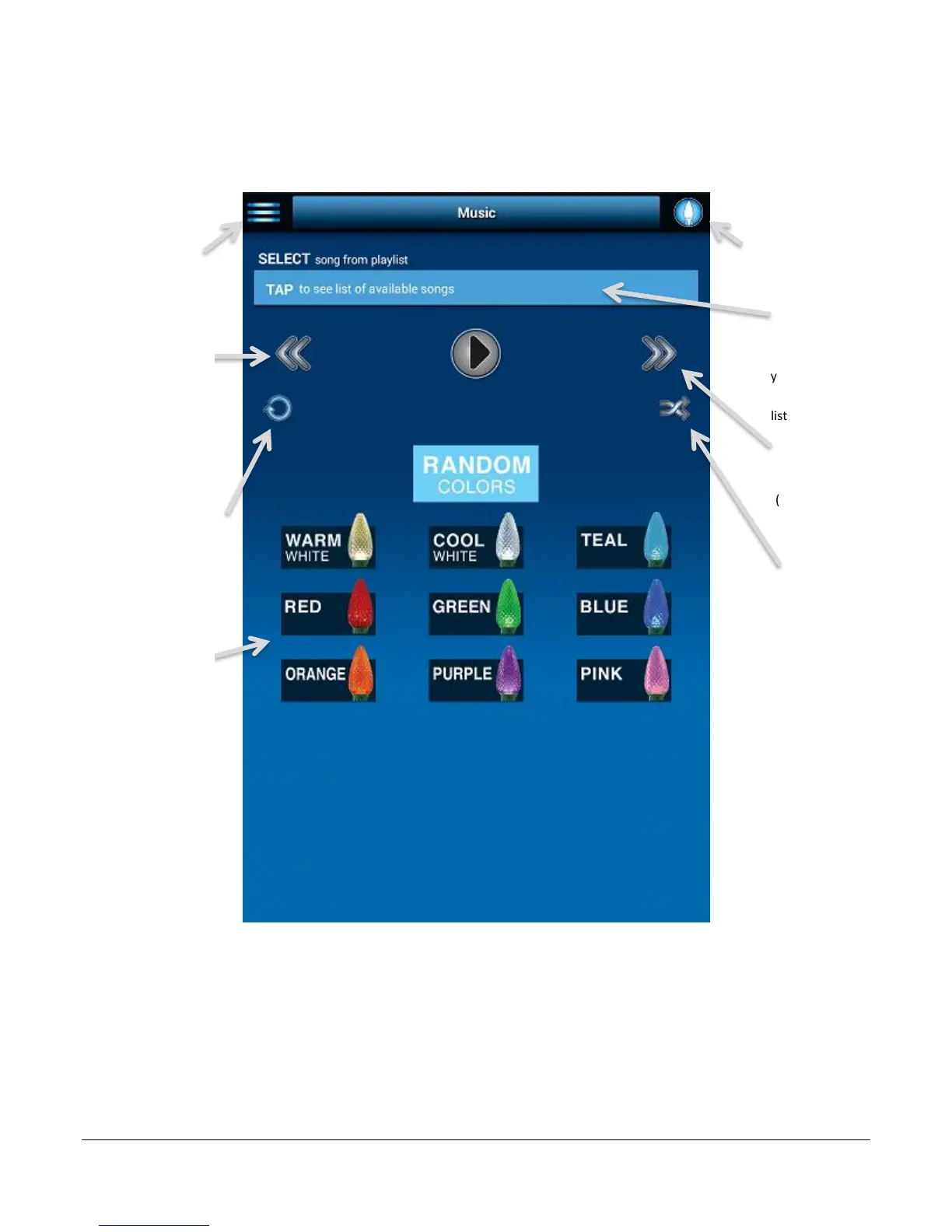
Music Screen
Illuminate will create a light show that changes color and flashes to your own music on your
device.
Note: Only user purchased music files will work with the Illuminate system. If music is
downloaded through a music service (Amazon music, Apple music, etc.) it will not work.
Menu: Navigate
between the
different parts of
Illuminate.
Available Songs:
Press to select from
a list of songs on
your device. Choose
one song or create a
list of multiple songs
On/Off: Turn the
illumnate lights on
and off.
Next song: Tap to
placy next song
(when more than 1
song is selected)
Repeat: Select to
repeat all songs.
Shuffle: Select to to
play songs in random
order.
Previous song: Tap
to placy previous
song (when more
than 1 song is
selected)
Color selection:
Select any of the
availible colors to be
shown while music is
being played.

Related product manuals