EasyManua.ls Logo

Philips Illuminate - Color Screen; Color Selection and Brightness

Philips Illuminate
26 pages
Print Icon
To Next Page IconTo Next Page
To Previous Page IconTo Previous Page
Loading...
Illuminate™ www.seasonalspecialties.com Page 8 of 26
Rev 082015
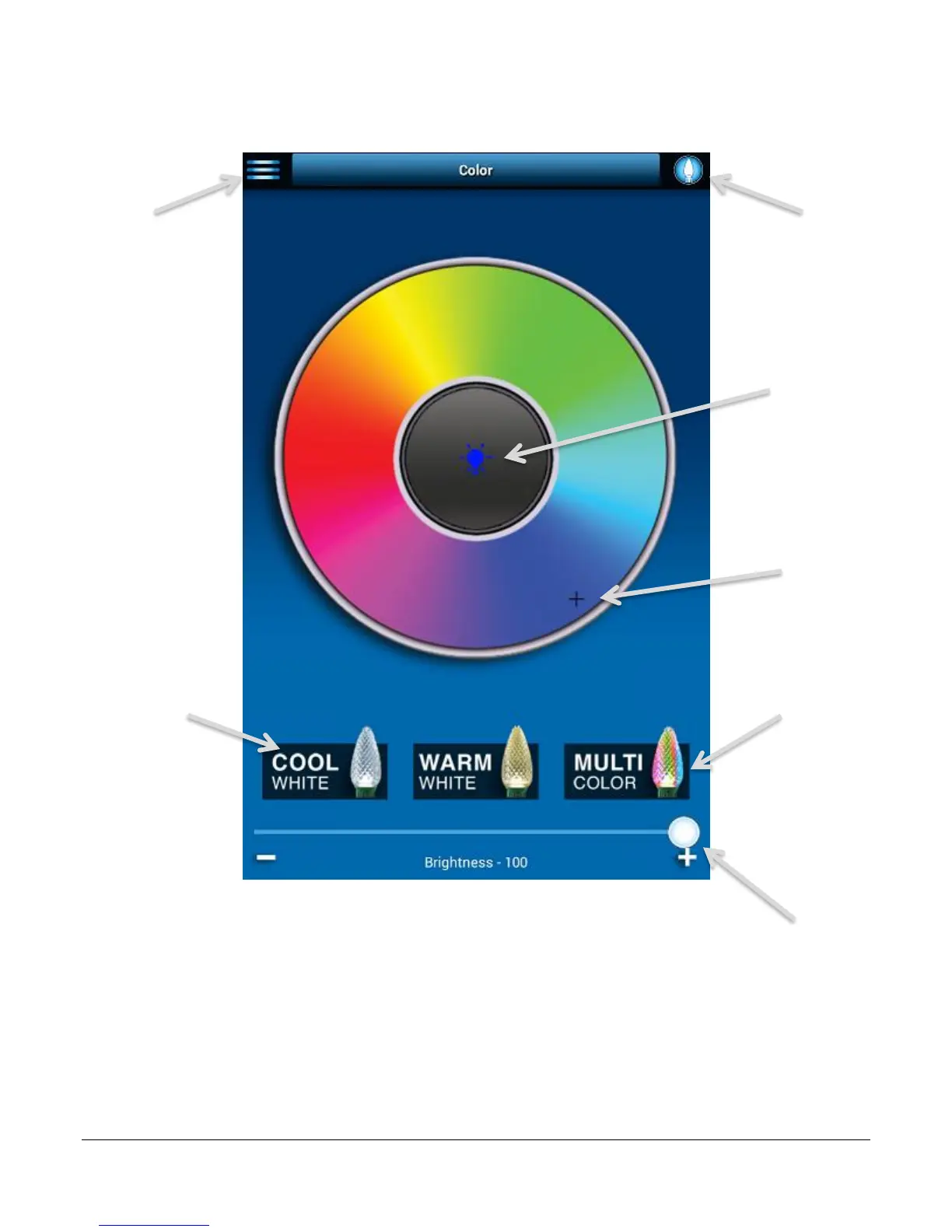
Color Screen
From the Color screen, you can choose from a multitude of static colors for your Illuminate
lights.
Menu: Navigate
between the
different parts of
Illuminate.
On/Off: Turn the
Illumnate lights on
and off.
Color Wheel: Slide
the + indicator
around the wheel to
select a color.
Current color: Shows
which color is
currently selected.
Specialty color
button: Select from a
pre-made color (Cool
White or Warm
White).
Brightness: Move
the slider to increase
or decrease the
brightness.
Multi-Color: Select
this button to create
a custom color
pattern or use the
default pattern.
Note: Additional pop
up windows will
appear after button
is selected.

Related product manuals