Service Modes, Error Codes, and Fault Finding
EN 30 L04L AA5.
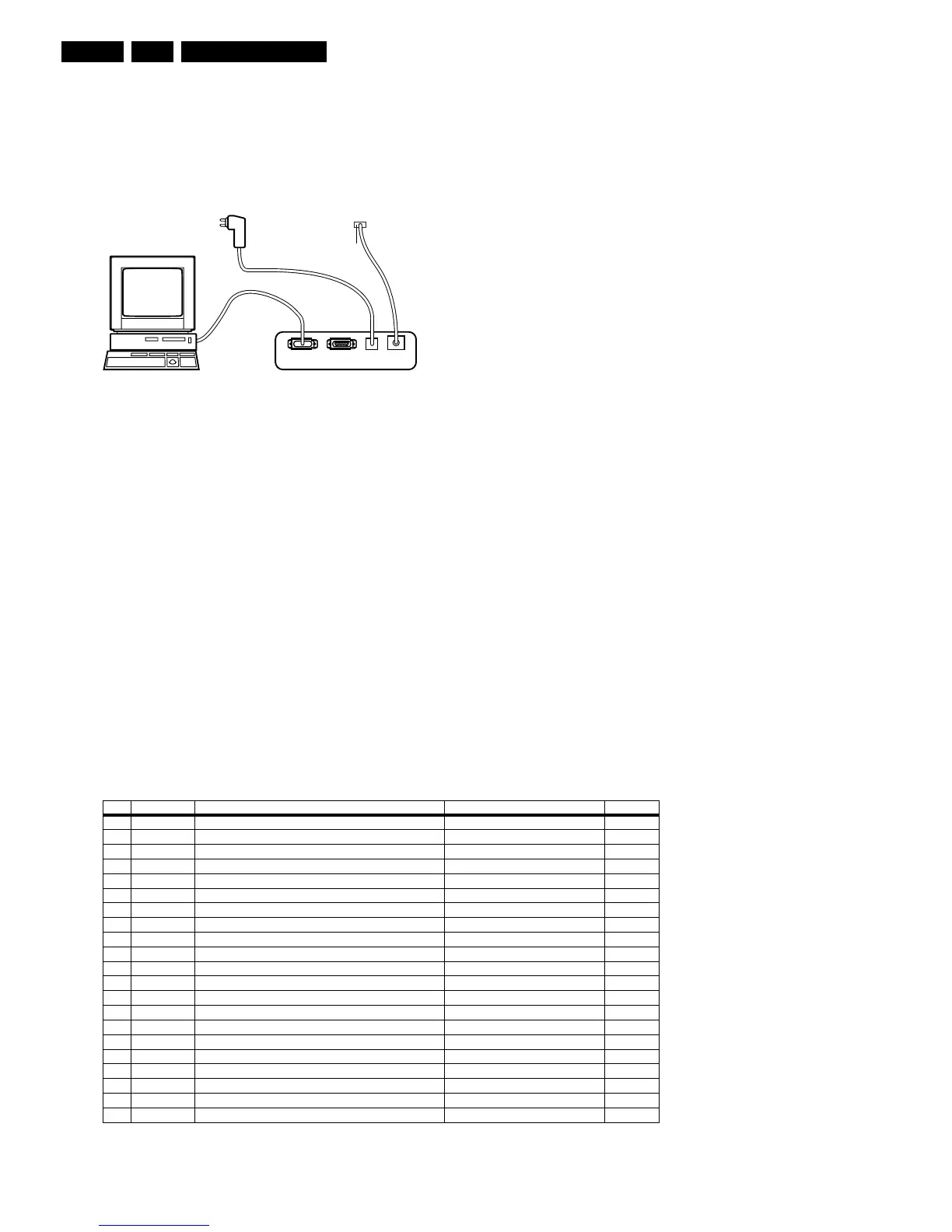
connector at the rear side of the TV (for its location see
chapter “Service Modes, ....”).
7. Plug the mains adapter in a mains outlet, and switch the
interface “on”. The green and red LEDs light up together.
The red LED extinguishes after approx. 1 second while the
green LED remains lit.
8. Start the ComPair program and read the “Introduction”
chapter.
Figure 5-4 ComPair Interface connection
5.4.4 How To Order
ComPair order codes:
• Starter kit ComPair32/SearchMan32 software and
ComPair interface (excl. transformer): 3122 785 90450.
• ComPair interface (excluding transformer): 4822 727
21631.
• Starter kit ComPair32 software (registration version): 3122
785 60040.
• Starter kit SearchMan32 software: 3122 785 60050.
• ComPair32 CD (update): 3122 785 60070 (year 2002,
3122 785 60110 (year 2003).
• SearchMan32 CD (update): 3122 785 60080 (year 2002),
3122 785 60120 (year 2003).
• ComPair interface cable: 3122 785 90004.
• ComPair firmware upgrade IC: 3122 785 90510.
• Transformer (non-UK): 4822 727 21632.
• Transformer UK: 4822 727 21633.
Note: If you encounter any problems, contact your local
support desk.
5.5 Error Codes
The error code buffer contains all errors detected since the last
time the buffer was erased. The buffer is written from left to
right. When an error occurs that is not yet in the error code
buffer, it is displayed at the left side and all other errors shift one
position to the right.
5.5.1 How To Read The Error Buffer
You can read the error buffer in 3 ways:
• On screen via the SAM (if you have a picture). Examples:
– ERROR: 0 0 0 0 0 : No errors detected
– ERROR: 6 0 0 0 0 : Error code 6 is the last and only
detected error
– ERROR: 9 6 0 0 0 : Error code 6 was detected first and
error code 9 is the last detected (newest) error
• Via the blinking LED procedure (when you have no
picture). See “The Blinking LED Procedure”.
• Via ComPair.
5.5.2 How To Clear The Error Buffer
The error code buffer is cleared in the following cases:
• By using the CLEAR command in the SAM menu:
– To enter SAM, press the following key sequence on the
remote control transmitter: “062596” directly followed
by the OSD/STATUS button (do not allow the display
to time out between entries while keying the
sequence).
– Make sure the menu item CLEAR is highlighted. Use
the MENU UP/DOWN buttons, if necessary.
– Press the MENU RIGHT button to clear the error
buffer. The text on the right side of the “CLEAR” line will
change from “CLEAR?” to “CLEARED”
• If the contents of the error buffer have not changed for 50
hours, the error buffer resets automatically.
Note: If you exit SAM by disconnecting the AC power from the
television set, the error buffer is not reset.
5.5.3 Error Codes
In case of non-intermittent faults, write down the errors present
Table 5-3 Error code overview
E_06532_008.eps
190204
PC VCR I
2
CPower
9V DC
TO SERVICE
CONNECTOR
Error Device Error description Check item Diagram
0 Not applicable No Error
1 Not applicable X-Ray/Over-voltage protection (US only) 2411, 2412, 2413, 6404, 6411, 6412 A2
2 Not applicable High beam (BCI) protection 3404, 7405 A2
3 Not applicable Vertical guard protection 3466, 7451, 7452, 7453, 7454 A2
4 Tuner I2C error while communicating with 2nd tuner 1000, 5010, (PIP Module) F2
5 Not applicable +5v protection 7604, 7605 A5
6 I2C bus General I2C error 7200, 3207, 3214 A4
7 Not applicable - - -
8 Not applicable - - -
9 24C16 I2C error while communicating with the EEPROM 7601, 3604, 3605 A5
10 Tuner I2C error while communicating with the PLL tuner 1000, 5001 A3
11 TDA6107/A Black current loop instability protection 7330, 3351, CRT B1
12 SDA9488X I2C error while communicating with the PIP processor 7242 (PIP Module) F1
13 Not applicable - - -
14 DVD Loader I2C error while communicating with the DVD Interface module DVD Interface module DVD Loader
15 TDA9178T/N1 I2C error while communicating with LTI module 7610 H
16 TDA9887 I2C error while communicating with PIP_Demodulator 7201 F2
17 Not applicable - - -
18 Not applicable - - -
19 TDA1200x I2C error while communicating with SSD stereo sound decoder 7200 A4
20 TDA1200x I2C error while communicating with video cosmic in Hercules IC 7200 A4



 To Next Page