B
ASIC
A
NTENNA AND
C
ABLE
C
ONNECTIONS
Y
our home’s signal input might
come from a single (75 ohm)
round cable, a Converter Box, or from
an antenna. In either case the connec-
tion to the TV is very easy.
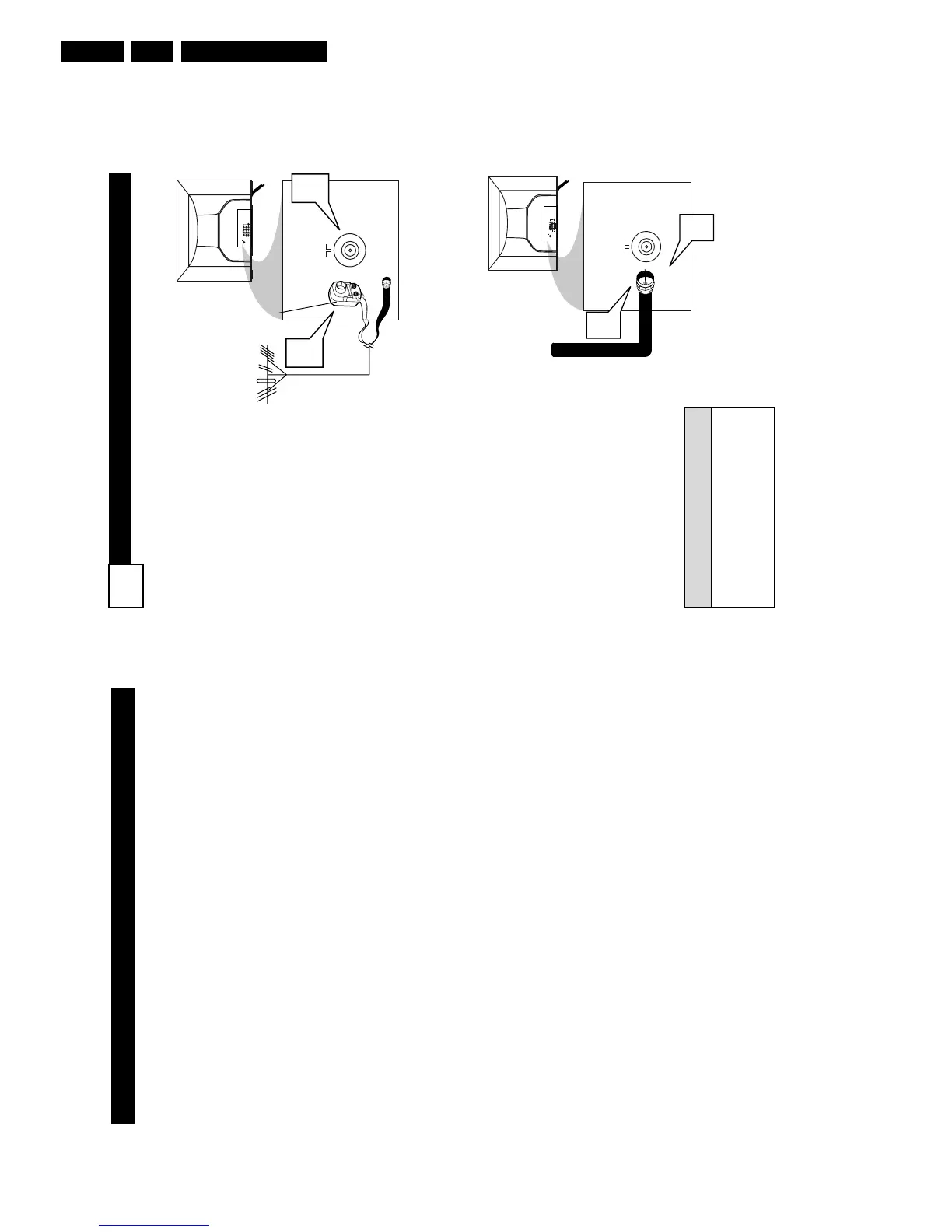
1
If your Cable TV signal or
Antenna signal is a round
cable (75 ohm) then you're
ready to connect to the TV.
If your antenna has flat twin-
lead wire (300 ohm), you first
need to attach the antenna wires
to the screws on a 300 to 75 ohm
adapter.
If you have a Cable Converter
Box: Connect the Cable TV sig-
nal to the Cable Signal IN(put)
plug on the Converter.
2
Connect the Cable TV cable or
Antenna cable (or 300 to 75 ohm
adapter) to the 751 plug on the
TV.
If you have a Cable Converter
Box: Connect the OUT(put) plug
from the Converter to the 751
plug on the TV.
After using the AutoProgram Control,
press the CH + and – buttons to scroll
through all the channels stored in the
television’s memory.
H
ELPFUL
H
INT
75 ⍀
1
2
ANT 75‰
L/Mono
Monitor out
VIDEO
S-VIDEO
AV1 in
Y
Pb
Pr
AV2 in
AUDIO
R
COMPONENT VIDEO INPUT
Back of TV
Cable signal
coming from
Cable Company
Jack Panel
Back of TV
P
ANEL
I
NDEX
Subject Panel No.
Active Control . . . . . . . . . . . . . . . . .23
Antenna/Cable Basic Connection . . .1
Audio/Video Connections
AV1 Input Jacks . . . . . . . . . . . . . . .4
Component Video Input Jacks . . . .7
Headphone Jack . . . . . . . . . . . . . . .5
Monitor Output Jacks . . . . . . . . . . .8
S-Video Input Jacks . . . . . . . . . . . .6
Side AV Input Jacks . . . . . . . . . . . .5
AutoLock™ Controls
Access Code . . . . . . . . . . . . . . . . .25
Block All Channels . . . . . . . . . . . .27
Block Channels . . . . . . . . . . . . . . .26
Clear All Blocked Channels . . . . .27
Movie Ratings . . . . . . . . . . . . . . . .28
Other Blocking Options . . . . . . . .30
TV Ratings . . . . . . . . . . . . . . . . . .29
Understanding AutoLock™ . . . . .24
Automatically Programming TV . .13
AutoPicture™ Control . . . . . . . . . .32
AutoSound™ Control . . . . . . . . . . .32
Basic Remote Operation . . . . . . . . . .3
Basic Television Operation . . . . . . . .3
Subject Panel No.
Cable Box Connection . . . . . . . . . . .2
Channel Edit . . . . . . . . . . . . . . . . . .14
Clock Controls
Activate Control . . . . . . . . . . . . . .21
Clock . . . . . . . . . . . . . . . . . . . . . . .18
Display Control . . . . . . . . . . . . . . .22
Specific Channel . . . . . . . . . . . . . .20
Start or Stop Time . . . . . . . . . . . . .19
Closed Caption Control . . . . . . . . . .31
Demo Mode . . . . . . . . . . . . . . . . . . .30
Factory Service Locations . . . . .36-37
Format Control . . . . . . . . . . . . . . . .17
Language Controls . . . . . . . . . . . . .11
Limited Warranty . . . . . . . . . . . . . .38
Picture Menu Controls . . . . . . . . . .15
QuadraSurf™ . . . . . . . . . . . . . . .33-34
Remote Batteries . . . . . . . . . . . . . . . .3
Remote Button Descriptions . . . .9-10
Sleeptimer . . . . . . . . . . . . . . . . . . . .31
Sound Menu Controls . . . . . . . . . . .16
Troubleshooting . . . . . . . . . . . . . . .35
Tuner Mode . . . . . . . . . . . . . . . . . . .12
Active Control, AutoPicture, AutoSound, and Incredible Surround are trademarks of Philips
Consumer Electronics Company. Copyright 2001 Philips Consumer Electronics.*Manufactured
under license from Dolby Laboratories. “Dolby” and the double-D symbol are trademarks of Dolby
Laboratories.



 To Next Page