Alignments
EN 77L04L AA 8.
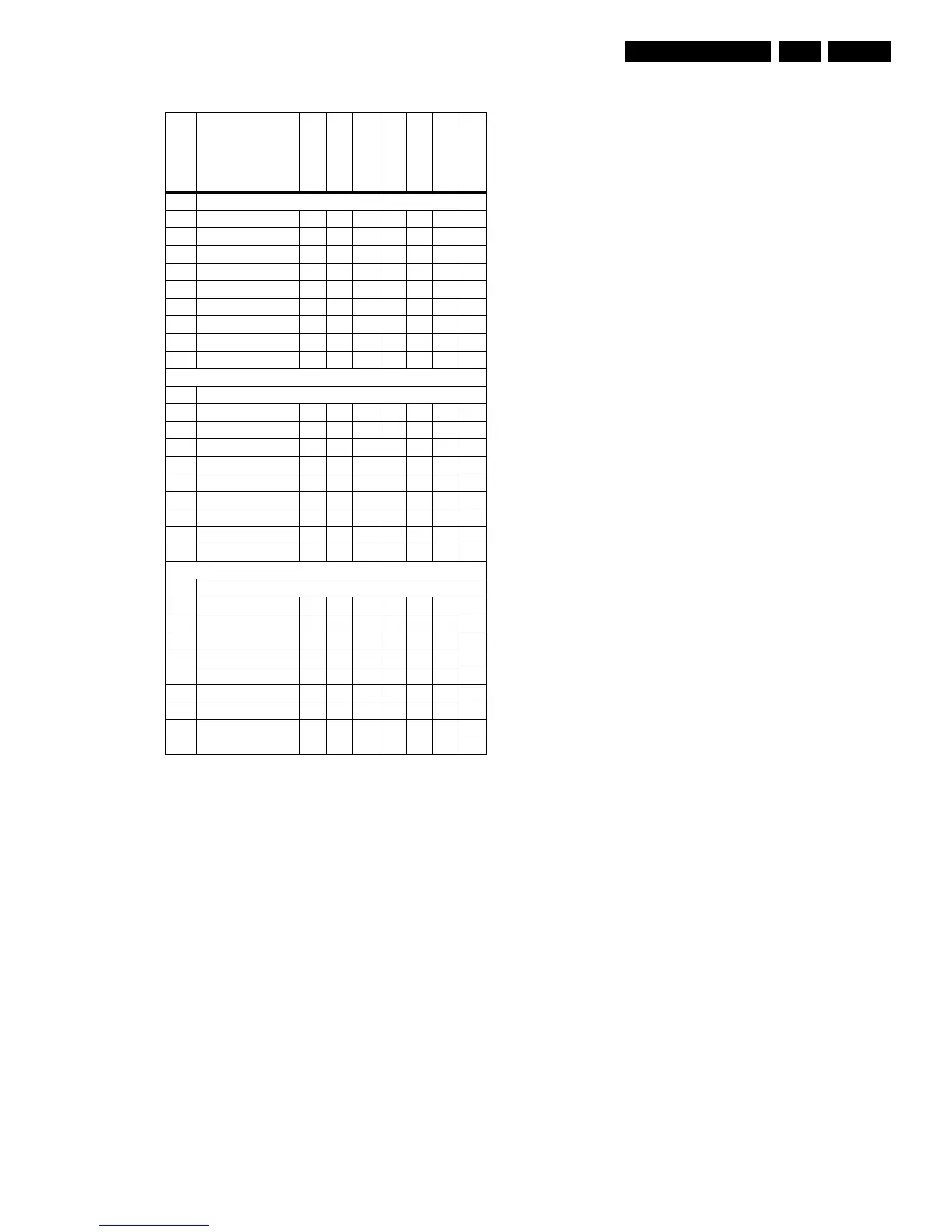
Table 8-3 Option code overview per model (OP5 - OP7)
• Option Byte 5 (OP5)
– OB57: AV1
– OB56: AV2
– OB55: AV3
– OB54: CVI
– OB53: SVHS2
– OB52: SVHS3
– OB51: HOTEL MODE
– OB50: Reserved (value= 0)
• Option Byte 6 (OP6)
– OB67: PERSONAL ZAPPING
– OB66: Reserved (value= 0)
– OB65: FM TRAP
– OB64: COMB FILTER
– OB63: ACTIVE CONTROL
– OB62: VIDEO TEXT
– OB61: LIGHT SENSOR
– OB60: DUAL TEXT
• Option Byte 7 (OP7)
– OB77: TIME WIN1
– OB76: Reserved (value= 0)
– OB75: Reserved (value= 0)
– OB74: Reserved (value= 0)
– OB73: Reserved (value= 0)
– OB72: Reserved (value= 0)
– OB71: Reserved (value= 0)
– OB70: Reserved (value= 0)
Option bit definition
Option Byte 1 (OP1)
• OB17: PHILIPS TUNER
– 0 : ALPS / MASCO compatible tuner is in use.
– 1 : Philips compatible tuner is in use.
• OB16: FM RADIO
– 0 : FM radio feature is disabled or not applicable.
– 1 : FM radio feature is enabled.
• OB15: LNA
– 0 : Auto Picture Booster is not available or not
applicable.
– 1 : Auto Picture Booster is available.
• OB14: ATS
– 0 : Automatic Tuning System (ATS) feature is disabled
or not applicable.
– 1 : ATS feature is enabled. When ATS is enabled, it
sorts the program in an ascending order starting from
program “1”.
• OB13: ACI
– 0 : Automatic Channel Installation (ACI) feature is
disabled or not applicable.
– 1 : ACI feature is enabled.
• OB12: UK PNP
– 0 : UK's default Plug and Play setting is not available or
not applicable.
– 1 : UK's default Plug and Play setting is available.
– When UK PNP and VIRGIN MODE are set to “1” at the
initial setup and after exiting from menu, VIRGIN
MODE will be set automatically to “0” while UK PNP
remains “1”.
• OB11: VIRGIN MODE
– 0 : Virgin mode is disabled or not applicable.
– 1 : Virgin mode is enabled. Plug and Play menu item
will be displayed to perform installation at the initial
startup of the TV when VIRGIN MODE is set to “1”.
After installation is finished, this option bit will be
automatically set to “0”.
• OB10: CHINA
– 0 : Tuning is not for China set, or this option bit is not
applicable.
– 1 : Tuning is for China set.
Option Byte 2 (OP2)
• OB27: Reserved
– Default setting is “0”.
• OB26: GREEN UI
– 0 : Green UI is disabled (for Philips brand).
– 1 : Green UI is enabled (for Magnavox brand).
– Note: only for NAFTA region.
• OB25: CHANNEL NAMING
– 0 : Name FM Channel is disabled or not applicable.
– 1 : Name FM Channel is enabled.
– Note : Name FM channel can be enabled only when
FM RADIO= “1”.
• OB24: LTI
– 0 : Luminance Transient Improvement (LTI) is disabled
or not applicable.
– 1 : LTI is enabled.
• OB23: TILT
– 0 : Rotate Picture is disabled or not applicable.
– 1 : Rotate Picture is enabled.
• OB22: FINE TUNING
– 0 : Fine Tuning for Channel Offset is disabled or not
applicable.
– 1 : Fine Tuning for Channel Offset is enabled.
• OB21: PIP PHILIPS TUNER
– 0 : ALPS / MASCO compatible tuner is in use for PIP
module.
– 1 : Philips compatible tuner is in use for PIP module.
• OB20: HUE
– 0 : Hue/Tint Level is disabled or not applicable.
– 1 : Hue/Tint Level is enabled.
Option Bit
Option Name
25PT5541
29PT4641
29PT5642
28PW6441
28PW6542
32PW6542
32PW6542/85
OP5
7 AV1 1111111
6 AV2 1111111
5 AV3 0011111
4 CVI 0011111
3 SVHS2 1111111
2 SVHS3 0000000
1 Hotel Mode 1111111
0 Reserved 0000000
OP5 value (dec) 202 202 250 250 250 250 250
OP6
7 Personal Zapping 0000000
6 Reserved 0000000
5 FM Trap 1111111
4 Comb filter 0000000
3 Active control 1111111
2 Video Text 0000000
1 Light sensor 0010110
0 Dual Text 0000000
OP6 value (dec) 40 40 42 40 42 42 40
OP7
7 Time Win1 0000000
6 Reserved 0000000
5 Reserved 0000000
4 Reserved 0000000
3 Reserved 0000000
2 Reserved 0000000
1 Reserved 0000000
0 Reserved 0000000
OP7 value (dec) 0000000



 To Next Page