EN 11
English
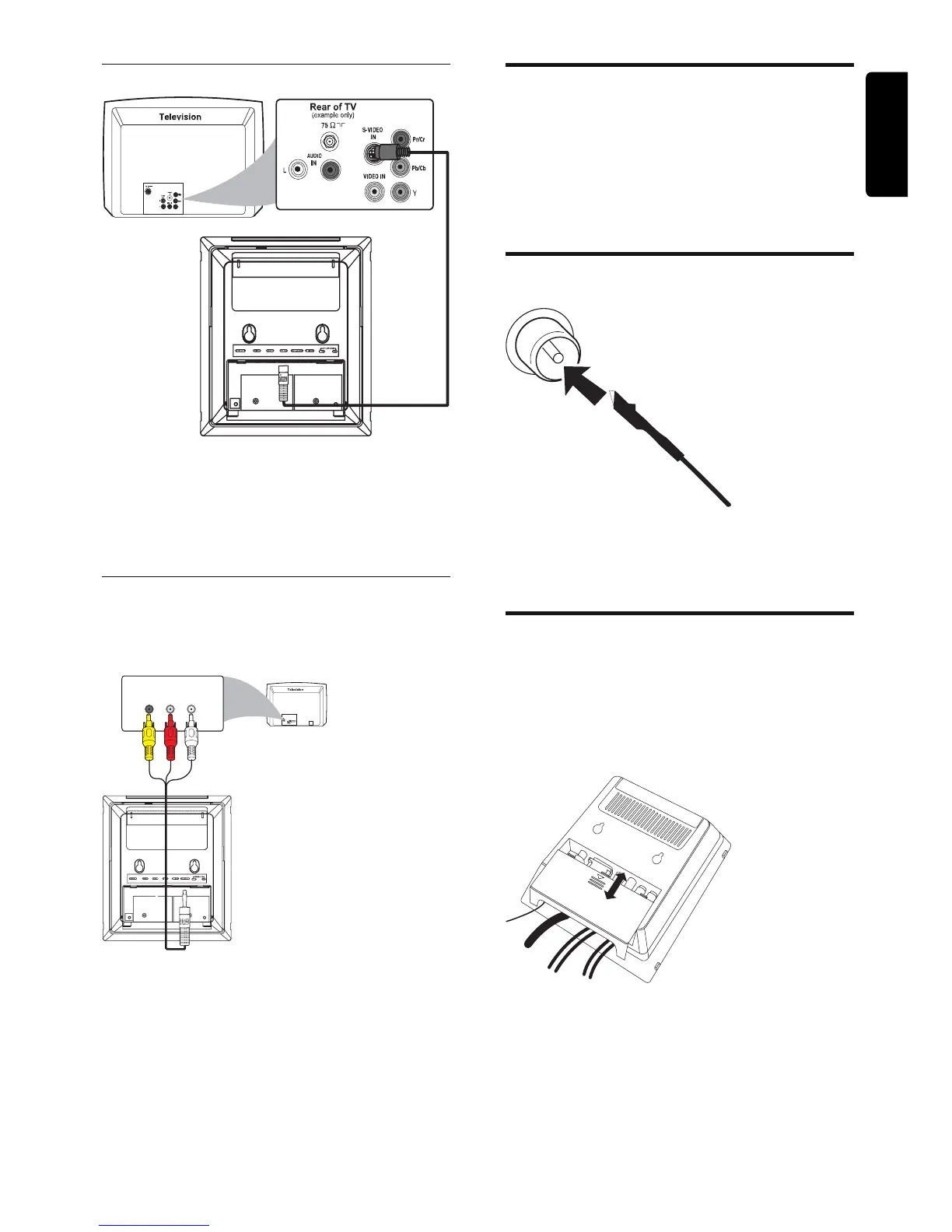
Connect through S-Video
1 Connect an S-video cable (not supplied) to:
the • S-Video socket on this unit.
the S-Video input socket (or labeled •
as Y/C or S-VHS) on the TV.
Connect through component video
Connect a progressive scan TV through
component video for higher quality video.
1 Connect the supplied AV cord (red/
white/yellow) to:
the • Component socket on this unit.
the component input sockets (or labeled •
as Y Pb/Cb Pr/Cr or YUV) on the TV:
yellow connector to the red socket, red
connector to the blue socket, white
connector to the green socket.
R
Red Blue
COMPONENT
Green
Connect audio cable
1
To hear the sound of this DVD system
through your TV, connect the audio
connectors (white/red) to the audio input
jacks on the TV.
Connect FM antenna
1 Connect the supplied FM antenna to the
FM AERIAL socket on the unit.
Place the unit
1
After fi nishing all rear connections, mount
the detachable cover on the back of the
set until hearing a click to avoid cable
clutter.



 To Next Page