13
Option 2: Connect through
component video
Connect a progressive scan TV through
component video for higher quality video.
Note
The progressive scan video quality is only •
available when a progressive scan TV is
connected.
If your TV does not support progressive scan, •
you cannot view the picture.
For how to activate progressive scan on your •
TV, refer to the TV user manual.
Connect a progressive scan TV through
component video for higher quality video.
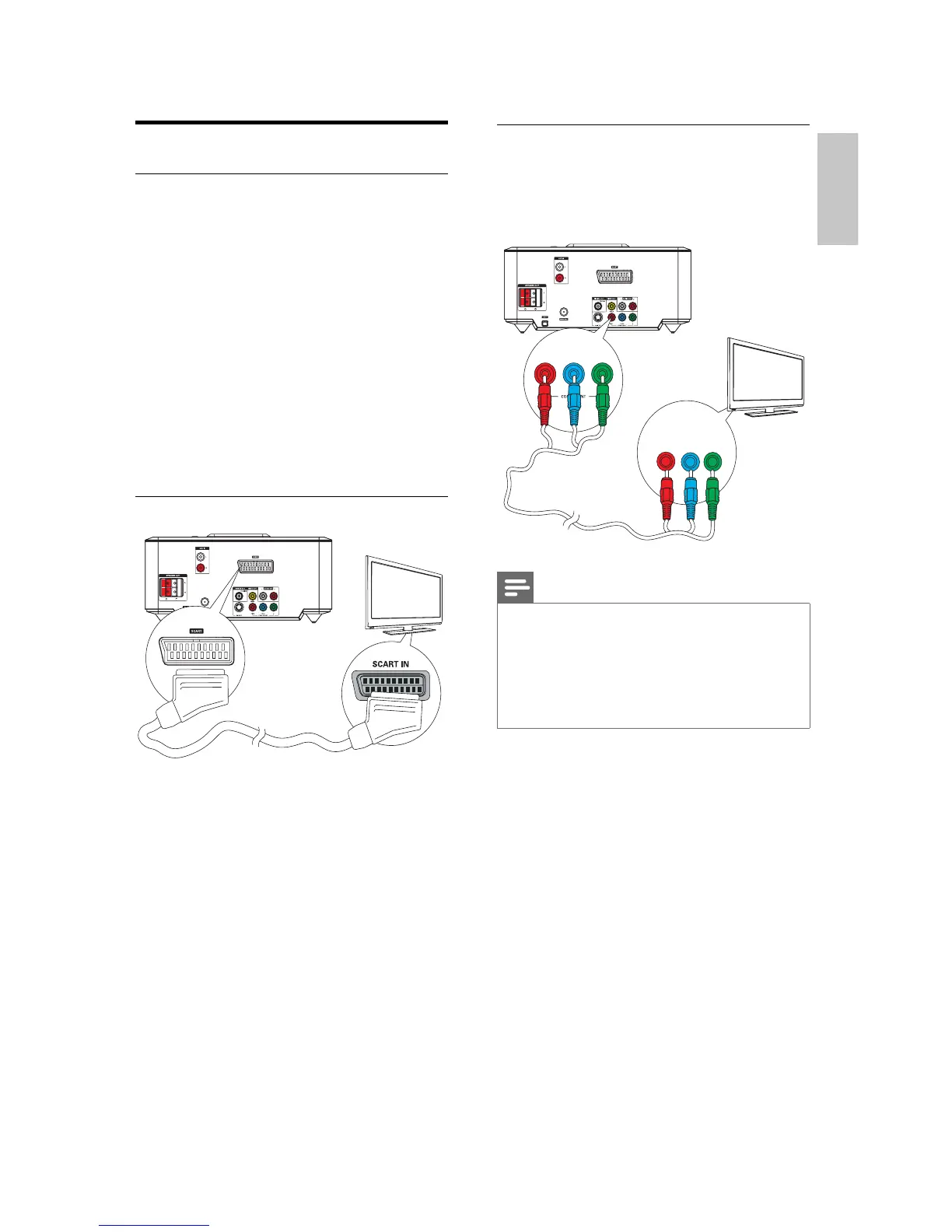
1 Connect component video cables (red/
blue/green - not supplied) to:
the • VIDEO OUT ( Pr/Cr Pb/Cb Y)
sockets on this unit.
the component input sockets on the •
TV.
TV
Pr/Cr Pb/Cb Y
COMPONENT VIDEO IN PUT
Connect TV
Connect video cables
With this connection, you can watch video
from the unit on the TV screen.
You can select the best video connection that
your TV supports.
Option 1: Connect through SCART (for a •
standard TV).
Option 2: connect through component •
video (for a standard TV or Progressive
Scan TV).
Option 3: connect through S-Video (for a •
standard TV).
Option 4: connect through composite •
video (CVBS) (for a standard TV).
Option 1: Connect through SCART
1 Connect a scart cable (not supplied) to:
the • SCART socket on this unit.
the • SCART socket on the TV.
TV
English
EN



 To Next Page
 Loading...