9
i
Stop play.•
Erase a program.•
In demo mode, activate or deactivate •
demonstration.
j VOLUME -/+
Adjust volume.•
Adjust time.•
k
Open or close the disc •
compartment.
l Disc compartment
m
Headphone socket.•
n
USB socket.•
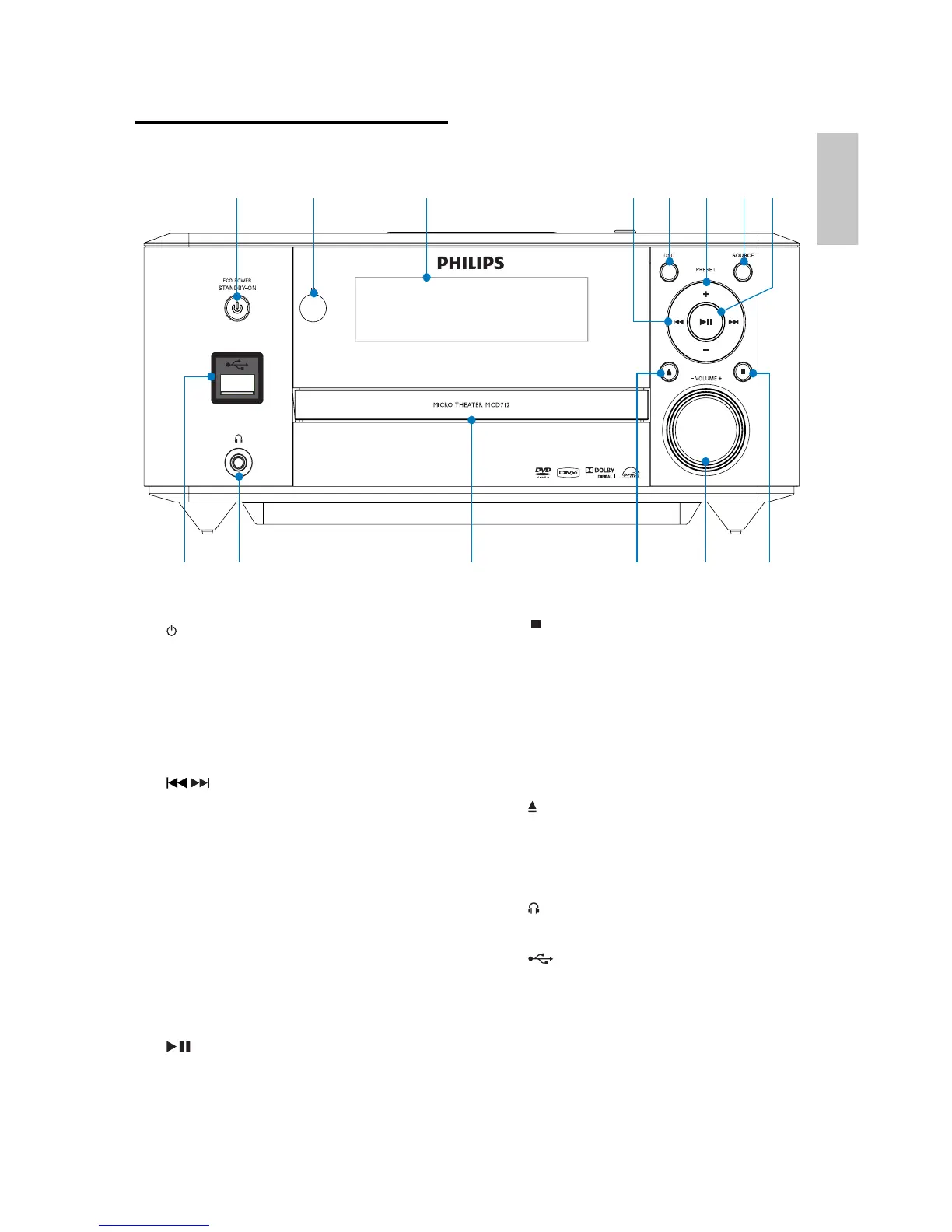
Overview of the main unit
a STANDBY-ON/ECO POWER
Turn on the apparatus or switch to •
the Eco Power standby mode.
b Remote control sensor
c Display panel
Display current status.•
d
/
Skip to the previous/next track.•
Skip to the previous/next title or •
chapter.
Tune to a radio station.•
e DSC
Select a preset sound setting.•
f PRESET +/-
Select a preset radio station.•
g SOURCE
Select a source.•
h
Start or pause play.•
a b c ed f g h
mn jl ik
English
EN


 To Next Page
 Loading...