3
English
EN
Contents
1 Important 4
Safety 4
Notice 6
2 Your DVD Micro Theater 8
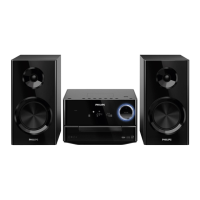
Introduction 8
What’s in the box 8
Overview of the main unit 9
Overview of the remote control 10
3 Connect 12
Place the unit 12
Connect speakers 12
Connect FM antenna 12
Connect TV 13
Connect power 14
4 Get started 15
Prepare the remote control 15
Set clock 15
Turn on 15
Find the correct viewing channel 16
Select the correct TV system 16
Change system menu language 16
Turn on Progressive Scan 16
5 Play 18
Play a disc 18
Play from USB 19
Play DivX video 19
Play MP3/WMA/picture fi les 19
Play control 20
Play options 20
Picture view options 21
6 Adjust settings 22
General setup 22
Audio setup 22
Video setup 23
Preference setup 23
7 Tune to FM radio stations 25
Program radio stations automatically 25
Program radio stations manually 25
Tune to a preset radio station 25
Set RDS clock 25
Show RDS information 26
8 Adjust volume level and sound effect
27
Adjust volume level 27
Select a sound effect 27
Mute sound 27
Listen through headphone 27
9 Other features 28
Activate demonstration mode 28
Adjust brightness of display panel 28
Set the alarm timer 28
Set the sleep timer 28
Connect other devices 28
10 Product information 30
Specifi cations 30
Supported disc formats 31
USB playability information 31
RDS program types 32
11 Troubleshooting 33


 To Next Page
 Loading...