Radio Stations 37
Tuning Radio Stations
1
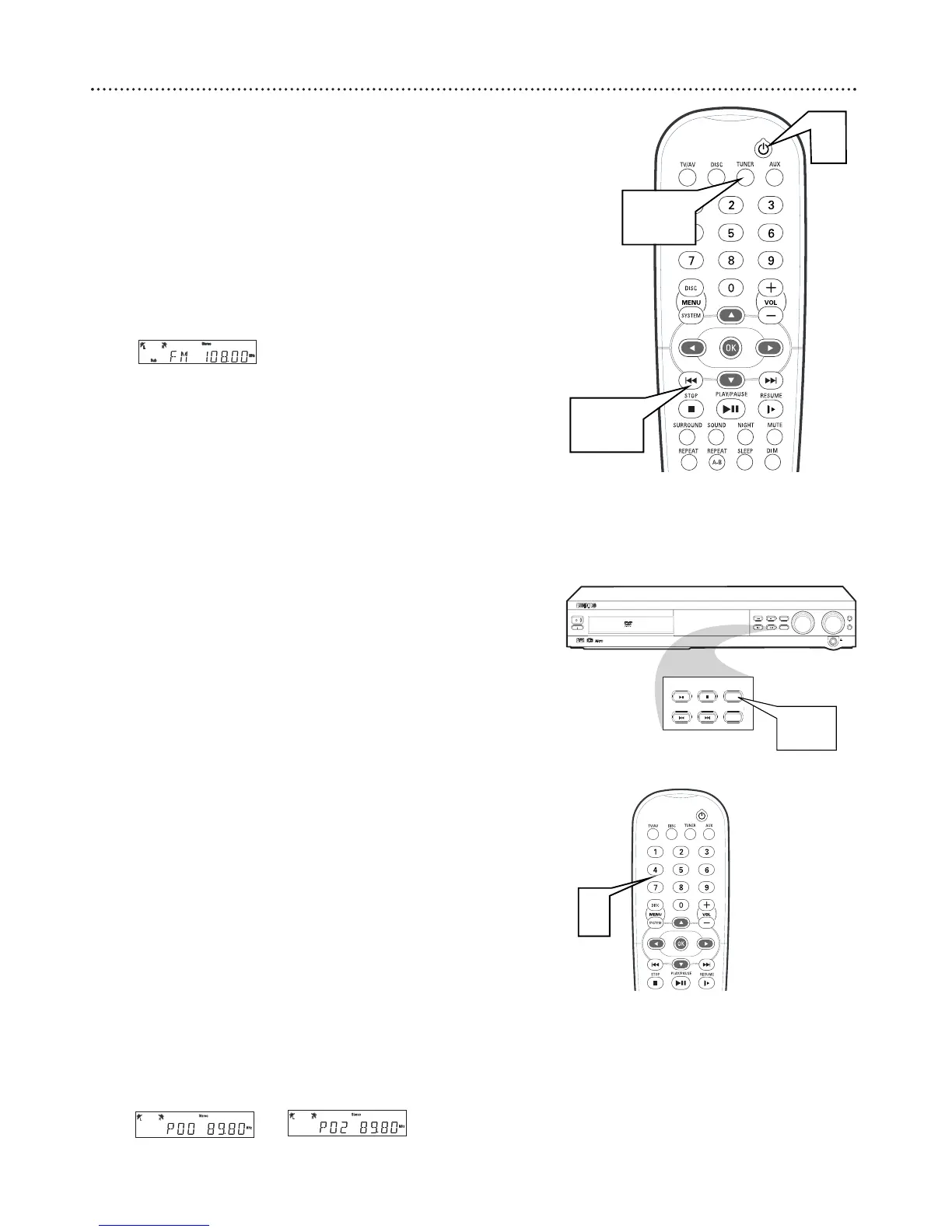
Press Power
yy
(or STANDBY-ON
yy
on the front of the DVD
Receiver) to turn on the last selected sound source.
2
Press TUNER on the remote (or turn the SOURCE dial on the
DVD Receiver) to select TUNER mode.
3
Press TUNER again to select FM or AM.
4
Press and hold H or G until the frequency indicator (station
number) starts to change, then release. The next radio station will
tune automatically.
5
To tune to a weak station, press H or G briefly and
repeatedly until the best possible reception is found.
Programming Radio Stations
You can preset up to 40 stations in memory.
1
Tune to the desired radio station as detailed above.
2
Press PROGRAM on the front of the DVD Receiver. “Program”
will appear on the display panel.
3
Within five seconds, press the Number buttons (0-9) to
select a preset number.
● If “Program” disappears from the display panel before you select
a preset number, repeat steps 2-3.
4
Within five seconds, press PROGRAM to store the radio sta-
tion. Repeat steps 1–4 to store other radio stations.
● If you try to program more than 40 preset radio stations, "FULL"
will appear on the display panel.
Selecting Preset Radio Stations
1
In Tuner mode, press ; or : or use the Number buttons to
select a preset station number. The preset station number, radio
frequency, and FM or AM will appear on the display panel.



 To Next Page