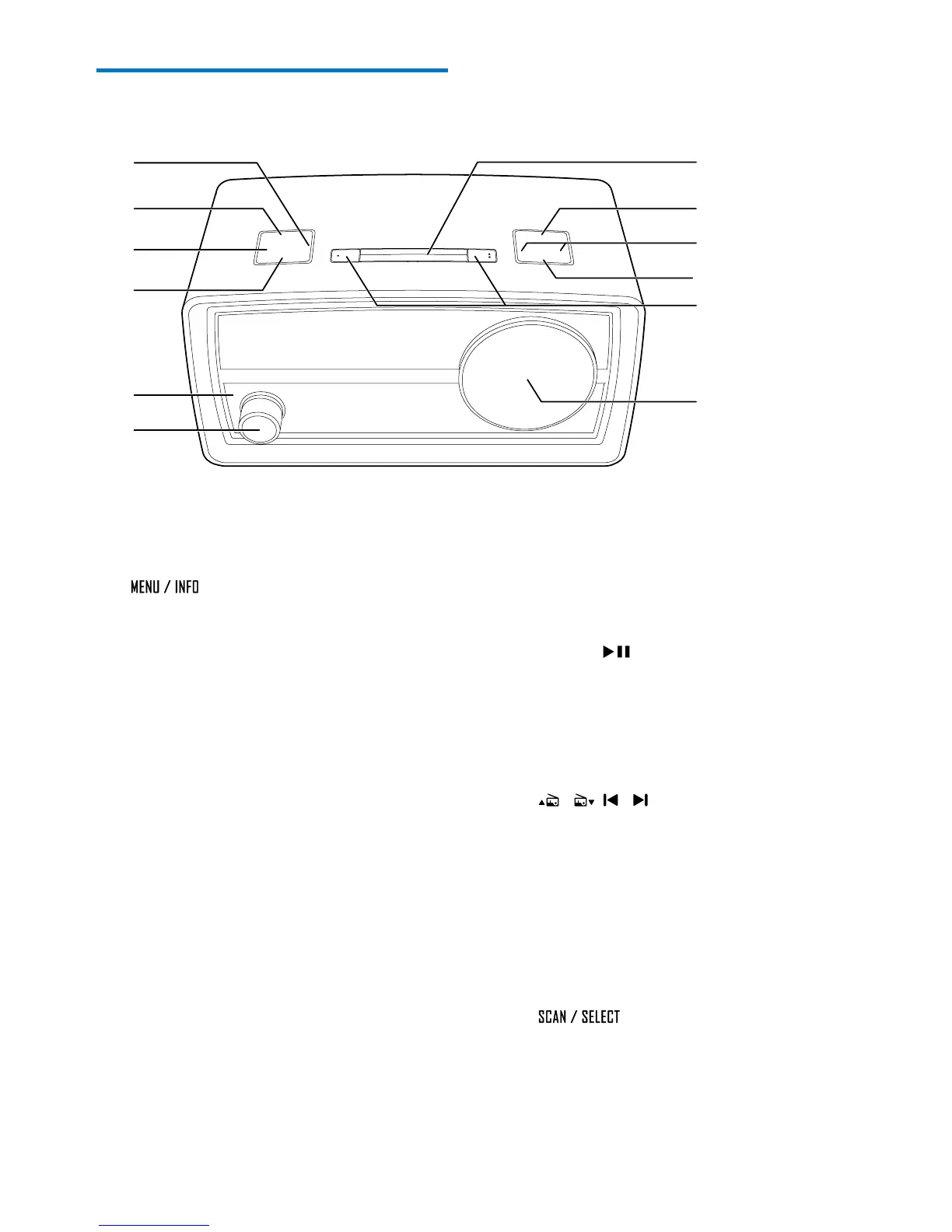
a TIMER
• Press and hold to start setting the
countdown timer.
b
• In standby mode, press and hold to
start setting time and date.
• In FM or DAB mode, press and hold to
access the menus.
• When listening to an RDS or DAB
station, press repeatedly to display
available information.
c SLEEP
• Press repeatedly to set the sleep timer.
d SOURCE
• Press to switch to another source.
e LED Bluetooth indicator
• Indicate the status of Bluetooth
connection.
f Power and volume knob
• Press to power on or off the product.
• Rotate to adjust the volume.
g LCD display
a
b
c
d
f
e
l
k
j
i
h
g
h AL1/AL2
• Press and hold to start setting the
alarm timer.
• When an alarm rings, press to stop the
alarm.
• Press to view the alarm settings.
i PRESET
• Press to access the list of stored radio
stations.
• During playing tracks via Bluetooth
connection, press to pause or resume
play.
j
/ , /
• Press repeatedly to tune to a station.
• Press and hold to tune to the previous
or next strong station automatically.
• Press to toggle through menus or
options.
• During playing tracks via Bluetooth
connection, press to skip to the
previous or next track.
k
• Press and hold to start storing radio
stations.
• Press to conrm an option.


 To Next Page