6 EN
3 Get started
Always follow the instructions in this chapter in
sequence.
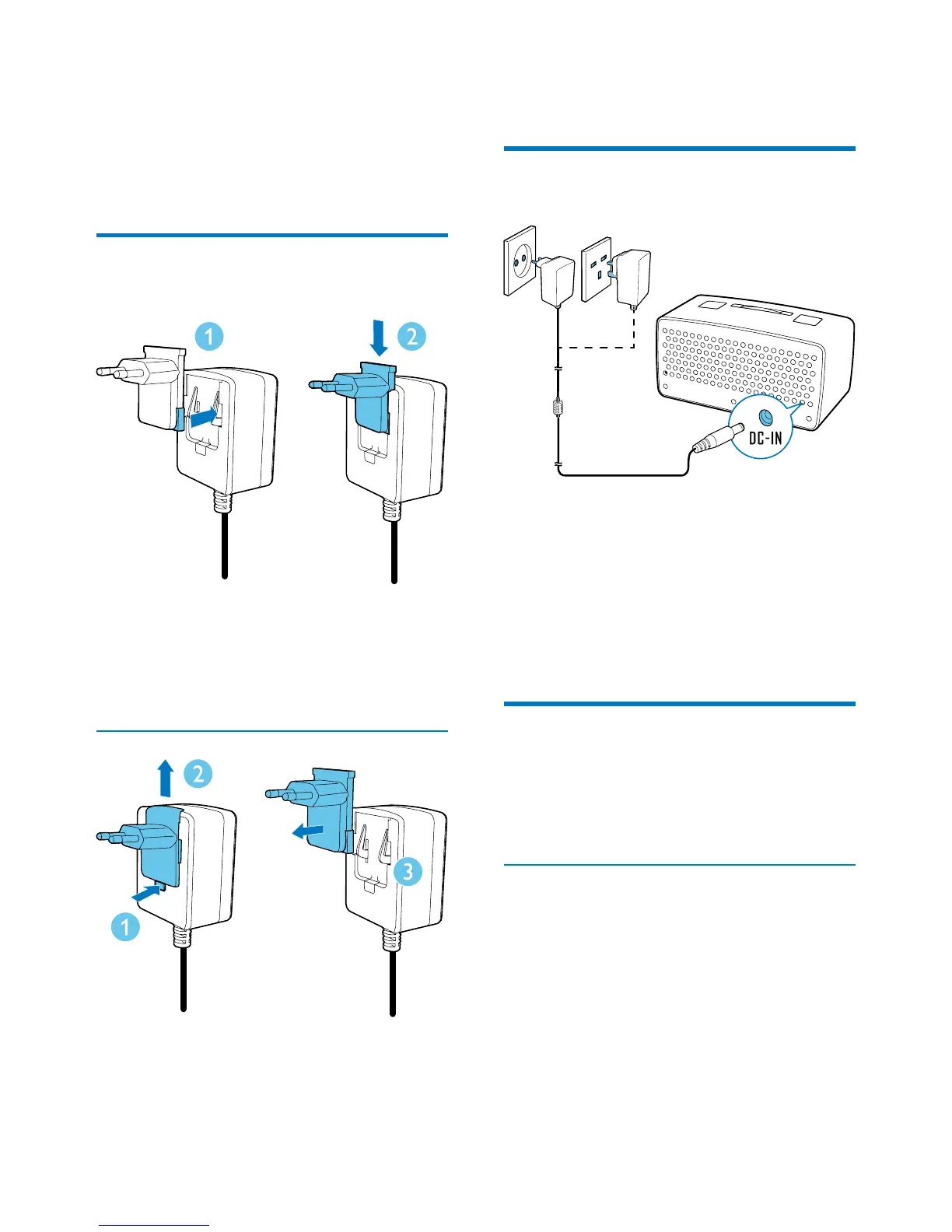
Assemble the AC power
adaptor
1 Align the plug converter to the holes on
the power adaptor.
2 Push the plug converter downwards until
you hear a "click".
Replace a plug converter
1 Press down the clip.
2 Slide the plug converter outwards.
3 Pull the plug converter out.
4 Fix another plug converter to the power
adaptor.
Connect power
Connect the AC power adaptor between
• the DC-IN socket on the back panel,
and
• the AC power outlet.
» The product switches to standby
mode.
» [0:00] blinks.
Power on
Press the power and volume knob.
» The product is powered on and
switches to the last mode.
Switch to standby mode
Press the power and volume knob again.
» If the clock is neither manually set nor
automatically synchronized with a DAB
radio station, [0:00] blinks.
» If the clock is manually set or
automatically synchronized with a
DAB radio station, the time and date is
displayed.


 To Next Page