Operation 9
Notice
For overhead mounting on ceiling,
purchase a projector mount
recommended by an installation
professional and follow the instructions
that come with the mount.
Before mounting on the ceiling, make
sure the ceiling can support the weight
of the projector and mounting kit.
For ceiling installation, this product
must be securely attached to the ceiling
in accordance with the installation
instructions. An improper ceiling
installation may result in accident, injury
or damage.
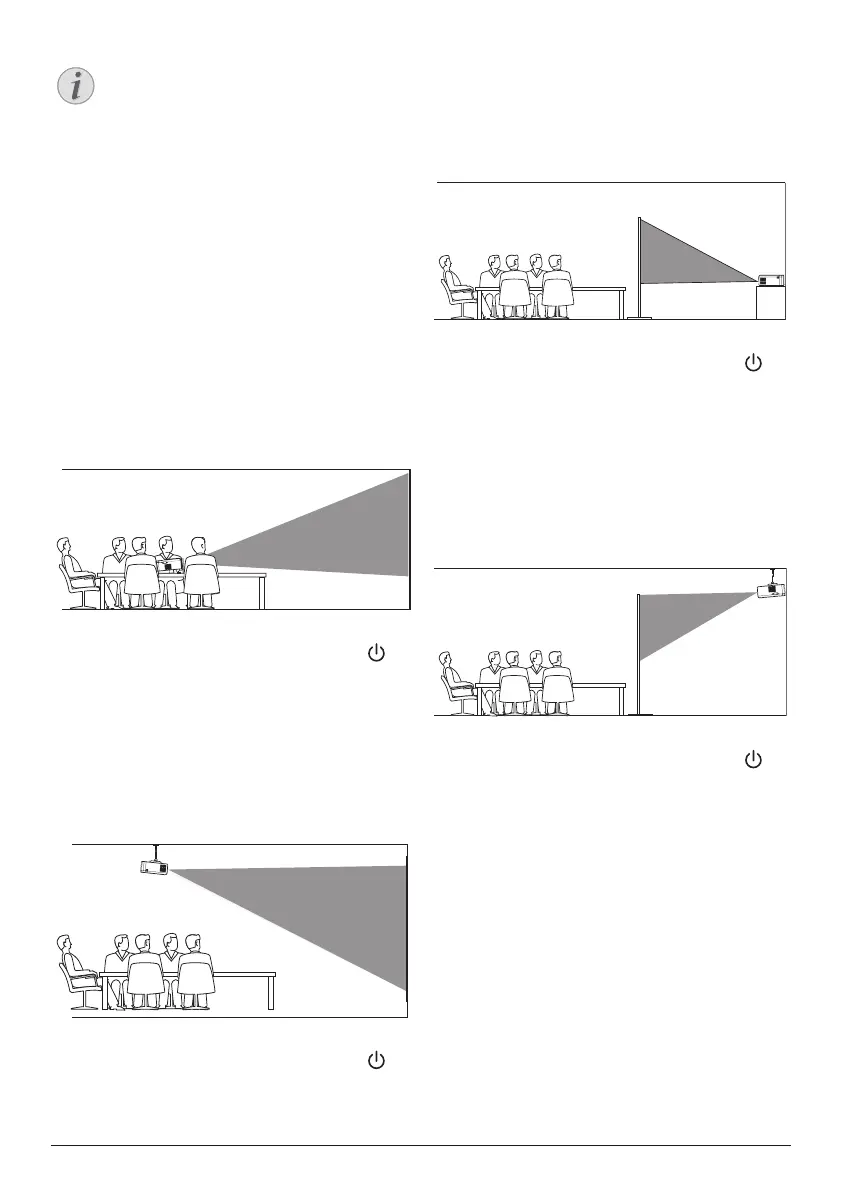
Front table
1 Place the projector on a table in front of the
projection screen. This is the most common
way to position the projector for quick
setup and portability.
2 To adjust projection to the correct position,
when the projector is turned on, press on
the projector to access the settings menu,
then navigate to select Proj. Direc. - Front
proj., then press OK.
Front ceiling
1 Mount the projector on the ceiling with
upside up in front of the projection screen.
A projector mount is required to mount the
projector on ceiling.
2 To adjust projection to the correct position,
when the projector is turned on, press on
the projector to access the settings menu,
then navigate to select Proj. Direc. - Rev.
front proj., then press OK.
Rear table
1 Place the projector on a table behind the
projection screen. A special rear projection
screen is required.
2 To adjust projection to the correct position,
when the projector is turned on, press on
the projector to access the settings menu,
then navigate to select Proj. Direc. - Rear
proj., then press OK.
Rear ceiling
1 Mount the projector on ceiling with upside
up behind the projection screen. To mount
the projector on ceiling behind the screen,
a projector mount and a special rear
projection screen is required.
2 To adjust projection to the correct position,
when the projector is turned on, press on
the projector to access the settings menu,
then navigate to select Proj. Direc. - Rev.
rear proj., then press OK.












 To Next Page