8 Philips · PPX2230 · 2330
3 Initial Operation
Setting up the Device
A tripod accessory is available if you want to elevate the
device.
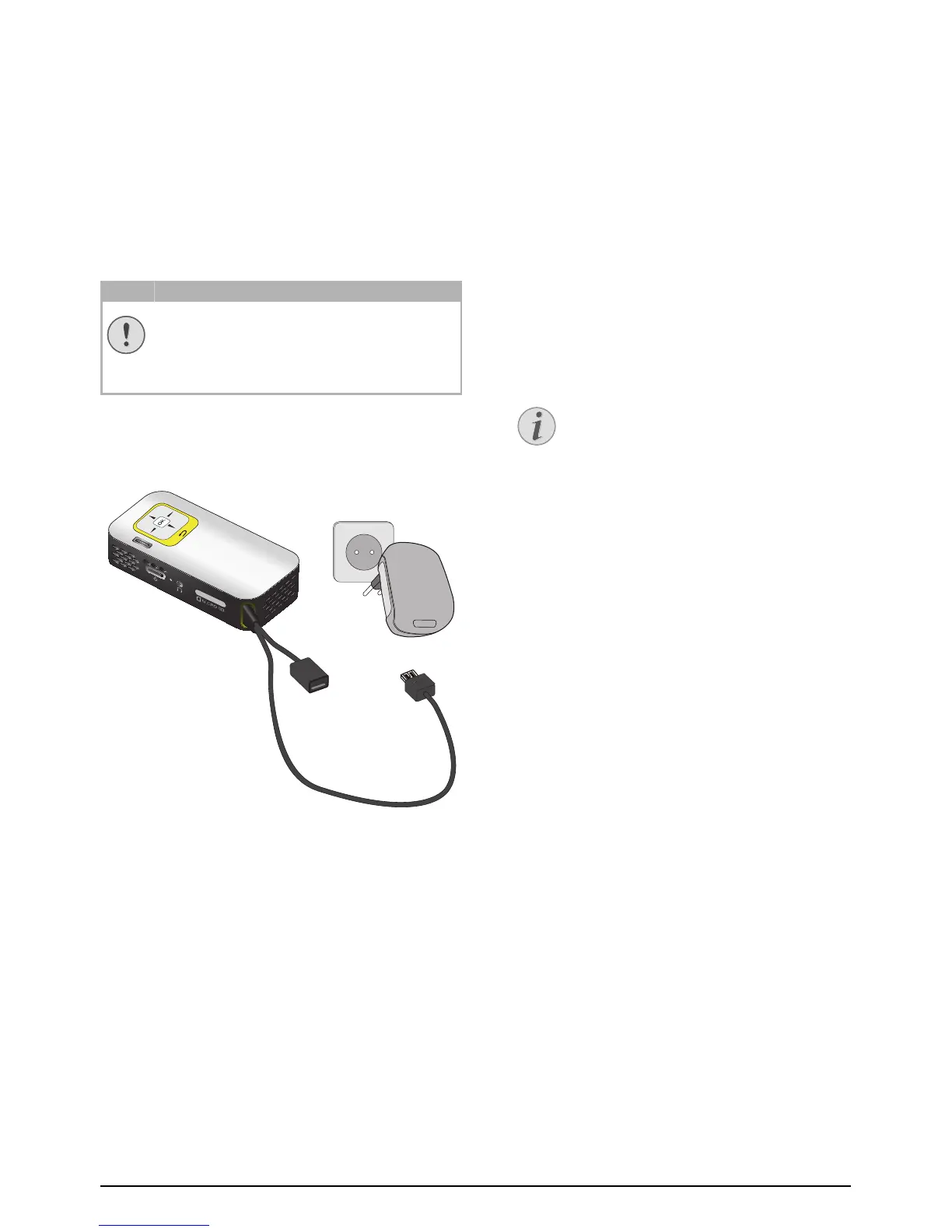
Connect power supply /
charge battery
Connect the USB plug to a computer, to charge the bat-
tery. Alternatively you may connect the USB plug to the
power adapter (not included) (see also chapter Com-
patible Power Supply, page 23).
Initial Installation
1 Switch the device on using the on/off switch on the
side.
2 Turn the device towards a suitable projection sur-
face or wall. Note that the distance to the projection
surface must be a minimum of 0.3 meters and a max-
imum of 2.1 meters. Make sure the projector is in a
secure position.
3 Use the focus wheel on the top to adjust the image
sharpness.
4 Select the desired menu language using ¡/¢.
5 Confirm with à.
Mains Voltage at the Site of Installation!
Check whether the mains voltage of the
power supply matches the mains voltage avail-
able at the setup location.
The main menu appears instead of
the language selection
The device has already been installed. In
order to change the menu language, pro-
ceed as follows:
1 Use the navigation keys to select Set-
tings.
2 Confirm with à.
3 Select with ¡/¢ Language.
4 Confirm with à.
5 Select the desired language with ¡/¢.
6 Confirm with à.
7 Exit with ¿.



 To Next Page