Service Modes, Error Codes, and Fault Finding
EN 35SDI PDP 5.
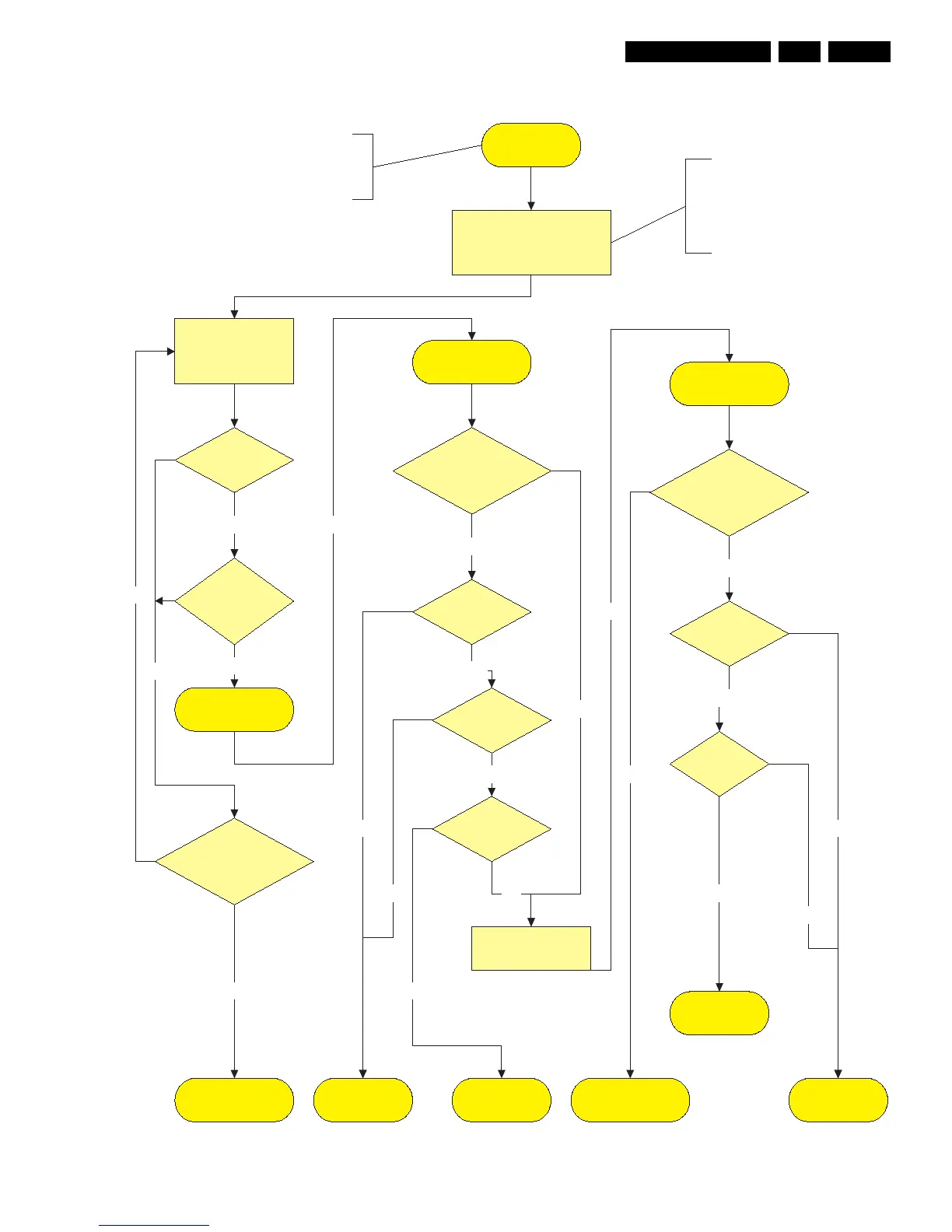
Figure 5-13 Fault symptom: “No Display”
No Display
Check Logic Main
Dip switch is on
Internal mode!
LED blinks?
Logic main
normal state
Ye s
OK
Check Fuse ?
Check FET
Short?
Y-Main & Y-buffer
normal state
Not OK
OK
No
Check Fuse ?
Check FET
Short?
No
Not OK
OK
Bring set in
repair set-up as standalone
Scavio or SSB is
disconnected and removed.
Power supply will be started-
up with Jig connector and
DIP switch on Logic Main is
on internal mode.
No
Open
Ye s
Replace the Logic-
main board
Replace the
Y-main board
Replace the
X-main board
Open
Ye s
Operating voltages exist, but there
is no Display.
No Display is related with Y-Main,
X-Main or Logic-main board
Check Power
supply on Logic mains.
3V3 & 5V.
Not OK
OK
OK
Waveform
on Y Buffer
test point ?
Waveform
on X-board
test point ?
Replace PDP Panel
OK
Check V-Sync
on test point logic
main board
OK
OK
Check Y-Main board
X-Main
normal State
Check X-Main board
Check
Y Buffer Uper
and Lower?
OK
Replace Y buffer
Not OK











 To Next Page