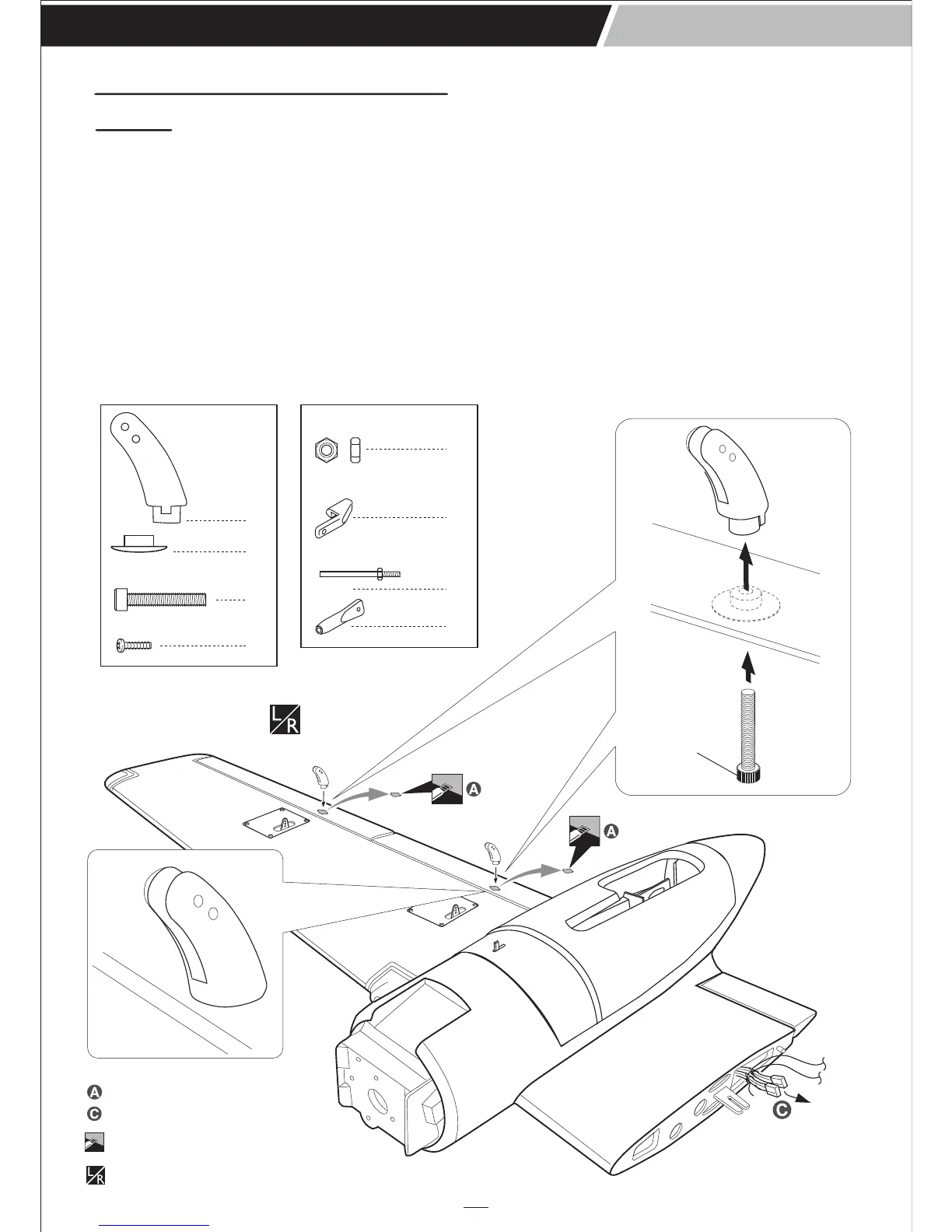
Assemble left and right
sides the same way
Cut off shaded portion
2. Attach the clevis to the outer hole in the control
horn and secure it.
3. Locate one nylon servo arm, and using wire
cutters, remove all but one of the arms. Using a
2mm drill bit, enlarge the third hole out from the
center of the arm to accommodate the aileron
pushrod wire.
4. Plug the aileron servo into the receiver and center
the servo. Install the servo arm onto the servo.
The servo arm should be perpendicular to the
servo and point toward the middle of the wing.
5. Center the aileron and hold it in place using a
couple of pieces of masking tape.
6. With the aileron and aileron servo centered,
carefully place a mark on the aileron pushrod wire
where it crosses the hole in the servo arm.
7. Using pliers, carefully make a 90 degree bend
down at the mark made. Cut off the excess wire,
leaving about 6mm beyond the bend.
8. Insert the 90 degree bend down through the hole in
the servo arm. Install one nylon snap keeper over
the wire to secure it to the arm. Install the servo
arm retaining screw and remove the masking tape
from the aileron.
9. Repeat step # 4 - # 8 to install the second aileron
linkage. After both linkages are completed,
connect both of the aileron servo leads using a
Y-harness you have purchased separately.
1. Working with the aileron linkage for now, thread
one nylon clevis onto one of the threaded wires.
INSTALLING THE AILERONs AND FLAPs
LINKAGES
3 x 20mm Cap Screw
4
4
4
4
2 x 10mm Screw
A26 INVADER
Instruction Manual
8
3x20mm
Cut away film only. here
Pull out servo cord with string.
Nut
2mm
4
4
Snap keeper
4
4
1.7x100mm Push rod



 To Next Page