14
3.10 Timer Remote (Optional)
Please note: The Awning system is not designed to operate in high wind conditions. Please consider the local
environment in the immediate vicinity of the awning when choosing to use the Timer function. If the Timer was to deploy
an awning when unattended in high wind conditions, the products could be damaged or destroyed.
Timer should only be used on product in sheltered areas away from direct wind.
Configuring the correct product
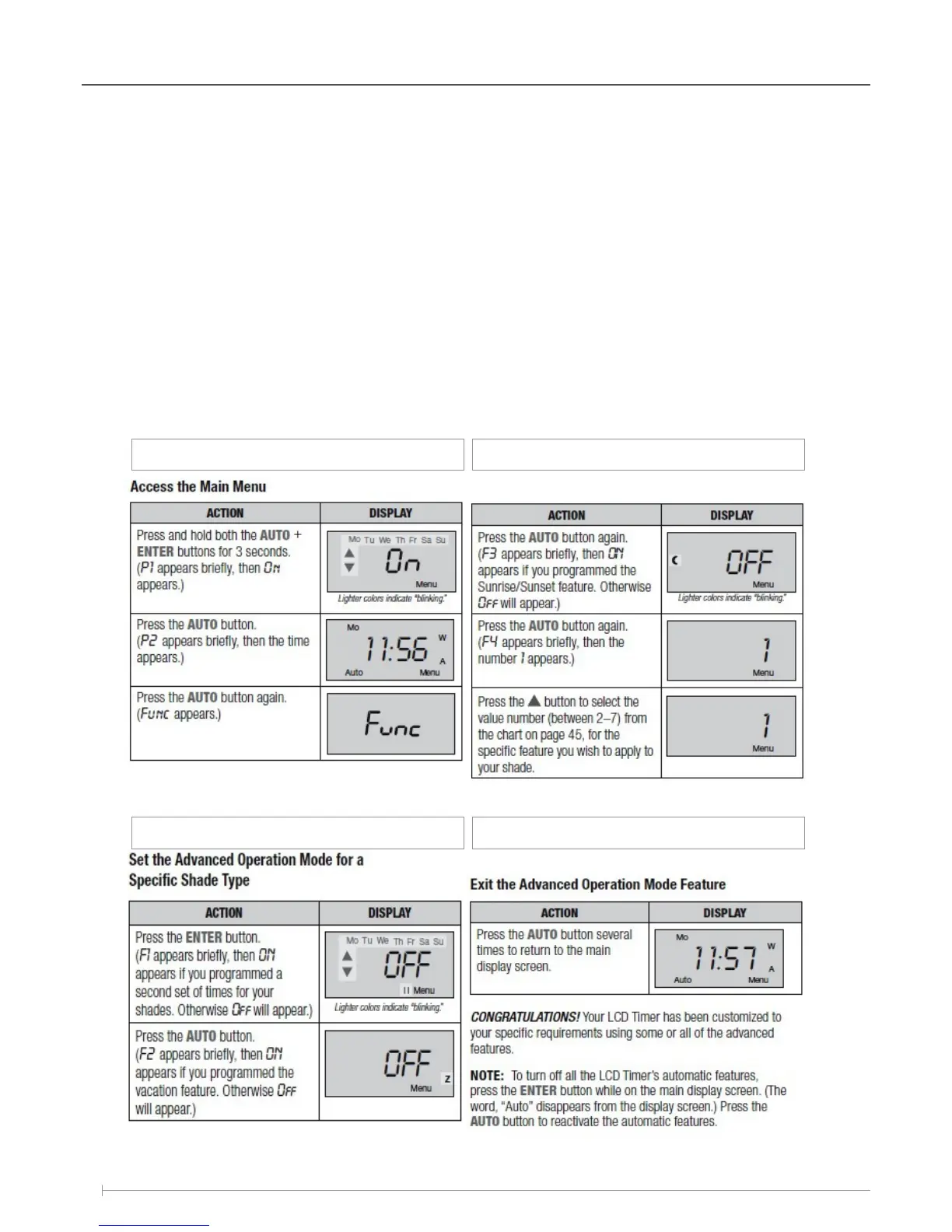
When setting the Timer for use with the Awning, the ‘Set the Advanced Operation Mode For Specific Shade Types’
setting must be configured to product ‘1’.
Failure to set the Timer to the correct product may cause faulty operation from the product.
Refer to the instructions below to setup the correct product number.
Use the instruction provided with the Timer for the rest of the setup process.
Installation / Setup
Step. 1
Step. 3
Step. 2 Step. 4
* Ensure number 1 is selected
for Solar Awning Motor.



 To Next Page