5-6 LIFEPAK CR Plus and LIFEPAK EXPRESS Defibrillator Operating Instructions
Caring for Your Defibrillator
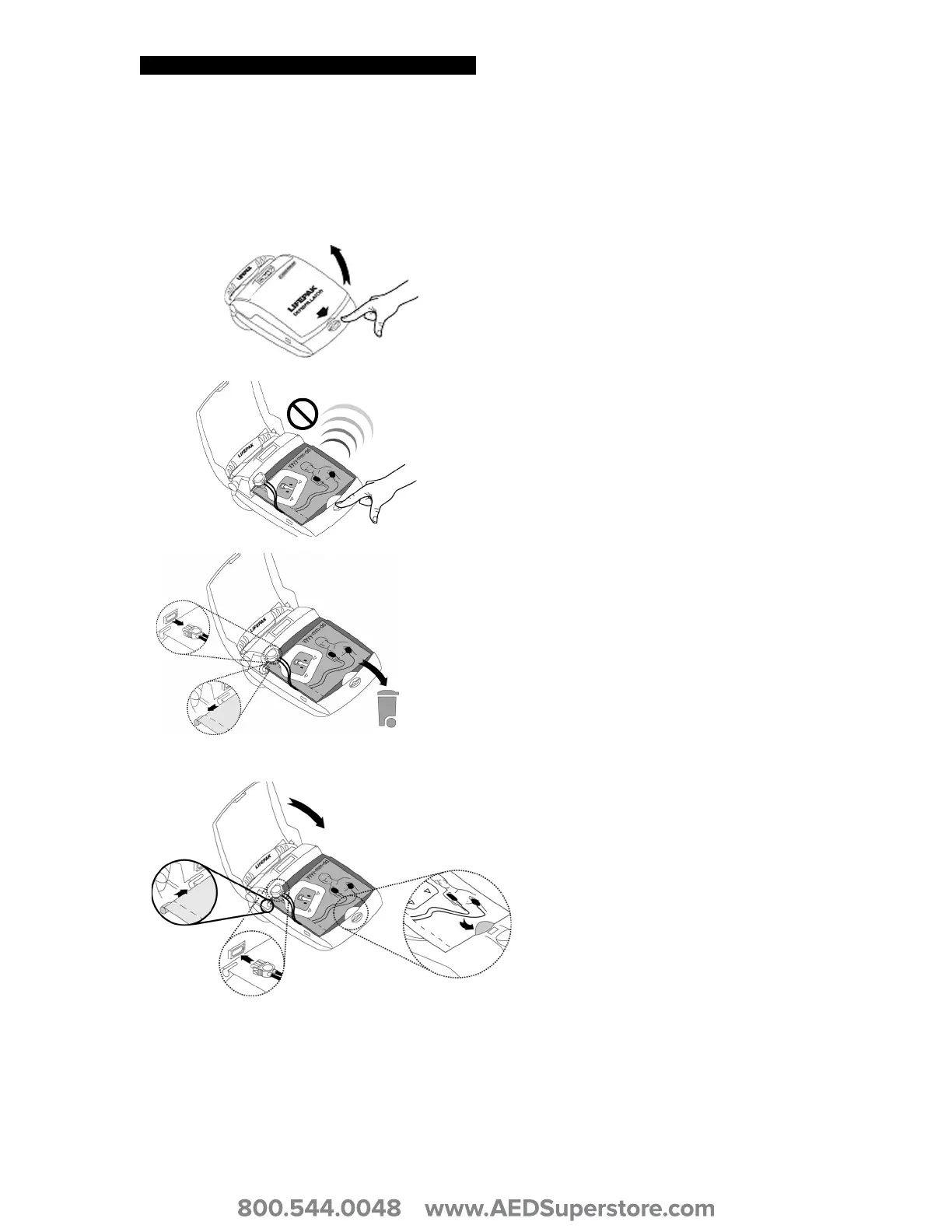
Replacing the QUIK-PAK Electrode Packet
To replace the QUIK-PAK Electrode Packet:
1 Press the
ON/OFF button to open the
defibrillator lid (voice instructions will
sound).
2 Press and hold down the
ON/OFF
button for 2 seconds to turn off the
defibrillator and save battery power.
3 Remove the outdated or used
electrode packet:
a Unplug the electrode connector
from the connector receptacle.
b Slide the anchor pin from the slot.
c Discard the outdated or used
electrode packet according to
local regulations.
4 Install the new electrode packet:
a Slide the anchor pin into the slot.
b Plug the electrode connector into
the receptacle.
c Ensure that the new electrode
packet is centered on the
defibrillator and is tucked behind
the lip before closing the lid.
d Close the lid. Confirm that the
packet Use By date is visible
through the upper right-hand
corner of the lid.












 To Next Page