23
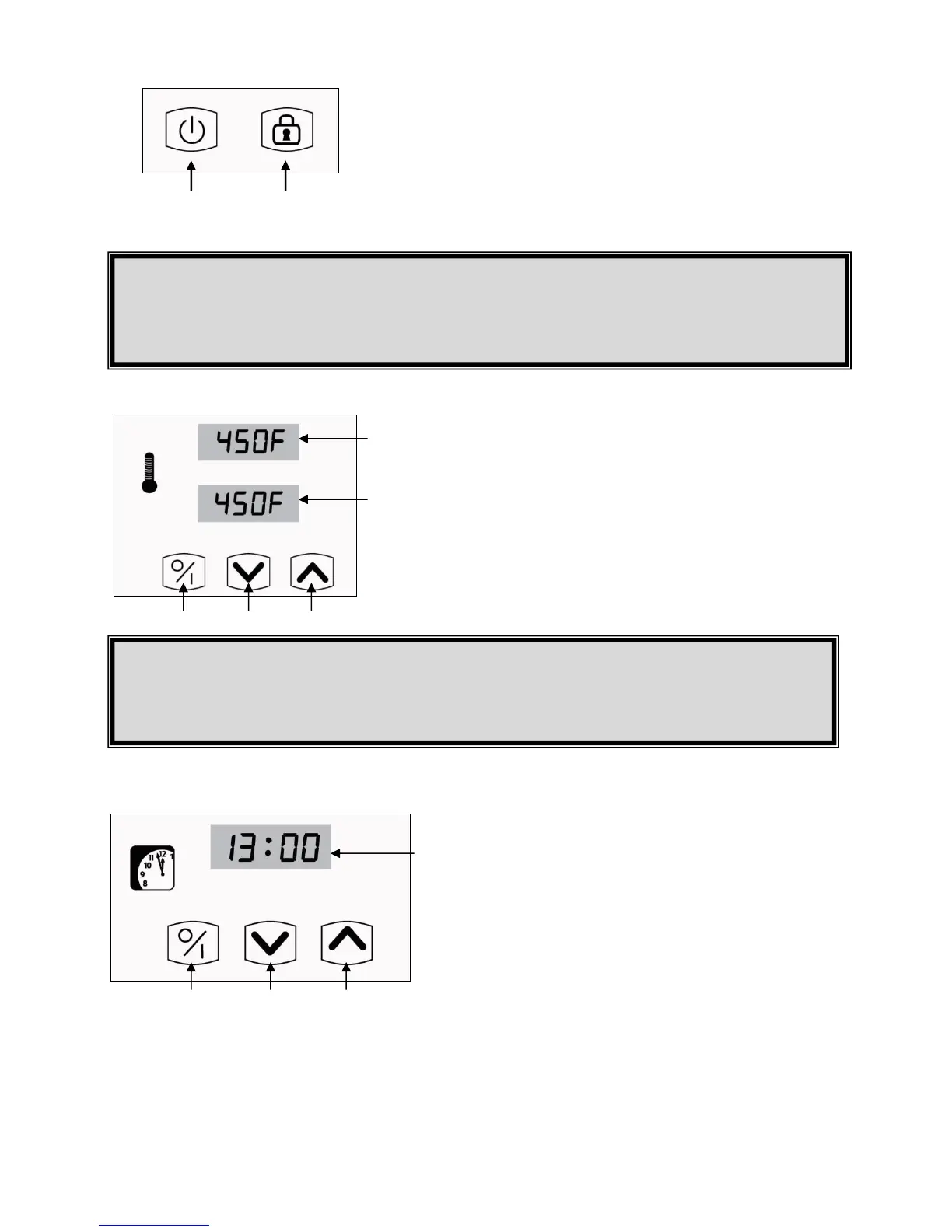
3. Displays the real internal temperature in the oven.
4. Displays the temperature configured in the settings.
5. Touch the blue arrow to lower the temperature setting.
6. Touch the red arrow to raise the temperature setting.
7. Press this button to start the burner.
8. Shows the cooking time.
9. Touch the down arrow to reduce baking time.
10. Touch the up arrow to increase baking time.
11. Press this button to start or stop the timer.
POWER AND LOCK BUTTON
1. On and Off Button for the control Panel.
2. The maintenance lock button turns the control panel on and
off. Push this button continually during 5 seconds to lock the
oven functions.
TEMPERATURE CONTROL
BAKING TIMER
The timer display shows 24 hour set cooking time and counts down by one second increments once the timing has begun.
F° TO C°
To change the temperature unit of measure from F° to C° or vice versa, hold the blue and
red arrows #5 and #6 simultaneously until the reading in the temperature display changes.
NOTE
Once the oven is locked the icon will flash, indicating that someone is servicing the oven.
The shelves and burner will not function until the maintenance lock button is pressed again for 5 seconds.


 To Next Page