Page 4.8
SECTION 4 - PROGRAMMING GUIDE
PXI/PXIe LVDT/RVDT/Resolver Simulator Module 41/43-670
pickering
Set Sample Buffer Feature
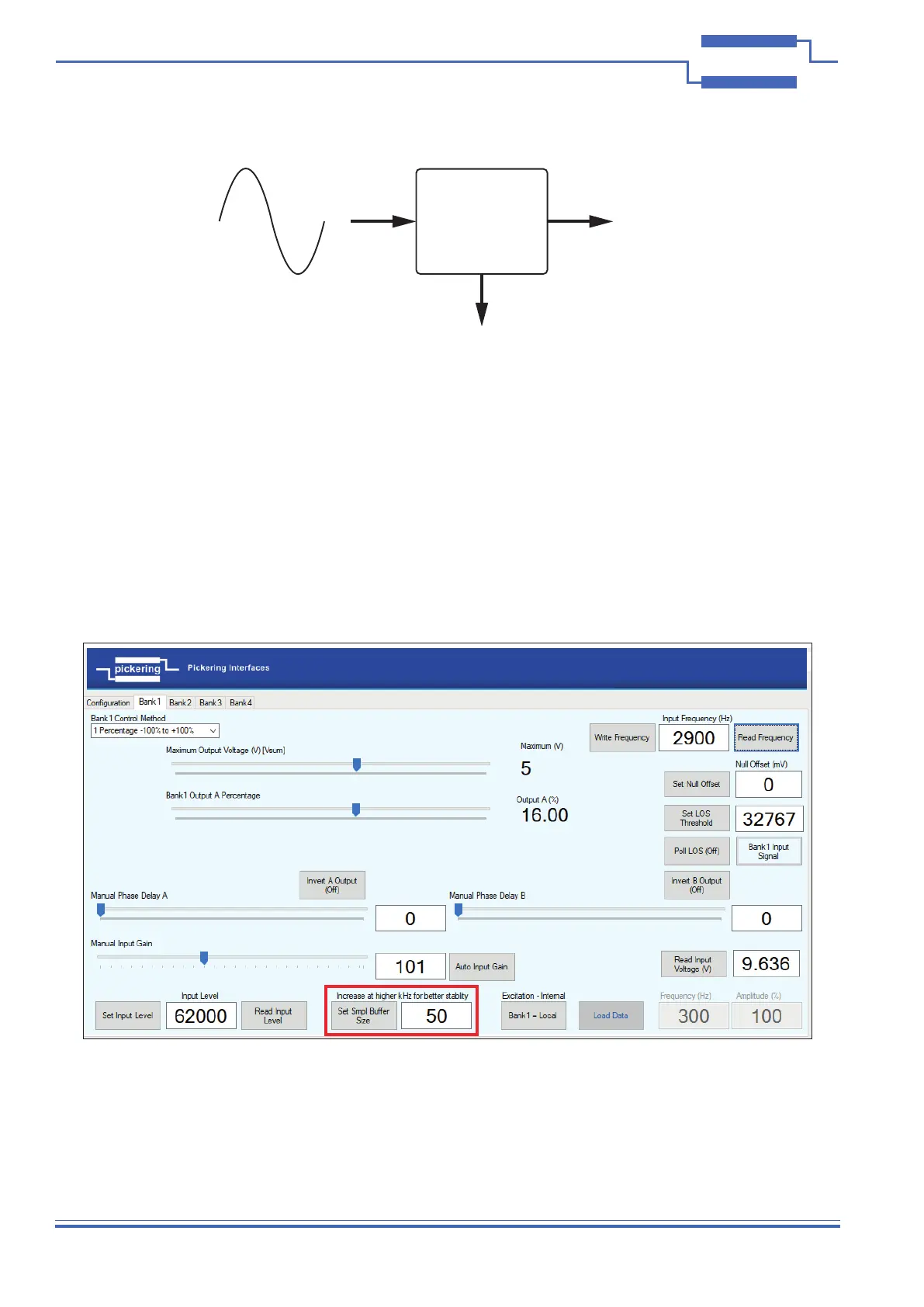
The sample buffer size averages over the measured number of cycles of the input signal and uses these to calculate
the input frequency, this calculation is used to apply phase correction to the output signals. A higher buffer size will
give a more stable frequency measurement but if the input frequency is intentionally varied it will impose a delay.
It should be noted that, for example, 500 samples at 300Hz will take 1.6 seconds whereas at 2kHz it will only take
250ms. The stability of the applied excitation signal should also be considered, so buffer size is generally a trade-off
between speed and stability.
As a guide, set the applied excitation signal and do multiple ‘Read Frequency’ functions and increase or decrease
the buffer size until the frequency value returned remains stable using the lowest number.
The buffer size is set to 50 as default but can be in the range 1-500.
Input
Attenuation
Stage
Average Frquency (Hz)
Figure 4.7 - Set Sample Buffer Size Feature


 To Next Page