IM_208.CCF.20170508-EN
33
Using the Software PC/MAC – Backup manager
5.5 Making a backup with the backup manager
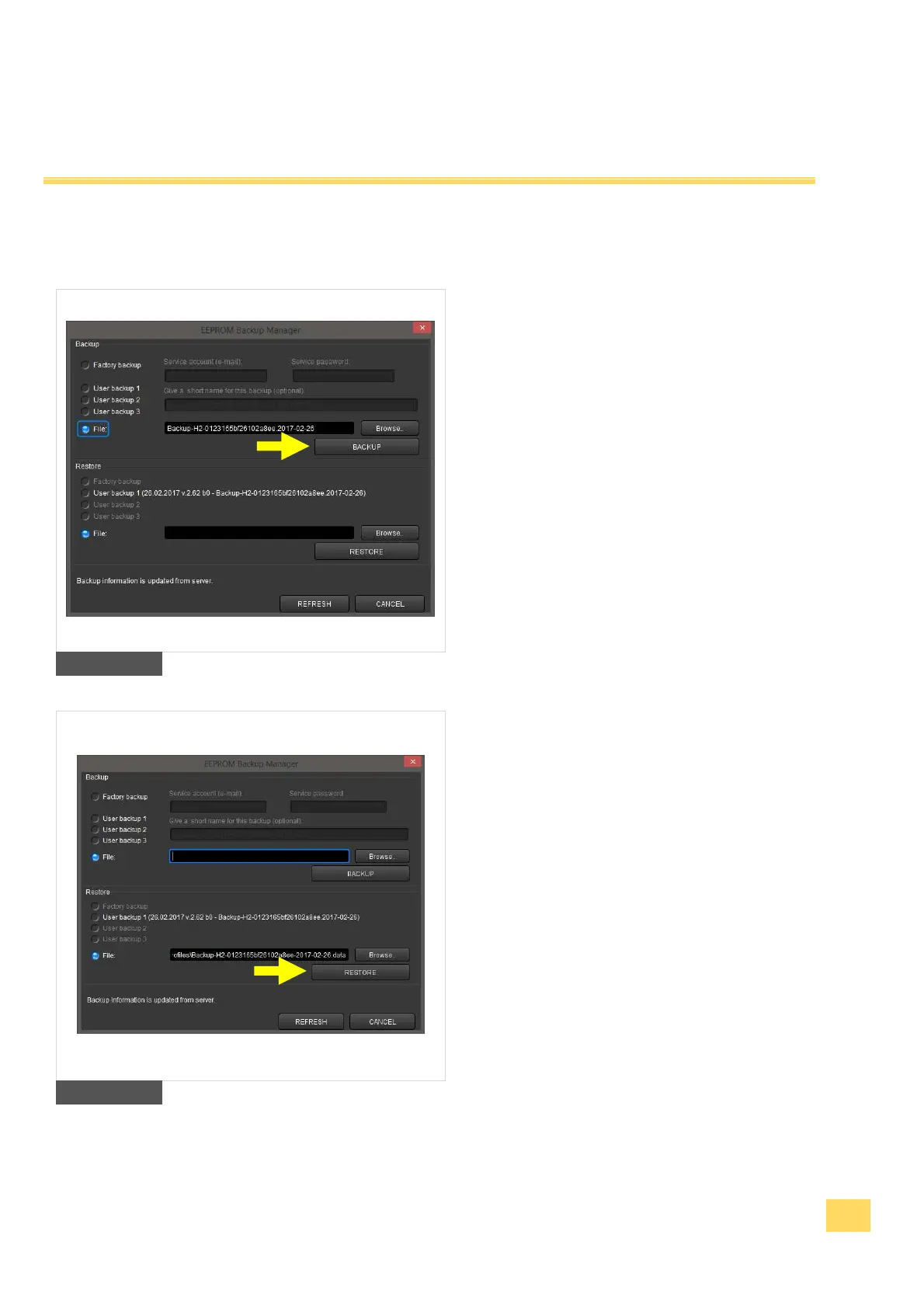
computer. Define a name for your backup file
and save your backup as a file on your
computer or other data storage of your
choice. By pressing "Browse" you define the
target folder. Press the button "Backup" to
confirm the saving of your backup file.
2. Making a backup onto our server. You can
save up to three backup files onto our
server. Select the number of your choice
(User backup 1-3) and define a name for your
backup file. Press the button „Backup“, to
save the backup file onto our server. Herewith
you have access to your backups everywhere
when you are conected with the internet.
18
Restore a backup from a file on your
computer. Press the “Browse” button and
select your backup file on your computer or
other data storage. Then press the button
„RESTORE“. The backup will be restored.
2. Restore a backup from a file on our server.
Select the wanted backup file (User backup 1-
3) and press the button „RESTORE“. The
backup will be restored. Furthermore, you can
see the option “factory backup”. For all
delivered Gimbals since Januar 2017, we
have already made a backup-file of the
factory presettings for you.
You must have a functioning internet
connection.
19


 To Next Page