Programming
41
3 Programming
3.1. Options
There are three ways to program the control panel:
1. Locally, using PIMA Fast Programmer PRG-896.
2. Locally and remotely (by telephone or via the GSM-200), using the COMAX upload/download
application
.
3. Via an LCD keypad.
3.1.1. The PRG-896 programmer
The PRG-896 is a flash memory module used for saving parameter sets for fast downloading and
quick installation. The sets are uploaded by the COMAX upload/download PC application.
The PRG-896 can save up to 4/7 different presets. It connects to LCD keypads only.
For download instructions, see section 11.3, on page 69.
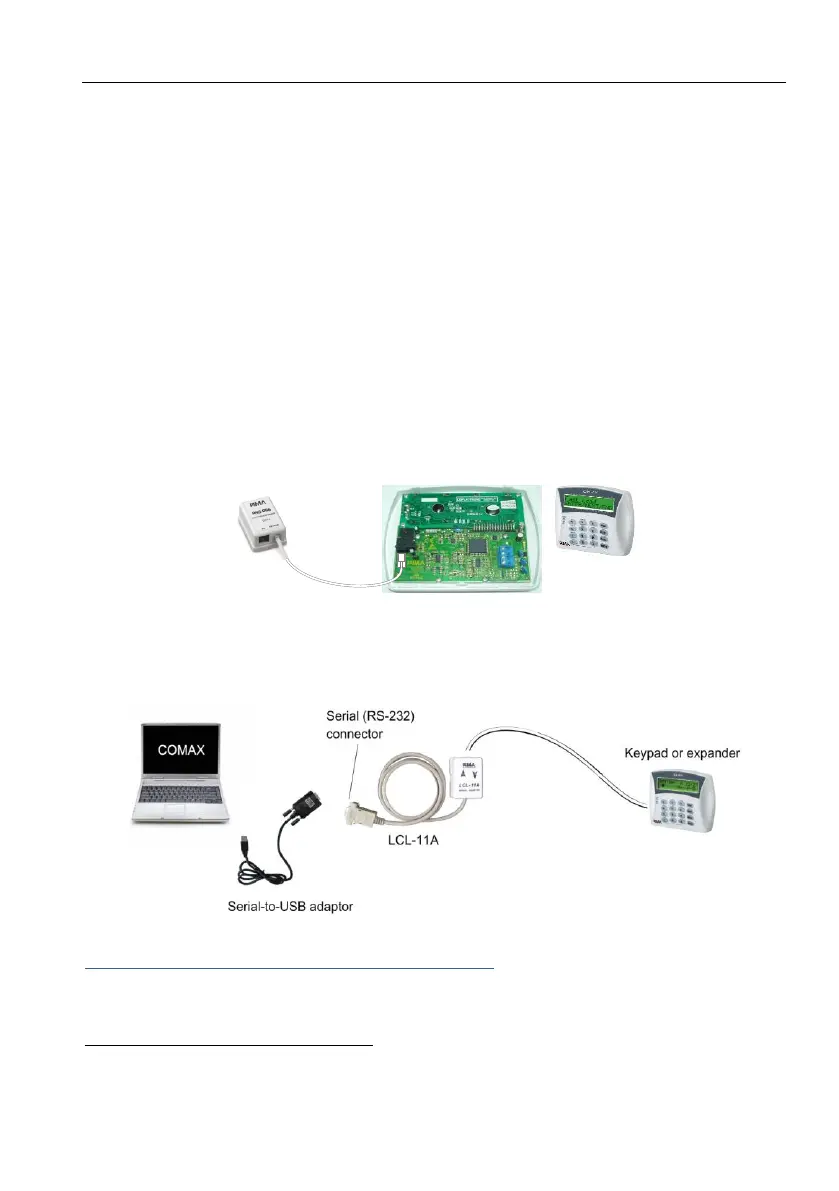
Diagram 42. Connecting PRG-896 to an LCD Keypad
3.1.2. Local Upload/Download via the COMAX
Connect a PC/laptop with the COMAX upload/download application installed in it, to an LCD keypad
or expander, using the LCL-11A adaptor
. To connect to USB socket use a Serial-to-USB adaptor.
Diagram 43. Connecting the COMAX via LCL-11A to a keypad
Remote Upload/Download via the COMAX software
Both the Hunter-Pro Series and Captain 8 systems can be programmed remotely using PC/laptop
and the COMAX upload/download software. Refer to the COMAX user guide for detailed
Version 3.39 and higher for the RXN-800
Revision H and higher for the RXN-800



 To Next Page
 Loading...