EasyManua.ls Logo

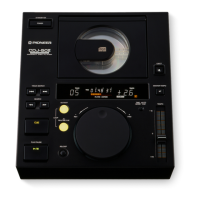
Pioneer CDJ-500II - User Manual

Pioneer CDJ-500II
16 pages
Print Icon
To Next Page IconTo Next Page
Loading...
<DRB1223>
En
1
R
Operating Instructions
COMPACT DISC PLAYER
CONTENTS
CAUTIONS REGARDING HANDLING ...............4
FEATURES ..........................................................5
CONNECTIONS...................................................6
PANEL FACILITIES..............................................7
Top Panel .........................................................7
Display Window ...............................................9
BASIC OPERATION ..........................................10
Basic playback operation................................10
To stop playback ............................................10
To pause playback temporarily.......................10
To search for a particular track.......................10
To search for a particular frame .....................11
To search for a particular passage .................11
Switching ON/OFF of the
Auto Cue function ..........................................11
Playback operation using
the auto cue function .....................................11
APPLICATION OPERATION .............................11
The setting of the cue point...........................11
Loop playback ................................................12
To stop the loop playback ..............................12
Restarting Loop Playback...............................13
To combine the selections
using two players...........................................13
Relay playback using two players ..................13
Controlling This Unit from a DJ Mixer............14
MOUNTING RACK............................................14
TROUBLESHOOTING .......................................15
SPECIFICATIONS................................ Back cover
CAUTION: This product satisfies FCC regulations when
shielded cables and connectors are used to connect the unit
to other equipment. To prevent electromagnetic interference
with electric appliances such as radios and televisions, use
shielded cables and connectors for connections.
IMPORTANT NOTICE:
RECORD THE MODEL NUMBER AND SERIAL
NUMBER OF THIS EQUIPMENT BELOW. THE
NUMBERS ARE ON THE REAR PANEL.
MODEL NO. CDJ-500II
SERIAL NO.
KEEP THESE NUMBERS FOR FUTURE USE.
Thank you for buying this Pioneer product.
Please read through these operating instructions so
you will know how to operate your model properly.
After you have finished reading the instructions, put
them away in a safe place for future reference.
WARNING: TO PREVENT FIRE OR SHOCK
HAZARD, DO NOT EXPOSE THIS APPLIANCE TO
RAIN OR MOISTURE.
[For Canadian model]
CAUTION: TO PREVENT ELECTRIC SHOCK DO
NOT USE THIS (POLARIZED) PLUG WITH AN
EXTENSION CORD, RECEPTACLE OR OTHER
OUTLET UNLESS THE BLADES CAN BE FULLY
INSERTED TO PREVENT BLADE EXPOSURE.
ATTENTION: POUR PREVENIR LES CHOCS
ELECTRIQUES NE PAS UTILISER CETTE FICHE
POLARISEE AVEC UN PROLONGATEUR, UNE PRISE
DE COURANT OU UNE AUTRE SORTIE DE
COURANT, SAUF SI LES LAMES PEUVENT ETRE
INSEREES A FOND SANS EN LAISSER AUCUNE
PARTIE A DECOUVERT.
THE POWER SWITCH IS SECONDARY CONNECTED AND
THEREFORE DOES NOT SEPARATE THE UNIT FROM MAINS
POWER IN STANDBY POSITION.
'
'
D
–10
0
+10
0
M T
+
FWD
REV
4
¢
1
¡
CUE
6
COMPACT DISC PLAYER
/
PROFESSIONAL
CDJ-500II
STANDBY/ON
POWER
TRACK SEARCH
SEARCH
PLAY/PAUSE
RELOOP
IN/
REALTIME CUE
LOOP
OUT/EXIT
OUT ADJUST
TIME
MODE
AUTO
CUE
EJECT
MASTER TEMPO
TEMPO
LMITED

Other manuals for Pioneer CDJ-500II

Questions and Answers

  • L
    laura15Sep 10, 2025
    Why is the sound distorted or noisy on my Pioneer CDJ-500II?
    • M
      martinezchadSep 10, 2025
      Distorted sound or noise can occur due to several reasons. Ensure that the connections are correctly made to the audio mixer's LINE INPUT terminals, and not the MIC terminals. Clean any dirt from the pin plugs or amplifier terminals. Also, try switching off any nearby TV sets or moving the player away from them, as interference from the TV could be the cause.
  • J
    jonesjenniferAug 23, 2025
    Why Pioneer CDJ-500II CD Player track search is not finished?
    • A
      April GrayAug 23, 2025
      If the track search on your Pioneer CD Player is not finishing when the auto cue function is ON, it may be because the muted portion between selections is too long. To resolve this, press the TIME MODE/AUTO CUE button for more than 1 second to set the auto cue function to OFF. Also, if the sound muted portion is recorded for about 20 seconds or more, playback will start without the auto cue function, so you should still set the auto cue function to OFF.
  • R
    Rachel OrtizAug 25, 2025
    Why Pioneer CD Player disc is not rotating when the power is ON?
    • J
      Justin PetersonAug 25, 2025
      If the disc in your Pioneer CD Player is not rotating when the power is ON, it might be because the disc rotation stops automatically if no operation has been performed for 80 minutes or more in pause mode. You can start playback by pressing the PLAY/ PAUSE button, or open the door by pressing the EJECT button.
  • L
    Lee CoxAug 27, 2025
    How to fix Pioneer CD Player when the door is not expelled?
    • J
      Justin LamAug 27, 2025
      If the door does not open when you press EJECT, check if the power plug is properly connected to the wall outlet. If it's disconnected, connect the plug to the outlet.
  • R
    Robert GainesAug 27, 2025
    Why is my Pioneer CD Player disc not rotating when the power is on?
    • J
      John CollinsAug 28, 2025
      If the disc is not rotating, it might be because the disc rotation automatically stops if the CD player is in pause mode and no operation has been performed for 80 minutes or more. Press the PLAY/PAUSE button to start playback. Alternatively, pressing the EJECT button will open the door.
  • J
    Joann BakerAug 29, 2025
    Why Pioneer CD Player has no sound?
    • R
      ryansnyderAug 29, 2025
      If your Pioneer CD Player has no sound, there might be several reasons. Check if the output cables are connected properly. Verify the settings of your audio mixer, including switches and volume controls. Clean any dirt from the pin plugs or amplifier terminals. Also, ensure that the player is not in pause mode by pressing the PLAY/PAUSE button.
  • D
    Derrick BatesSep 18, 2025
    Why is the picture on my TV fluctuating or FM broadcast interfered with noise when using Pioneer CDJ-500II CD Player?
    • C
      Cindy KellySep 18, 2025
      If you are experiencing TV picture fluctuations or noise interference with FM broadcasts, it could be due to interference from the CD player. Turn off the power to the player or move it away from the TV or tuner.
  • E
    Emma ByrdSep 12, 2025
    What does error code E-72 01 mean on my Pioneer CD Player and how to fix it?
    • J
      James AllenSep 12, 2025
      Error code E-72 01 indicates that the disc is either dusty, dirty, or cracked. Try cleaning the disc first. If the problem persists, replace the disc.
  • I
    Ian DominguezSep 8, 2025
    What to do if my Pioneer CDJ-500II CD Player playback stops immediately or pauses?
    • S
      Shane ArcherSep 8, 2025
      If your CD Player stops or pauses during playback, ensure that the disc is loaded correctly, with the label side facing up. Additionally, check the disc for smudges and clean them before playing again.
  • C
    Crystal CollinsSep 5, 2025
    How to fix fluctuated TV screen because of Pioneer CDJ-500II CD Player?
    • B
      bishopashleySep 5, 2025
      If the picture on your TV screen is fluctuating or FM broadcast is experiencing noise, it could be due to interference from the Pioneer CD player. Try turning off the power of the player or moving it away from the TV or tuner.

Summary

Safety Instructions

Cautions Regarding Handling

Location

Install the player in a well-ventilated location away from heat and humidity sources.

POWER-CORD CAUTION

Safety precautions for handling the power cord to prevent electric shock or fire.

Features

Digital sound reproduction

Explains digital features like Master Tempo, Loop Playback, and Cue Point monitoring for DJ-style performance.

Connections

AUDIO OUTPUT CONNECTION

How to connect the player's audio output jacks to a DJ mixer or stereo amplifier's line input.

POWER CORD CONNECTIONS

Instructions for connecting the power cord to a household AC wall outlet or amplifier.

Panel Facilities

Control Buttons and Indicators

Details the function of various operational buttons and indicators like PLAY/PAUSE, CUE, RELOOP, and Jog dial.

Display Window Details

Explains the indicators and displays on the unit, including track, time, tempo, and status information.

Basic Operation

Basic playback operation

Step-by-step guide for loading a disc and starting basic playback without auto cue.

Application Operation

The setting of the cue point

Procedure for memorizing a specific point on a track to start playback from.

Loop playback

Instructions for setting a section to play repeatedly, including setting loop-in and loop-out points.

Combine selections with two players

Steps to align tempo and beat between two players for seamless mixing.

Relay playback with two players

How to set up successive playback between two connected players.

Control from DJ Mixer

Using the CONTROL jack to link the player with a DJM-500/300 mixer for fader start or back cuing.

Troubleshooting

Specifications

Pioneer CDJ-500II Specifications

General IconGeneral
Playback FormatsCD, CD-R
Sampling Rate44.1 kHz
Bit Depth16-bit
Digital OutputNo
Pitch Control+/- 10%
Fader StartYes
Frequency Response4 Hz - 20 kHz
Total Harmonic Distortion0.006%
OutputsRCA
TypeCD Player
Output Level2.0 V (at 0 dB)
Disc Type12 cm
Power SupplyAC 50/60 Hz

Related product manuals