
 Need help?
Do you have a question about the Pioneer DJ DDJ-REV1 and is the answer not in the manual?
Details on Serato DJ Lite compatibility and the paid upgrade to Serato DJ Pro.
Information that the DDJ-REV1 requires no specific drivers on macOS or Windows.
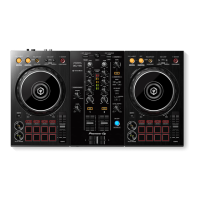
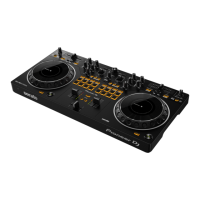
The Pioneer DJ DDJ-REV1 is a DJ controller designed for use with Serato DJ software, offering a comprehensive set of features for mixing, scratching, and performance. It functions as a "Serato DJ Lite hardware unlocked" device, meaning it operates out of the box with Serato DJ Lite. For advanced functionalities, it can be upgraded to a "paid upgrade to Serato DJ Pro device" by purchasing and activating a Serato DJ Pro license. The device does not require specific manufacturer drivers for macOS or Windows operating systems; users simply connect it via a USB cable and launch Serato DJ Pro.
The DDJ-REV1 serves as the central control hub for DJ performances. It connects to a computer via a USB cable, facilitating communication with Serato DJ Pro. For audio output, it features a Master output (RCA) to connect to speakers, ensuring the audience hears the mix. Additionally, a microphone input (TRS) with an adjustable level allows for vocal integration into performances. For personal monitoring, a 3.5mm audio output is provided for headphones, with an adjustable headphone output level. A Kensington Lock slot is included for securing the device.
The controller features two main decks, each equipped with a jog wheel, channel fader, and various controls for manipulating tracks. The jog wheels are versatile, allowing for pitch bending during playback or controlling the waveform within Serato DJ in vinyl mode. Each deck also has a Play/Pause button to toggle playback and a Cue button for setting temporary cue points or cueing from existing ones. Channel faders adjust the volume of each channel, while a crossfader allows for smooth audio transitions between channels 1 and 2.
Each channel includes a TRIM knob to adjust channel gain and an EQ section with HI, MID, and LOW controls for precise frequency manipulation. A filter section provides a low and high pass combo filter per channel. The DDJ-REV1 integrates DJ-FX powered by iZotope™, accessible via FX paddles. These paddles can be pulled down to momentarily engage effects or pulled up to lock them on, controlling either FX Unit 1 or FX Unit 2. The FX section offers both Single FX Mode and Multi FX Mode. In Single FX Mode, users select one effect per FX bank and adjust multiple parameters. Multi FX Mode allows for up to three effects per FX bank, with adjustment of a single parameter, the FX Depth. Controls for FX slots include arming effects, selecting effects via a drop-down menu, and adjusting beats multipliers for effects. The LEVEL/DEPTH control increases the FX level/depth for individual slots or all slots in Multi FX Mode.
The DDJ-REV1 is equipped with 8 performance pads per deck, offering access to 8 different performance pad modes, significantly expanding creative possibilities.
A BROWSE knob allows for library scrolling and toggling between track and crate selection. The TEMPO SLIDER adjusts the tempo/pitch of the track. A SYNC button enables beat synchronization between tracks. The AUTO LOOP button enables/disables a 4-beat loop, while 1/2X and 2X buttons halve or double the active loop length. SHIFT acts as a modifier, enabling secondary functions for many controls.
The DDJ-REV1 supports MIDI mapping, allowing users to remap Serato DJ Pro software functions to the controller. This feature is accessed via the SETUP screen's MIDI tab. Users can select their connected device, ensure "Allow Serato Hardware Remapping" is checked, and then use the MIDI assign button to start remapping. Custom MIDI presets can be saved, edited, or deleted, and the 'Restore Defaults' option reverts all mappings to their original settings.
Serato DJ Pro provides several helpful resources within the software. The "Show Tooltips" feature, enabled via the Help button, displays context-sensitive tooltips when hovering over screen sections. "Watch Tutorials," also accessed through the Help button, launches the user's internet browser to a collection of tutorials. For further assistance, the "Get Support" option directs users to the Serato DJ Pro knowledge base, where they can find articles and guides or search for specific topics using keywords.
The DDJ-REV1 is designed to be a robust and intuitive tool for DJs, offering a blend of traditional mixing controls and advanced performance features, all integrated seamlessly with Serato DJ Pro.
 General
| Channels | 2 |
|---|---|
| Deck Control | 2 |
| Jog Wheels | Yes |
| Performance Pads | 8 per deck |
| Beat FX | Yes |
| Power | USB Bus Powered |
| Type | DJ Controller |
| Effects | Yes |
| Software | Serato DJ Lite |
| USB | USB-B |
| Outputs | 1 x Master (RCA) |
| Weight | 2.1 kg |
| Inputs | 1 x Mic (1/4") |



 To Next Page