Using with other equipment
10
53
En
English
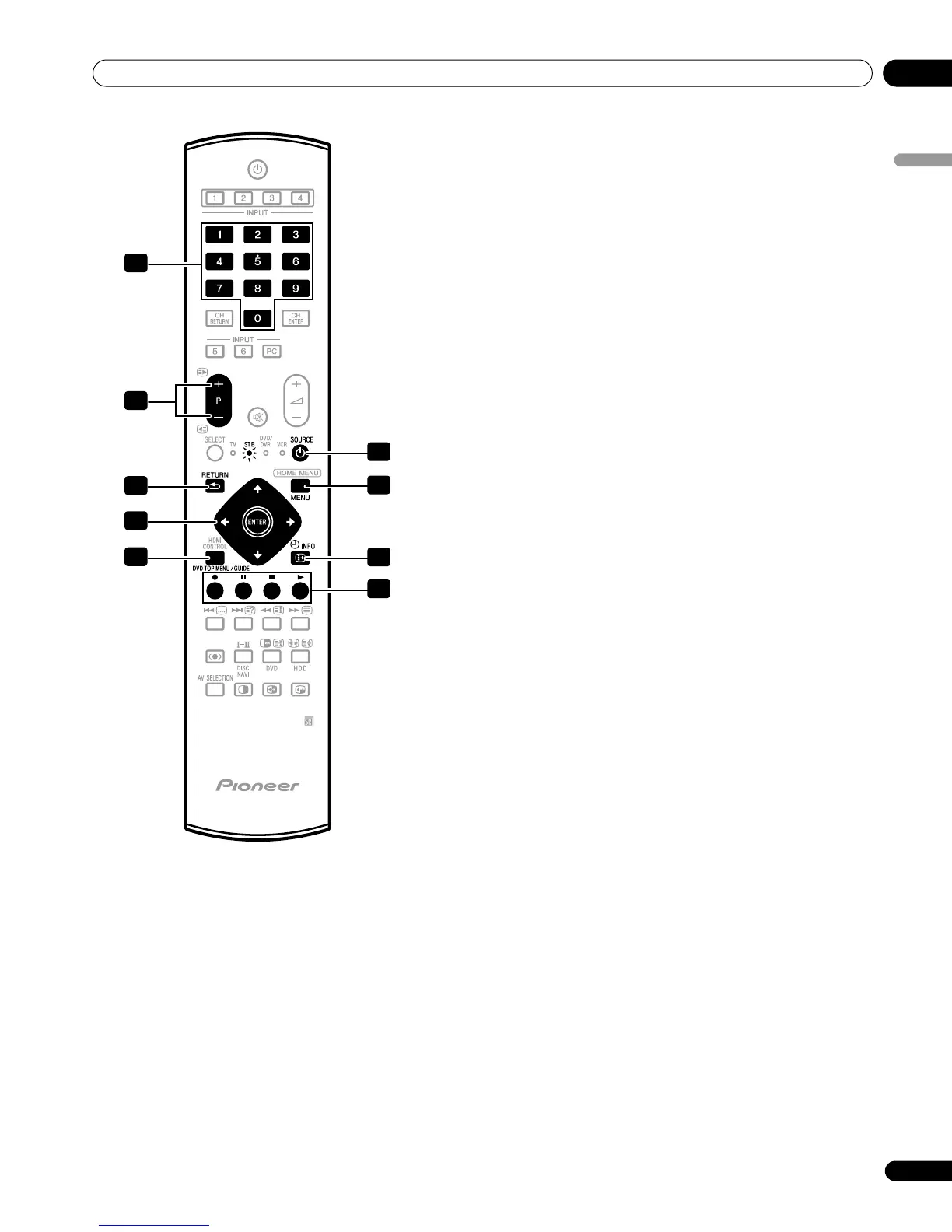
STB (set - top box) control buttons
When in the STB mode, the buttons on the remote control unit
function as below.
10 to 9
Function as the numeric buttons.
2P+/P–
Press to tune in a higher or lower channel.
3RETURN
When the broadcasting menu screen is in display, press to
restore the immediately previous screen.
4 ENTER
Press to activate the selected function.
///
Press to select items on the broadcasting menu screen or the
broadcasting guide screen.
5GUIDE
Press to display the broadcasting guide screen.
6SOURCE
Turns the set-top box on and off.
7MENU
Press to display the broadcasting menu screen.
8INFO
Press to display information on the current broadcasting.
9 Color (RED/GREEN/YELLOW/BLUE)
This operation is available for only AonVision and Zinwell
products.
1
2
3
5
4
6
7
8
9


 To Next Page
 Loading...