Need help?
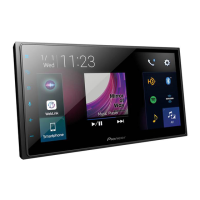
Do you have a question about the Pioneer Siriusxm DMH-2600NEX and is the answer not in the manual?
 General
| Display Type | LCD |
|---|---|
| Display Resolution | 800 x 480 |
| Bluetooth | Yes |
| Apple CarPlay | Yes |
| Android Auto | Yes |
| SiriusXM Ready | Yes |
| HD Radio | Yes |
| Rear View Camera Input | Yes |
| WebLink | Yes |
| Steering Wheel Control Compatible | Yes |
| Power Output | 50 W x 4 |
| Dimensions (W x H x D) | 7 x 4 x 6 inches |
| Screen Size | 6.8 inches |
Details regarding FCC/ISED compliance, radiation exposure limits, and safety guidelines.
Step-by-step guide on how to start the unit for the first time.
Explains how to operate the unit using the touch screen interface and keys.
Guides on how to establish a Bluetooth connection with a device.
Instructions for making and receiving calls using the Bluetooth hands-free system.
Steps to connect an iPod to the unit via USB or Bluetooth.
Guide to operating iPhone applications through Apple CarPlay.
Guide to operating Android applications through Android Auto.
Steps to subscribe to and activate the SiriusXM radio service.
Adjustments for audio output, including EQ, fader, balance, and loudness.
Common problems, causes, and solutions for operating the product.
List of error messages and their corresponding corrective actions.
 To Next Page