> Before Start >Part Names > Install > Initial Setup > Playback
Advanced Setup | Firmware Update | Others
5
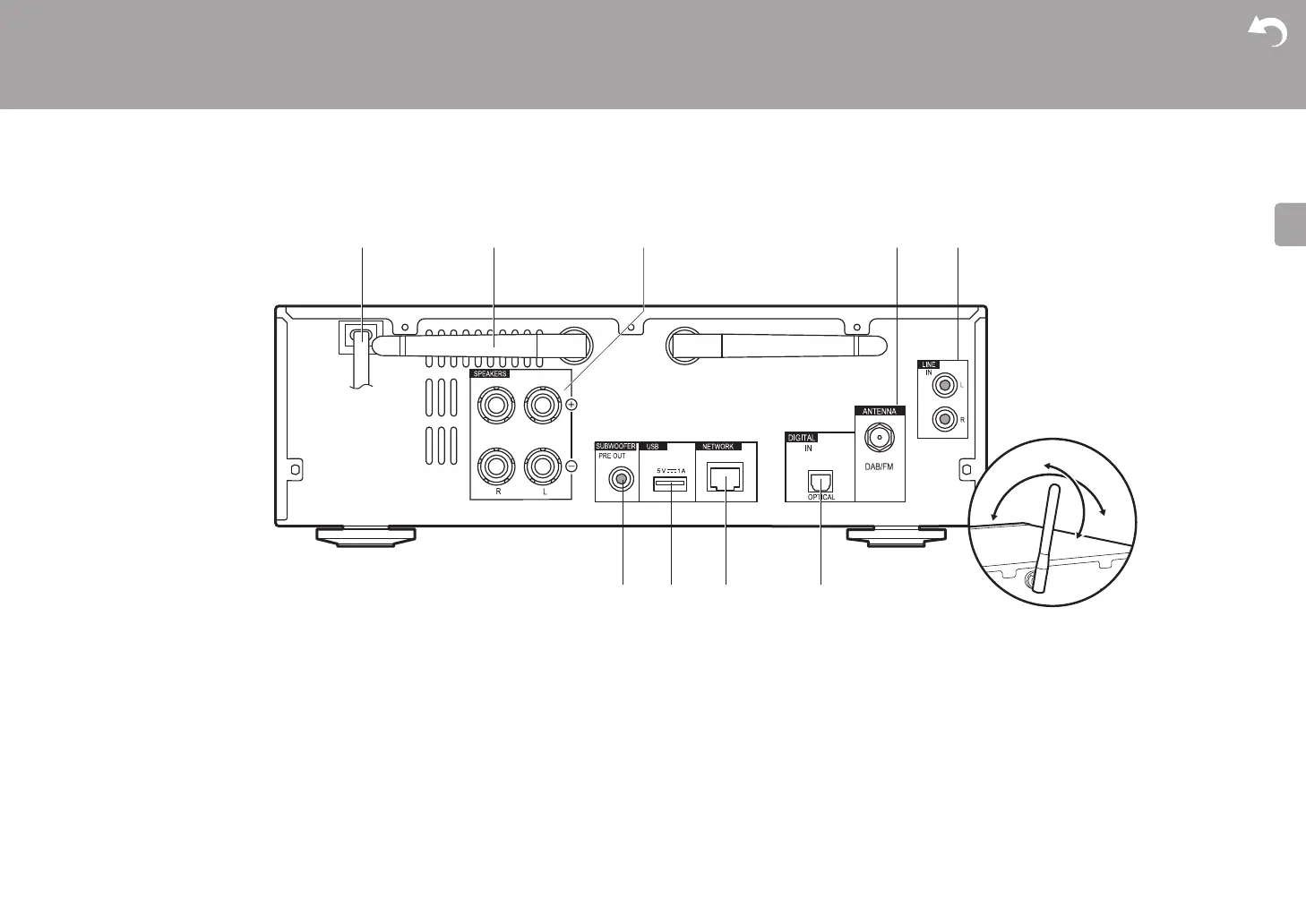
Rear Panel (X-HM76D, X-HM86D, XC-HM86D)
1. Power cord
2. Wireless antenna: Used for Wi-Fi connection or when using a BLUETOOTH enabled
device. Adjust their angles according to the connection status.
3. Speaker terminals: Connect speakers with speaker cables.
4. DAB/FM ANTENNA jack: Connect the supplied DAB/FM wire antenna.
5. LINE IN jack: You can play the audio from an external device such as a television
connected with an analogue audio cable.
6. SUBWOOFER PRE OUT jacks: Connect a subwoofer with built-in amplifier.
7. USB port: Connect a USB storage device or HDD (hard disk drive) to play music files. You
can also supply power (maximum 5 V/1 A) to USB devices with a USB cable.
8. NETWORK jack: Connect to the network with an ethernet cable.
9. DIGITAL IN OPTICAL jack: You can play the digital audio from an external device such as
a television connected with a digital optical cable.


 To Next Page
 Loading...