56
XC-LA21
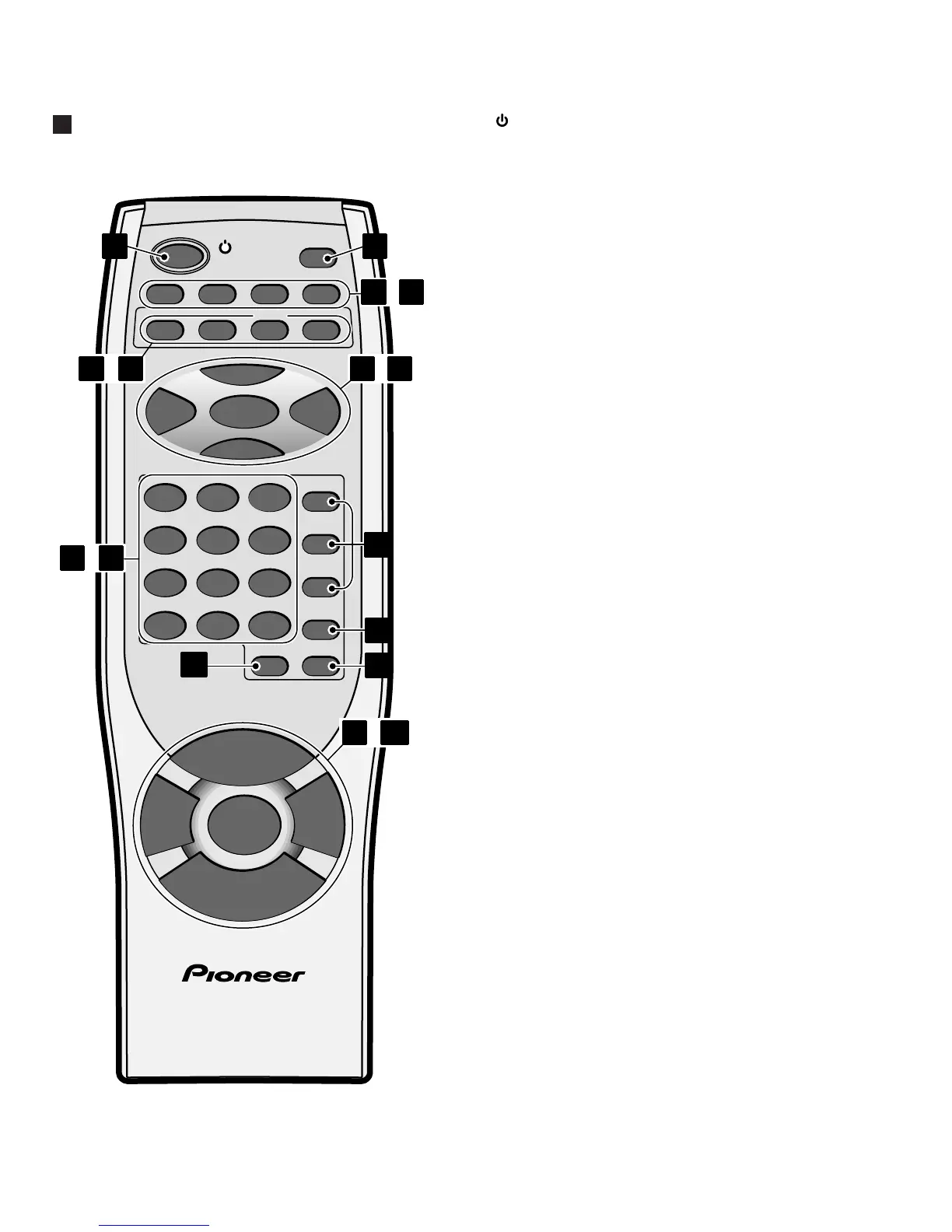
Remote Control Unit
1 STANDBY/ON – Press to switch the unit on or
into standby.
2 DISPLAY/CLOCK – Press to change the informa-
tion shown in the display.
3 DIMMER – Use to change the brightness of the
display.
4 TIMER – Press to set the wake up timer.
5 SLEEP – Press to set the sleep timer.
6 SNOOZE – Press for snooze function when using
the wake up timer.
7CD – Press for CD mode. Also switches the
system on if it was in standby.
8AUX – Press for auxiliary mode. Also switches the
system on if it was in standby.
9 FM/AM TUNER – Press for tuner mode, and to
switch between AM and FM. Also switches the
system on if it was in standby.
10 MONO – Press to hear a stereo FM broadcast in
mono (improves the sound quality).
11 6 – Press to start or restart playback, or pause
a disc that’s already playing.
12 4 and ¢ – When listening to CDs, press to
skip back/forward tracks; press and hold for fast
reverse/forward play. When listening to the radio,
use for turning and use to tune into stations and
select preset stations.
13 ENTER – Use to save a radio station preset; set
the clock or timer.
14 7 – Press to stop playback. Also cancels auto
scan tuning.
15 Number buttons – When playing CDs, use to
select track numbers. When listening to the radio,
use to select preset stations.
16 C – Press to clear a CD playlist.
17 CD buttons – Press to select discs. Also switches
the system on if it was in standby.
18 PGM – Press to start programming a CD playlist.
19 RANDOM – Press to start random CD playback.
20 REPEAT – Use to select the repeat mode (1-
track, current disc or all-disc).
21 VOLUME +/– – Use to adjust the volume.
22 BASS / TRE – Use to adjust the tone (bass and
treble) of the sound.
23 PLAY MODE – Use to select single disc play, or
all-disc play.
ENTER
BASS
TRE
RANDOM REPEAT
PGM
CD 3
CD 2
CD 1
MONOTUNER
FM/AM
AUXCD
DISPLAY
/CLOCK
SNOOZESLEEPTIMERDIMMER
123
456
789
10/0 >10 C
PLAY MODE
STANDBY/ON
4¢
7
6
V
O
L
U
M
E
V
O
L
U
M
E
+
–
REMOTE CONTROL UNIT
6
7
10
1 2
21 23
3
18
19
20
11
14
15 16
17
–
–
–
–
–


 To Next Page