2 5
2 4
Shooting control
Shooting control
When the camera lens focus function is set to be [ A ], even receiving the shooting signal
the camera will not shoot at the moment as most of camera don't seize focus.
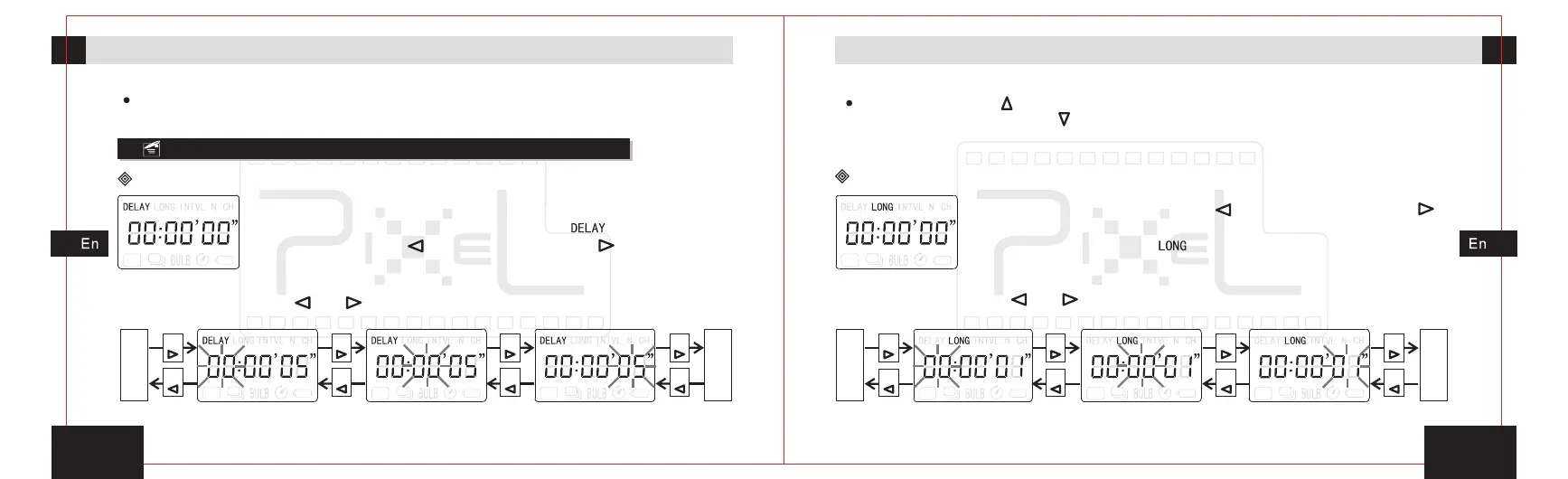
3. By pressing button[ ]or[ ],enter into the setting for minutes and hours ,
as the sketch map.
“ ” “ ”
Timing plan for shooting
Delay time setting
1. In the power-on state, move the functional activities
icon to the delay timing program icon[ ]by pressing the
left move button[ ]or right move button[ ].
2. Press the set button, enter the delay time for ‘second
bit’ setting.
Press
Press
Press
Press
Press
Press
Press
Press
The
shot
number
of
timing
plan
setting
Exposu
-re
time
of
timing
plan
setting
Delay time of timing
plan--hours setting
Delay time of timing
plan--minutes setting
Delay time of timing
plan--seconds setting
Gently press button[ ]once to set numerical increased, hold it on, set the value rapidly
increased; Press the button[ ]once to set the numerical reduced, hold on to set the
values rapidly reduced.
4. Press the set button, save and exit settings.
Exposure time setting
1. Press left move button[ ]or right move button[ ],
move the transmitter’s activities icon to the exposure
timing program icon[ ].
2. Press the set button, enter the delay time for ‘second
bit’ setting.
3. By pressing button[ ]or[ ],enter into the setting for minutes and hours ,
as the sketch map.
“ ” “ ”
Press
Press
Press
Press
Press
Press
Press
Press
Exposure time of timing
plan--hours setting
Exposure
plan--minutes setting
time of timing Exposure
plan--seconds setting
time of timing
Delay
time
of
timing
plan
setting
Interval
time
of
timing
plan
setting


 To Next Page