1. Press left move button[ ]or right move button[ ],
move the transmitter ’s activities icon to the icon of timing
shots [ ].
2 7
2 6
Shooting control
Shooting control
Gently press button[ ]once to set numerical increased, hold it on, set the value rapidly
increased; Press the button[ ]once to set the numerical reduced, hold on to set the
values rapidly reduced.
4. Press the set button, save and exit settings.
Interval time setting
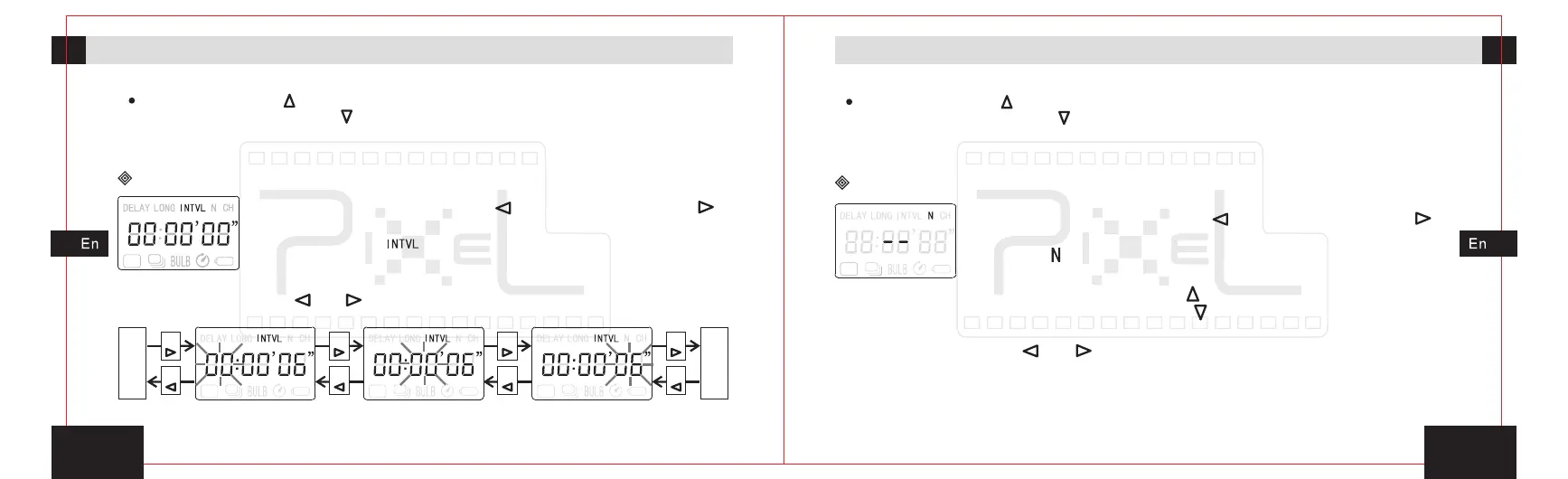
1. Press left move button[ ]or right move button[ ],
move the transmitter’s activities icon to the interval timing
program icon[ ].
2. Press the set button, enter the time for second
bit” setting.
interval “
3. By pressing button[ ]or[ ],enter into the setting for minutes and hours ,
as the sketch map.
“ ” “ ”
Press
Press
Press
Press
Press
Press
Press
Press
Interval time of timing
plan--hours setting
Interval
plan--minutes setting
time of timing
Interval
plan--second setting
time of timing
Exposu
-re
time
of
timing
plan
setting
The
shot
number
of
timing
plan
setting
Gently press button[ ]once to set numerical increased, hold it on, set the value rapidly
increased; Press the button[ ]once to set the numerical reduced, hold on to set the
values rapidly reduced.
4. Press the set button, save and exit settings.
The shot number setting
2. Press the set button, entering to set the number plan
of shot. Press button[ ]setting shot number can be
increased, press button [ ], settings shot number can be
decreased. It can be set between 1 to 99 sheets.
3. By pressing button[ ]or[ ],enter into the setting for delay time and
“exposure time”, “interval time” as the shown picture.
“ ”


 To Next Page