
 Need help?
Do you have a question about the Pknight WIFI-DMX Easynode PLUS and is the answer not in the manual?
Lists various lighting control apps compatible with the WiFi-DMX EasyNode for different platforms.
Provides contact details for customer support and the company website for comments or suggestions.
Highlights the default IP address and hotspot password required for initial setup and connection.
Explains the function and appearance of the battery indicator and signal channel indicator lights.
Details the operation of the power switch button and the channel button for device control.
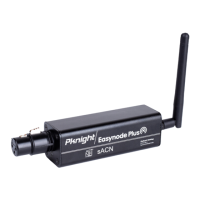
Identifies the charging port for power input and the device's antenna for wireless connectivity.
Provides a step-by-step procedure on how to reset the device to its factory default configuration.
Details the seven colors used by the signal channel indicator and alerts about indicator blinking.
Guides users to find the 'PKNIGHT.WIFI+XXXX' network and connect using the default password.
Explains how to access the controller's web interface by entering its IP address (192.168.4.1) in a browser.
Details how to customize the controller's WiFi network name (SSID) and password for security.
Describes setting up Router mode by connecting to a router's WiFi and optimizing signal transmission.
Explains Easylink mode setup and highlights its advantages for system construction and cost-effectiveness.
Outlines the process for connecting controllers to a router in router mode via the browser interface.
Specifies the duration and conditions of the product warranty, including exclusions for man-made damage.
Advises users to read instructions for optimal performance and highlights important safety information.
 General
| DMX Channels | 512 |
|---|---|
| DMX Ports | 1 |
| Ethernet Ports | 1 |
| Wireless | Yes |
| Power Input | 5V DC |
| Protocols | Art-Net, sACN |
| Wireless Protocol | Wi-Fi (802.11 b/g/n) |
| Connection | Wi-Fi |
| Operating Temperature | -20°C to 50°C |

 To Next Page