Etha3 etha3
18 19
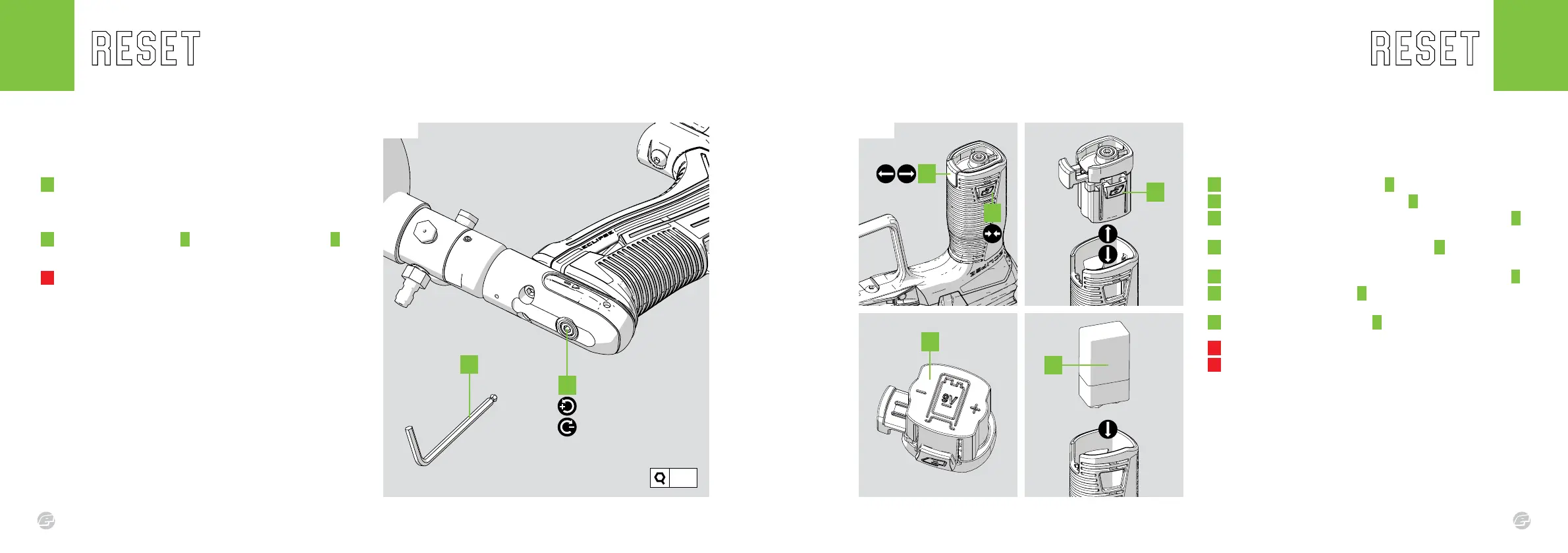
FACTORY RESET INSTALLING A 9V BATTERY
It is important that the marker is set-up as per factory standards before
use.To restore to factory settings follow these steps.
FIG-1
1 Enter set-up mode (see page 16). Reset all of the parameters to
their factory-set default values by pressing and holding the
tournament lock button for 2 seconds (see page 33). The status
indicator will ash BLUE when the parameters have been reset.
2 Using the 1/8” hex key A turn the inline regulator screw B 4
turns clockwise from it’s fully screwed-out position.
! DO NOT turn the adjuster screw in too far.
This will prevent the marker from ring.
The lock n’ load battery system is located in the foregrip and makes
changing your battery easy.
FIG-1
1 Pull out the bottom locking tab A .
2 Pinch and hold the side locking tabs B .
3 With the side locking tabs held rmly, pull the battery base C
out of the bottom of the foregrip and remove.
4 The battery base has a positional diagram D to show the
correct orientation of the battery and terminals.
5 Install your battery ensuring the terminal position is correct E .
6 Replace the battery base C , ensuring the side tabs click and
lock into place.
7 Push the bottom locking tab A back in place to lock the unit.
! DO NOT use rechargeable batteries.
! DO NOT use poor quality batteries.
Fig.1
A
B
C
E
B
Fig.1
1/8”
A
D















 To Next Page