Etha3 etha3
08 09
SUB TITLE LED STATUS INDICATOR
Etha3 etha3
08 09
SWITCHING THE ETHA3 ON/OFF PUSH BUTTON SAFETY
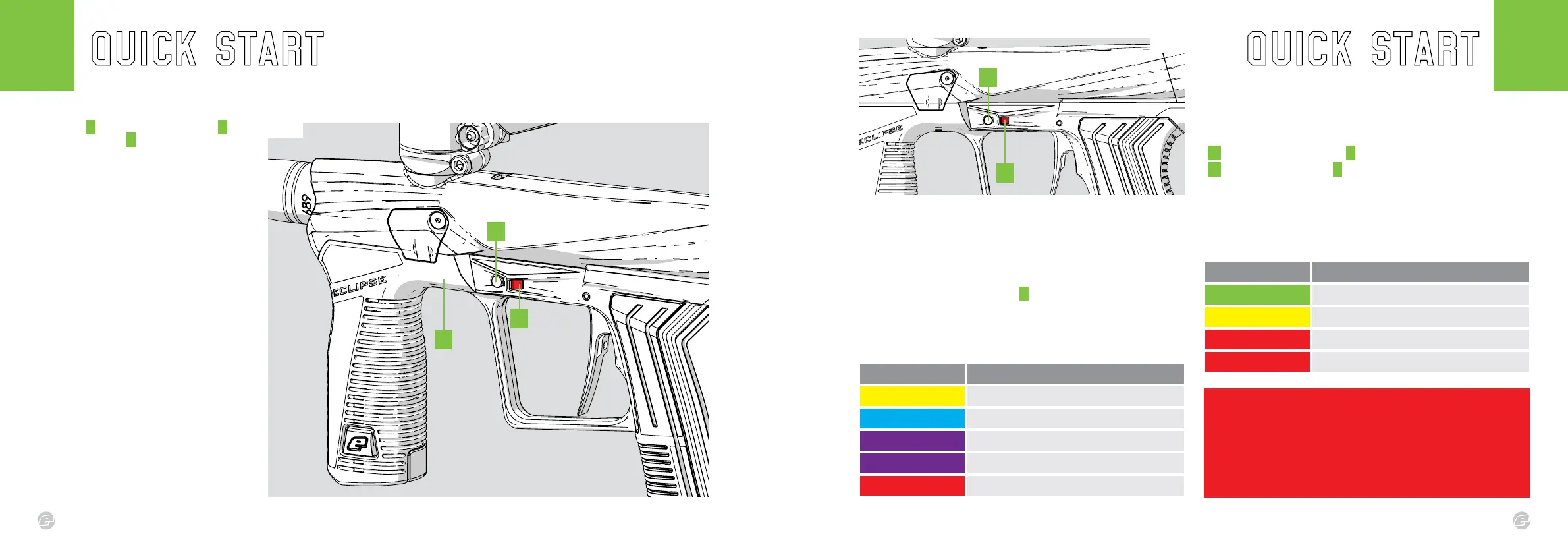
The frame A houses the On/Off button B and
the status indicator C . Use the On/Off button
to switch the marker On/Off.
FIG-1
SWITCHING THE ETHA3 ON
Press and hold the On/Off button. Release the
On/Off button when the status indicator lights
up.
On power up, if the marker is unable to load
its previous settings it will restore the factory
settings. If this happens, the LED will ash
RED (error), then BLUE factory reset).
See pages 16-17 for settings.
SWITCHING THE ETHA3 OFF
Press and hold the On/Off button. Release the
On/Off button when the status indicator turns
RED. The marker will now switch off.
FIRING THE ETHA3
Pull the trigger to re the marker. If the marker
is ON and able to re then it will do so.
warning!
If the On/Off button does not work contact your local Eclipse Dealer immediately and
do not use the marker.
When the marker is On, the marker is live and will re with every pull of the trigger, if
an air system is tted.
Fig.1
Fig.1
FIG-1
The status indicator is visible on each side of the marker and is used to
indicate a number of different things.
BREECH SENSOR STATUS
After power up the status indicator C will display the status of the
breech sensor (BS). The breech sensor (BS) is used to detect paintballs
in the breech of the marker.
The table below shows each LED colour and its relevant BS status.
BATTERY STATUS
1 Tap the On/Off button B when the marker is On.
2 The status indicator C will indicate the status of the battery for
2 seconds (see the table below for battery status colour
information).
The status indicator also indicates the various marker parameter
settings. See pages 16-17.
A
Led colour Breech sensor (BS) status
Flashing Yellow BS enabled. NO paintball detected. Marker WILL NOT re.
Flashing Light Blue BS enabled. Paintball detected. Marker WILL re.
Flashing Purple (Slow) BS disabled. Marker WILL re.
Flashing Purple (Fast) Blockage detected. BS disabled. Marker WILL re.
Red Replace battery! Marker may or may not re.
Led colour Battery status
Green Battery level is good.
Yellow Battery level is low.
Red Replace the battery!
Flashing Red Insufcient energy. Replace the battery immediately!
C
B
B
C















 To Next Page