Etha3 etha3
10 11
SUB TITLE TRIGGER ADJUSTMENT
Etha3 etha3
10 11
VELOCITY ADJUSTMENT DETENTS
WARNING!
DO NOT exceed 300FPS.
ALWAYS wear correct protective equipment when ring your marker.
NEVER point your marker in the direction of other people when not on the eld.
ALWAYS be aware of where the barrel is facing when adjusting the velocity.
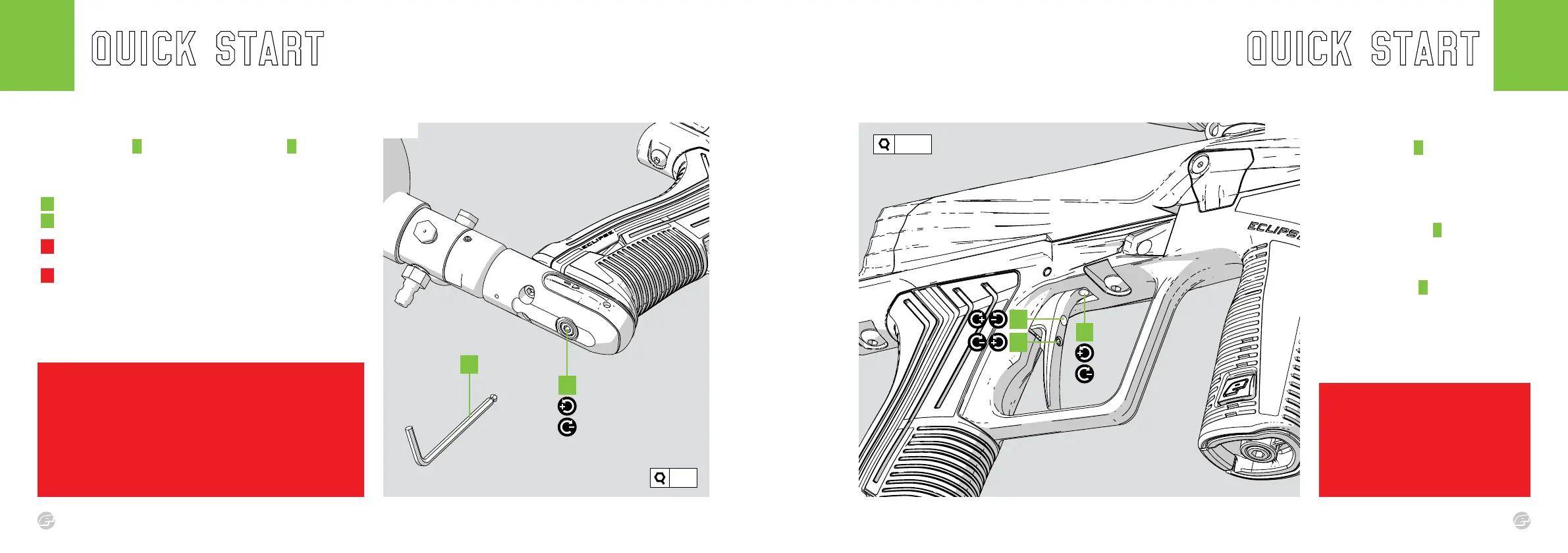
FIG-1
The pre-travel screw A adjusts the distance
the trigger travels before the microswitch is
actuated. Clockwise reduces the amount of
travel (shortening the trigger), counter-
clockwise increases the trigger pre-travel
distance.
The trigger spring screw B adjusts the spring
strength of the trigger return. Clockwise
increases the spring strength, counter-
clockwise reduces the spring strength.
The post-travel screw C adjusts the distance
the trigger travels once the microswitch has
been actuated. Clockwise reduces the
amount of travel (shortening the trigger),
counter-clockwise increases the trigger post-
travel distance.
B
C
Fig.1
warning!
Do not wind the screws in too far as this may prevent
the marker from ring or even damage the marker.
If the pre-travel screw is wound in too far this could
cause the marker to re unintentionally.
FIG.1
Insert a 1/8” hex key A into the velocity adjuster screw B to alter the
velocity of the marker.
ADJUSTING THE VELOCITY:
A Turn the hex key clockwise to reduce velocity.
B Turn the hex key counter-clockwise to increase velocity.
! Fire two clearing shots after each velocity adjustment for an
accurate velocity reading.
! DO NOT turn the adjuster screw in too far.
This will prevent the marker from ring.
B
Fig.1
1/16”
1/8”
A
A















 To Next Page