17
6.RecoveringBacktoDefaultConguration
IP address has been changed or admin password has been forgotten –
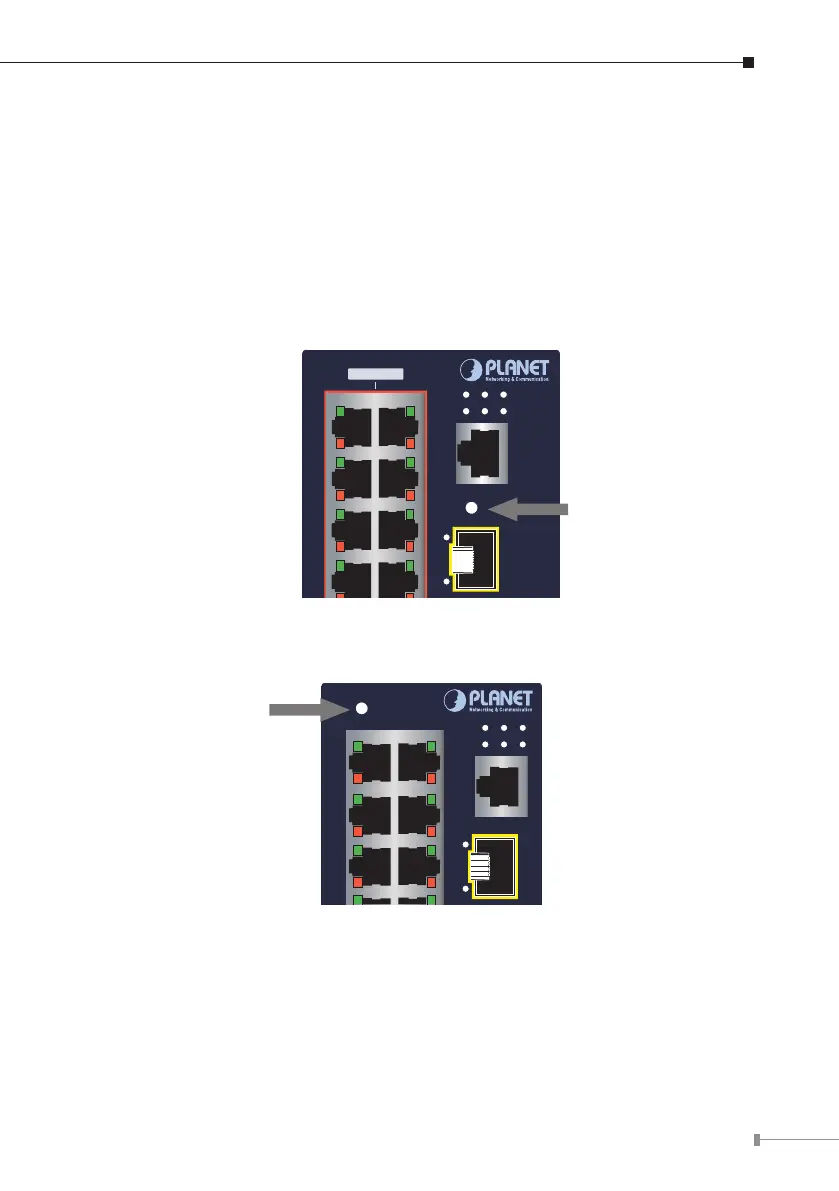
To reset the IP address to the default IP address “192.168.0.100” and the
user password to factory default mode (default password is admin), press the
hardware-based reset button on the front panel for about 10 seconds. After
the device is rebooted, you can log in the management Web interface within the
same subnet of 192.168.0.xx and default password. Be noted that all the previous
setups will be disappeared after the factory default reset is made.
1
3
5
7
2
4
6
8
Reset
Console
115200,N,8,1
P1 P2
Ring R.O.
Fault
I/O
802.3at PoE+
17
Reset Button
Figure 6-1: IGS-6325-16P4S Reset Button
5
Reset
1
3
6
2
4
17
Console
R.O.Ring I/O
FaultP2P1
Reset Button
Figure 6-2: IGS-6325-16T4S Reset Button




 To Next Page