10
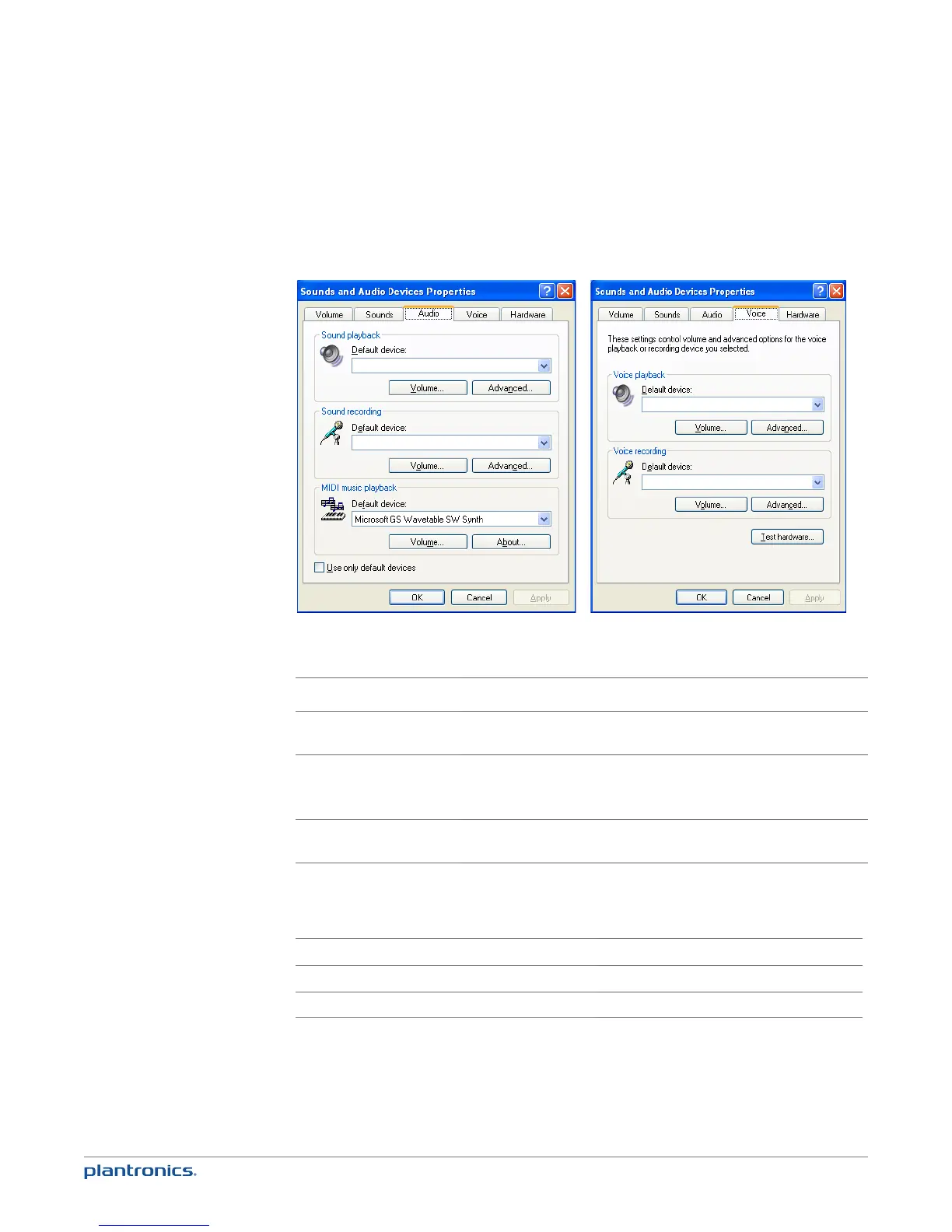
PC audio setup for Windows XP (To reach this screen: Start > Control Panel> Sound and Audio
Devices)
Blackwire C7xx
Blackwire C7xx
Blackwire C7xx
Blackwire C7xx
Default setting: All PC sounds and audio is played in the headset.
Placing, answering and ending calls with Microsoft Lync/Office Communicator
To place a call Dial number using Microsoft Lync/Office Communicator.*
To answer a call Short press the PC talk button on the inline controller.
To answer a call when already
on an active call on your
mobile phone
Press the mobile talk button to end the mobile phone call then press the PC
talk button.
To end a call Short press the PC talk button.
*Consult Microsoft Lync/Office Communicator Help for more information on how to place a call.
PC talk button LED indicators
Incoming call
Rapid flash green
Active call
Slow flash green
Media audio
Slow flash green







 To Next Page