ANC
Timer
Custom Button
Device Controls
Headphones
Camera
Headset
Lock
ANC
Timer
Custom Button
Device Controls
Headphones
Computer
Camera
Headset
Volume
Mic / Mic Mute
Play / Pause
Power
Device Controls
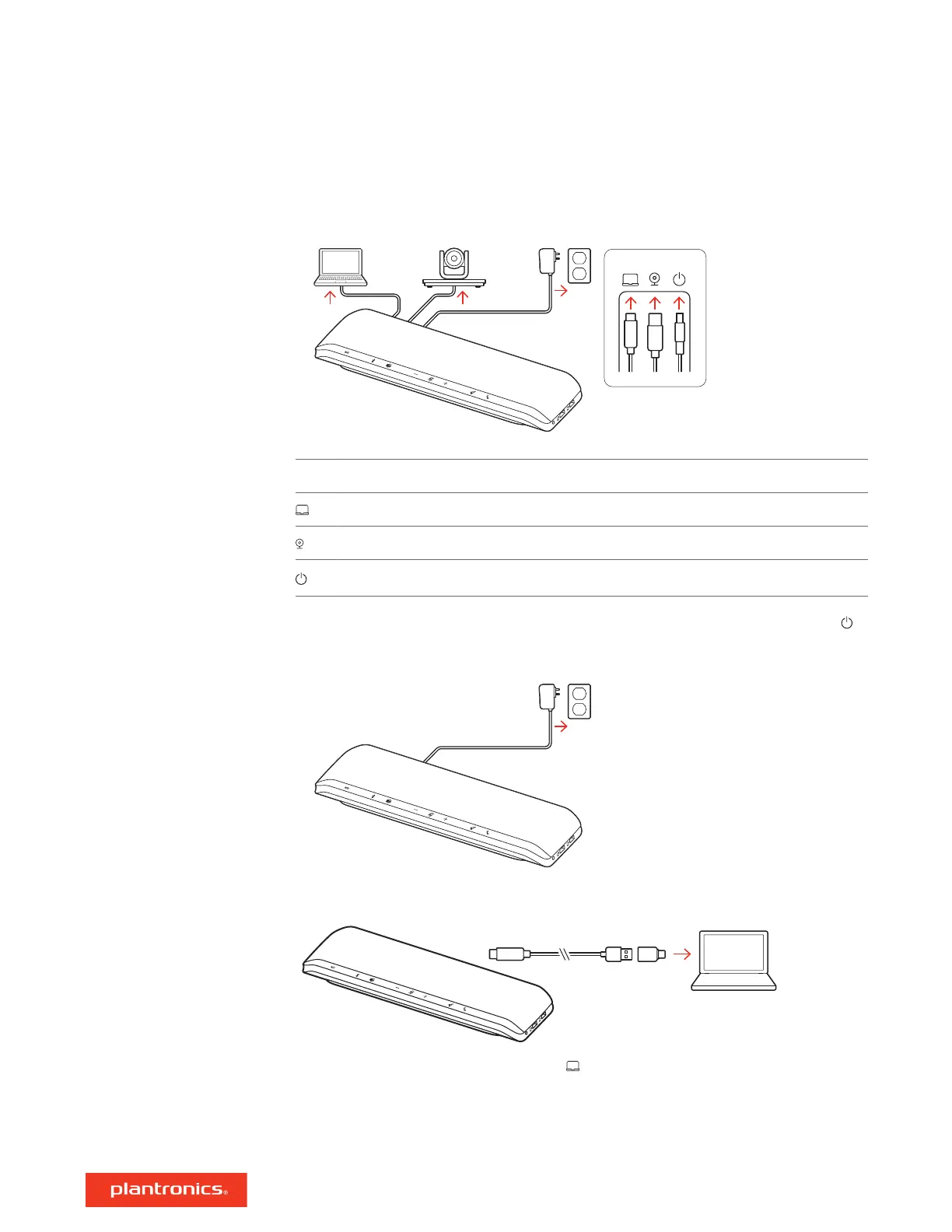
Ports on speakerphone's reverse side
Computer USB-C port
Video camera USB-A port
Power port
The speakerphone is powered on when the power cable is connected to an outlet. The power
port is on the reverse side of the speakerphone.
Connect the USB cable from the speakerphone to your computer's USB-A or USB-C port.
NOTE The USB cable connects to the computer port on the reverse side of the speakerphone.
NOTE Ensure that the USB-C-only connector is plugged into the speakerphone. Corded mode may not
function if the USB-A to USB-C adapter is connected to the speakerphone.
Set up, power and pair
Power
Corded setup
5



 To Next Page