EasyManua.ls Logo

Plessey PRC 320/1 - Page 34

Default Icon
99 pages
Print Icon
To Next Page IconTo Next Page
To Previous Page IconTo Previous Page
Loading...
22
1.
CHECK
BATTERY
Set
to
ВАТТ
СНК
and
CW.
Depress
pressel/morse
key.
Check
meter
needle
registers
on or
above
second
mark.
(The
first
mark
is
zero).
Release
pressel.
If
needle
was
below
second
mark,
replace
battery.
2.
SELECT
FREQUENCY
Set
switches
(shown
set
to
5.763
MHz)
to
required
frequency
(stop
at
zero
positions
enables
frequency
to
be
set
by
touch
in
dark).
Set
FREQUENCY
RANGE
switch
(no
stop
fitted)
to
corresponding
frequency
band.
Tone
heard
in
headset/handset
ceases
when
correct
band
selected
and
frequency
stabilized.
5.
TUNE
ANTENNA
TUNING
UNIT
(ATU)
Set
to
ANT.
Set
RANGE
and
LOAD
switches
to
suit
antenna
and
frequency
(see
para.2.7).
Depress
pressel/morse
key
and
adjust
TUNE
control
for
maximum
reading.
Adjust
LOAD
switch
for
maximum
reading.
Selecting
lower
number
position
if
two
give
same
reading.
Re-adjust
TUNE
control
for
maximum
reading
and
release
pressel.
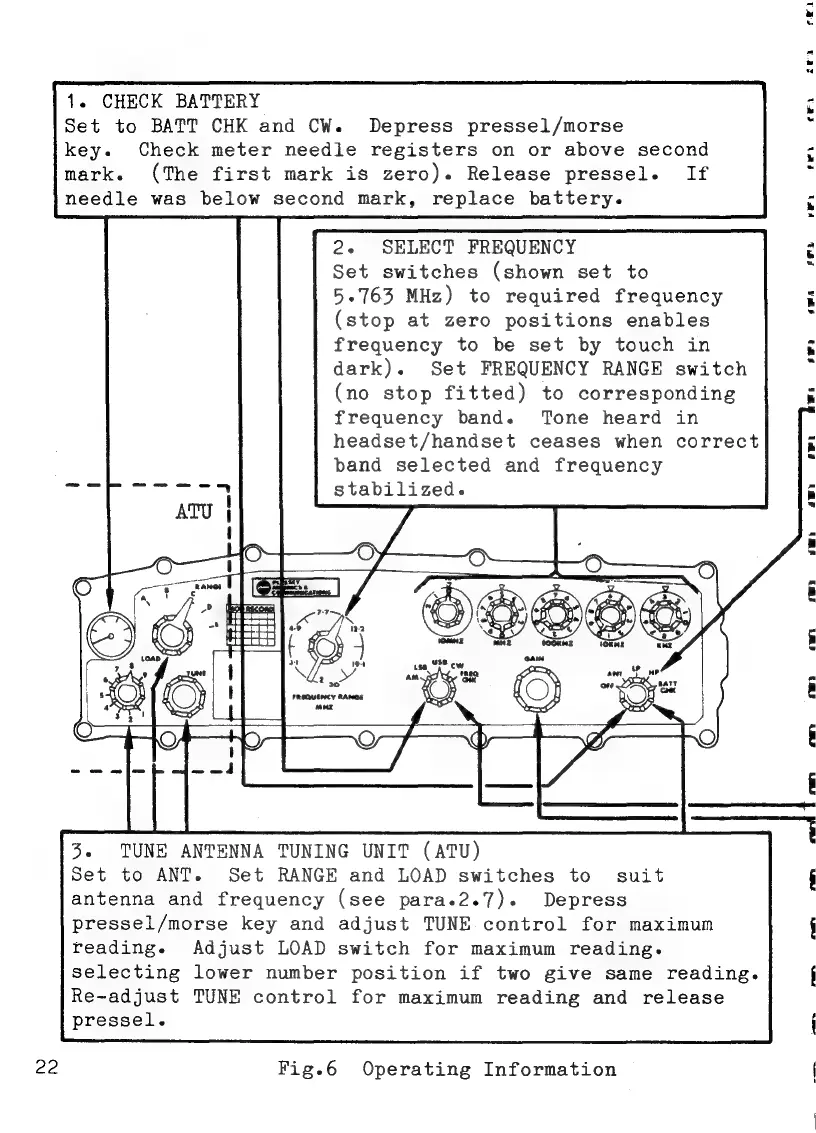
Fig.6
Operating
Information