0.00.16 PMDG 737NGX
TUTORIAL #2
27FEB15 RTM DO NOT DUPLICATE For Simulator Use Only
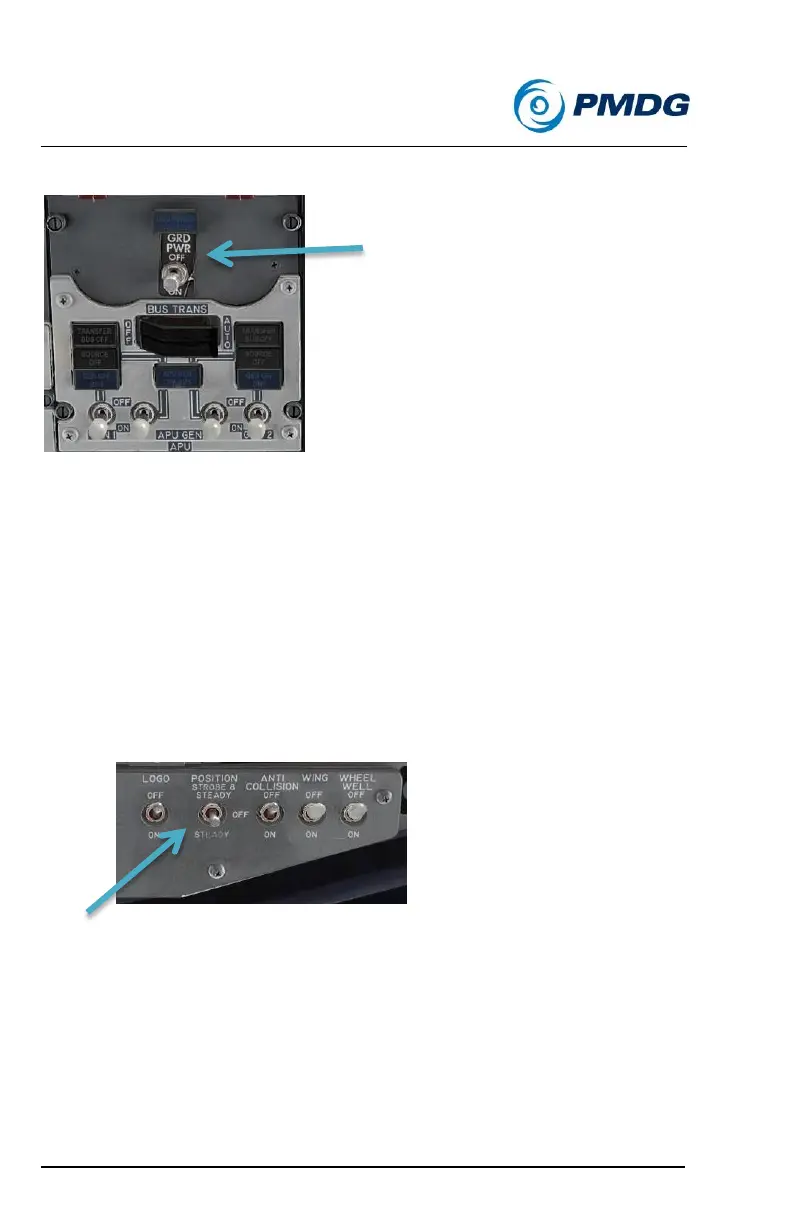
Now move to the electrical sub-panel
Verify that the blue GRD POWER AVAILABLE light in the center
above the GRD POWER switch is illuminated.
Click the GRD POWER switch to ON.
You’ll see and hear the cockpit come to life now. When on battery
only the essential systems are powered to conserve power.
o Verify that the SOURCE OFF, TRANSFER BUS OFF
and STANDBY PWR OFF lights are all extinguished.
Turn the POSITION lights switch to the STEADY position.
This isn’t explicitly stated in the manual’s procedures, but these
lights must be on any time the aircraft has electrical power
applied.
This completes the Electrical Power Up Supplemental Procedure. Return
now to FCOM Vol. 1 page NP.21.1 (page 77 of the PDF version) and we’ll
begin the Amplified Normal Procedures.



 To Next Page