0.00.54 PMDG 737NGX
TUTORIAL #2
27FEB15 RTM DO NOT DUPLICATE For Simulator Use Only
COCKPIT PREFLIGHT FLOWS
We’re now going to do the rest of the captain’s and first officer’s preflight
items. These sequences or “flows” as they’re called in the industry look
very long when written out like this but they can actually be completed
very quickly once you have the proper positions for all the items
memorized.
We’ll do the first officer’s flow first – notice when doing this that it follows a
loose pattern if you divide the lower overhead up into four vertical strips.
The first few items are on the upper left panel of the lower overhead.
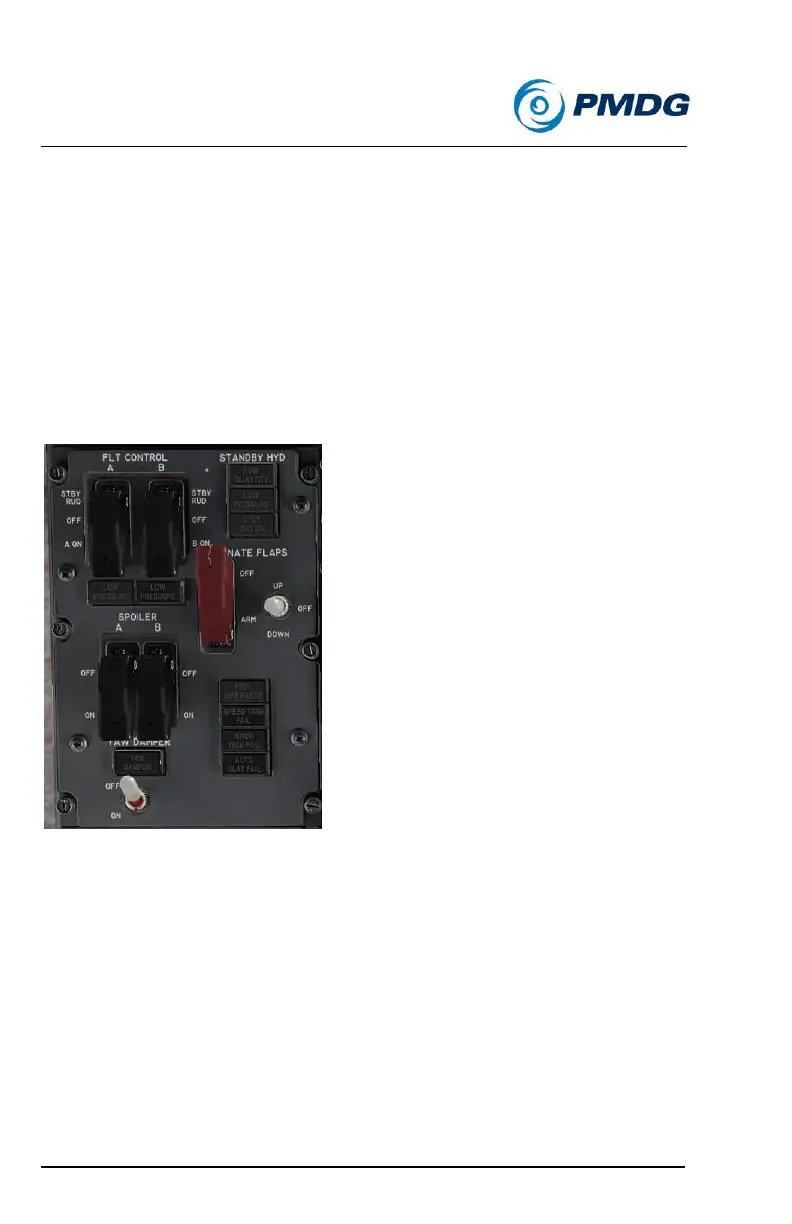
Verify that the FLT CONTROL A and B have their switch guards
closed and thus the switches themselves ON.
Verify that the SPOILER A and B switches below the FLT
CONTROL ones have their switch guards closed as well.
Turn the YAW DAMPER switch ON and verify the light
extinguishes.
Note – If you’re in the normal captain’s seat VC view and you
can’t see the YAW DAMPER switch due the HGS projector
housing blocking it, you can left click the projector housing to
move it out of the way.



 To Next Page