Two and four value views
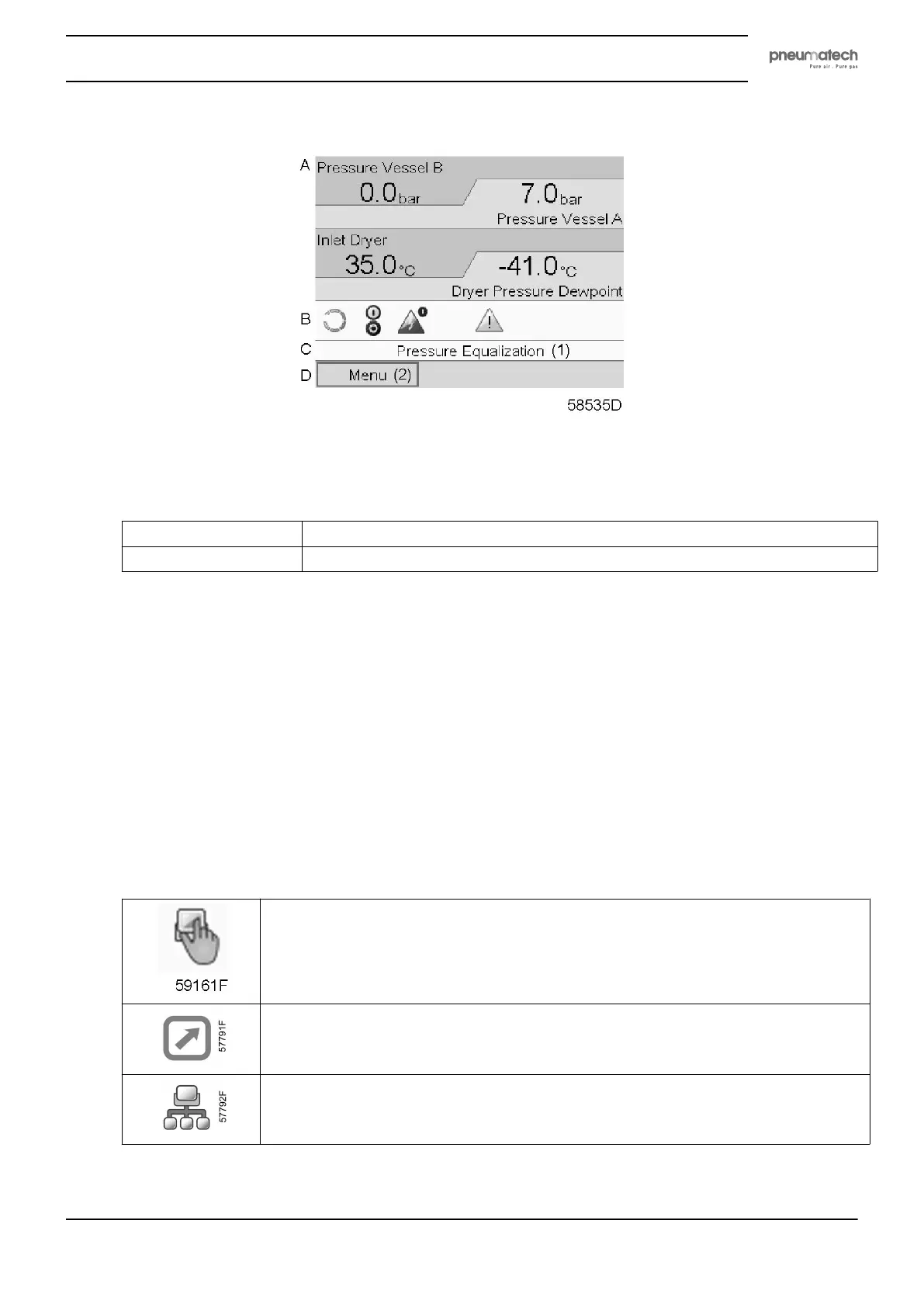
Typical Main screen (Four value lines)
Text on figures
(1)
Pressure Equalization
(2)
Menu
• Section A displays information regarding the dryer operation (e.g. outlet pressure, temperature at
dryer outlet).
• Section B displays Status icons. Following icon types are shown in this field:
• Fixed icons
These icons are always shown in the main screen and cannot be selected by the cursor (e.g.
dryer stopped or running)
• Shortcut icons
These icons are always shown in the main screen. If the icon is selected and the Enter key is
pushed, the screen will jump to the corresponding menu (e.g. if the icon for Motor stopped or
Running Loaded is selected, the screen will jump directly to the regulation menu after pressing
the Enter key).
• Control mode icons
These icons are always shown in the main screen. If the icon is selected and the Enter key is
pushed, the screen jumps to the control mode menu. Following control modes are available:
Local control
Remote control
Network control
• Optional icons
Instruction book
2920 1891 00 21


 To Next Page