Troubleshooting 69
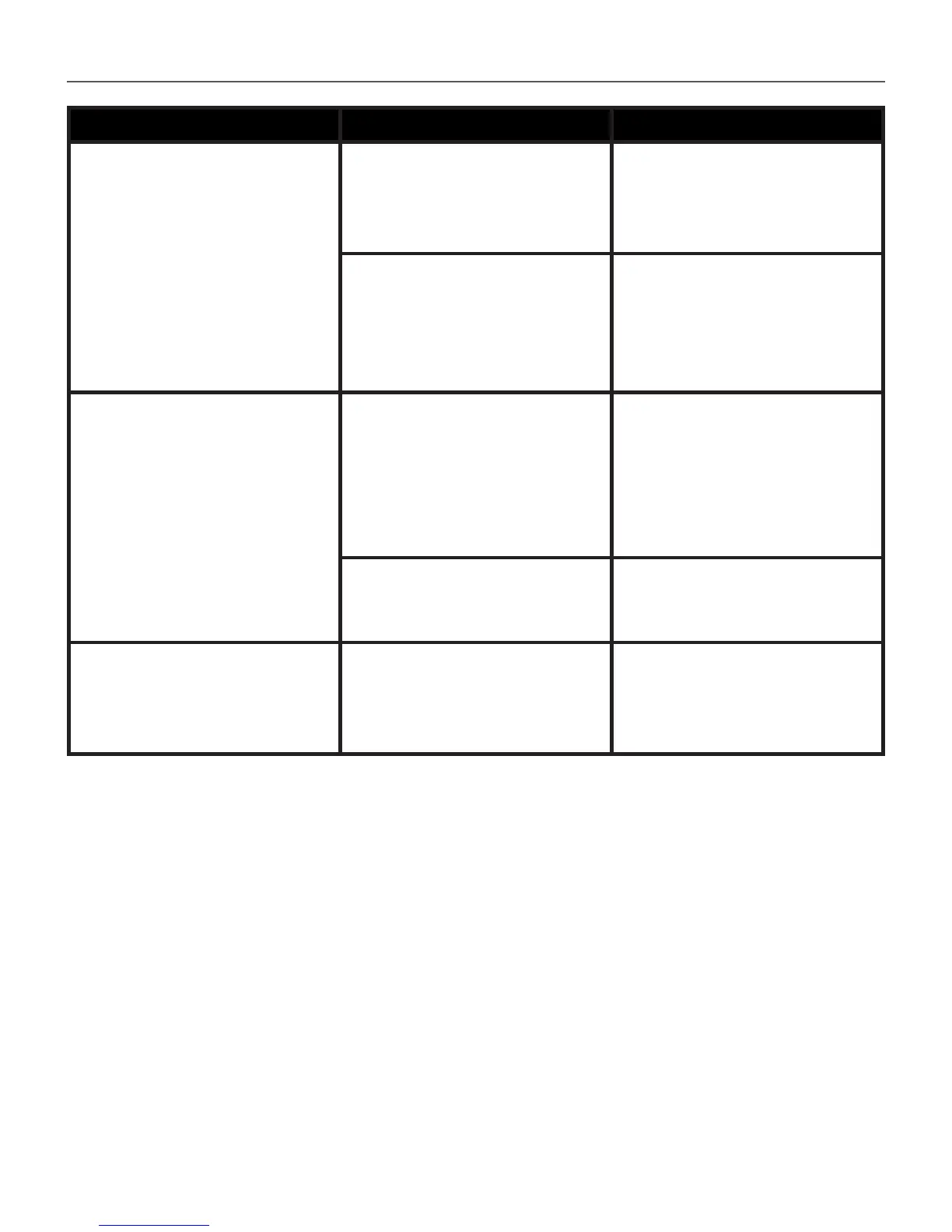
Malfunciton Possible Reason Solution
After connection to PC
disks are not displayed in
Explorer
Your Device is in the bat-
tery charging mode.
Check USB mode in Set-
tings Main Menu item. Set
Connection to PC or Ask at
Connection
No signal in connection
cable
Check USB cable condition
and its proper connec-
tion to connector. Try to
connect the USB-cable to
another port
Bookmarks, settings and
current position in file can-
not be saved
File system damaged
Connect the device to a
PC and check disks. To pro-
ceed, open My Computer,
right-click on the selected
disk and select Properties >
Service> Check Disk
Internal memory is full
Delete books, images and/
or music files that you do
not need
Battery discharges too fast
Disabled automatic turn-
ing off
Settings > Clock in Main
Menu. Select automatic
turn off time in Auto Turn
Off in… item














 To Next Page